.PPP Bestandsextensie

Serif PagePlus Document

Ontwikkelaar Serif
Populariteit
3.0  |  45 Stemmen
 

Wat is een PPP-bestand?

A PPP file is a document created by Serif PagePlus, a British desktop publishing program for Windows. It may contain text, images, charts, tables, and multiple pages. The PPP file format was discontinued in 2017, when Serif replaced PagePlus with Affinity Publisher.

Meer informatie

Serif PagePlus was a long-running desktop publishing program available for Windows. Serif released the first version of PagePlus in 1990.

Throughout its many versions, PagePlus saved users' documents as PPP files. The PPP format changed over time, making some versions of PPP files incompatible with some versions of PagePlus. However, every PPP file contains some sort of document created using a version of PagePlus, such as a report, flyer, or manuscript. PagePlus users can also export PPP files as .PDF files, email messages, and webpages.

Serif released the last version of PagePlus, PagePlus X9, in November 2015. In 2017, Serif replaced PagePlus with a new desktop publishing program, named Affinity Publisher.

How do I transfer my PPP files to Affinity Publisher?

There is no easy way to import PagePlus PPP files into Affinity Publisher. Serif recommends that users either:

  • Copy the contents of their PPP file, create a new Affinity Publisher document, and paste the PPP file's contents into the Affinity Publisher document
  • Export the PPP file from PagePlus as a .PDF file, then import the PDF into Affinity Publisher

Een PPP-bestand openen

You can open a PPP file in Serif PagePlus (Windows). Serif still hosts downloads for PagePlus X9 on its website, which you can access using the link below. However, note that you will need a valid product key to install PagePlus X9.

Open meer dan 400 bestandsformaten met File Viewer Plus.Gratis downloaden

Programma's die PPP-bestanden openen

Windows

PhotoPad Project

Ontwikkelaar NCH Software
Populariteit
4.0  |  3 Stemmen
 

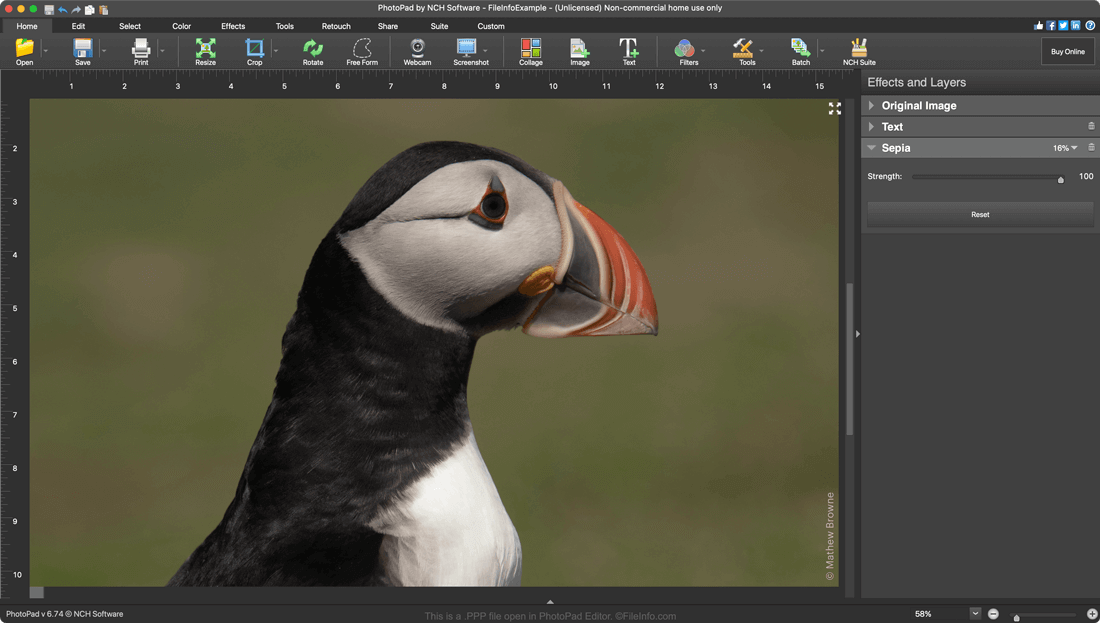
A PPP file is an image file created in NCH Software PhotoPad Editor. It contains an image edited in PhotoPad, as well as a record of the layers, adjustments, and other edits made to that image. PPP files can be used to export images to many common image and image editing project formats, including .JPG, .PNG, .TIFF, .GIF, and .PSD.

Meer informatie

Schermafbeelding van een .ppp-bestand in PhotoPad Photo Editor
PPP-bestand geopend in PhotoPad Photo Editor

PhotoPad Editor is a multi-platform image editing program that allows photographers and graphic designers to make non-destructive, layer-based edits to their images. Editors can enhance their images, add graphic design elements, and remove unwanted imperfections before exporting the image in one of many common image formats.

When a PhotoPad user saves an in-progress image editing project, it is saved in a PPP file. PPP files contain not only a user's edited image but a record of the edits that have been made to the image. That way, if a user saves, closes, and re-opens an image, they can continue to adjust their previous edits. For example, if a user adds a text layer to an image before saving the image as a PPP file and closing PhotoPad, they'll still be able to adjust that layer after re-opening their PPP file.

Een PPP-bestand openen

You can open a PPP file (PhotoPad Project) in PhotoPad Photo Editor (Windows, Mac, and Android). To do so, open PhotoPad and select File → Open... from the program's menu bar.

Programma's die PPP-bestanden openen

Geverifieerd door FileInfo.com

Het FileInfo.com-team heeft onafhankelijk onderzoek gedaan naar alle bestandsformaten en softwareprogramma's die op deze pagina worden vermeld. Ons doel is 100% nauwkeurigheid en we publiceren alleen informatie over bestandstypen die we hebben geverifieerd.

Als u aanvullingen of updates voor deze pagina wilt voorstellen, kunt u het ons laten weten.