.TSV 파일 확장자

Tab-Separated Values File

개발사 해당 없음
인기도
3.6  |  109 투표
 
🔍File Helper(으)로 .TSV 파일을 웹 브라우저에서 바로 여세요.온라인으로 보기

TSV 파일이란 무엇인가요?

A TSV file contains a plain text data table saved in the tab-separated values format. The table is divided into columns, separated by tabs, and rows, separated by line breaks. Commonly, users open TSV files with Microsoft Excel, Google Sheets, and other spreadsheet applications, to view the data they contain as a spreadsheet.

추가 정보

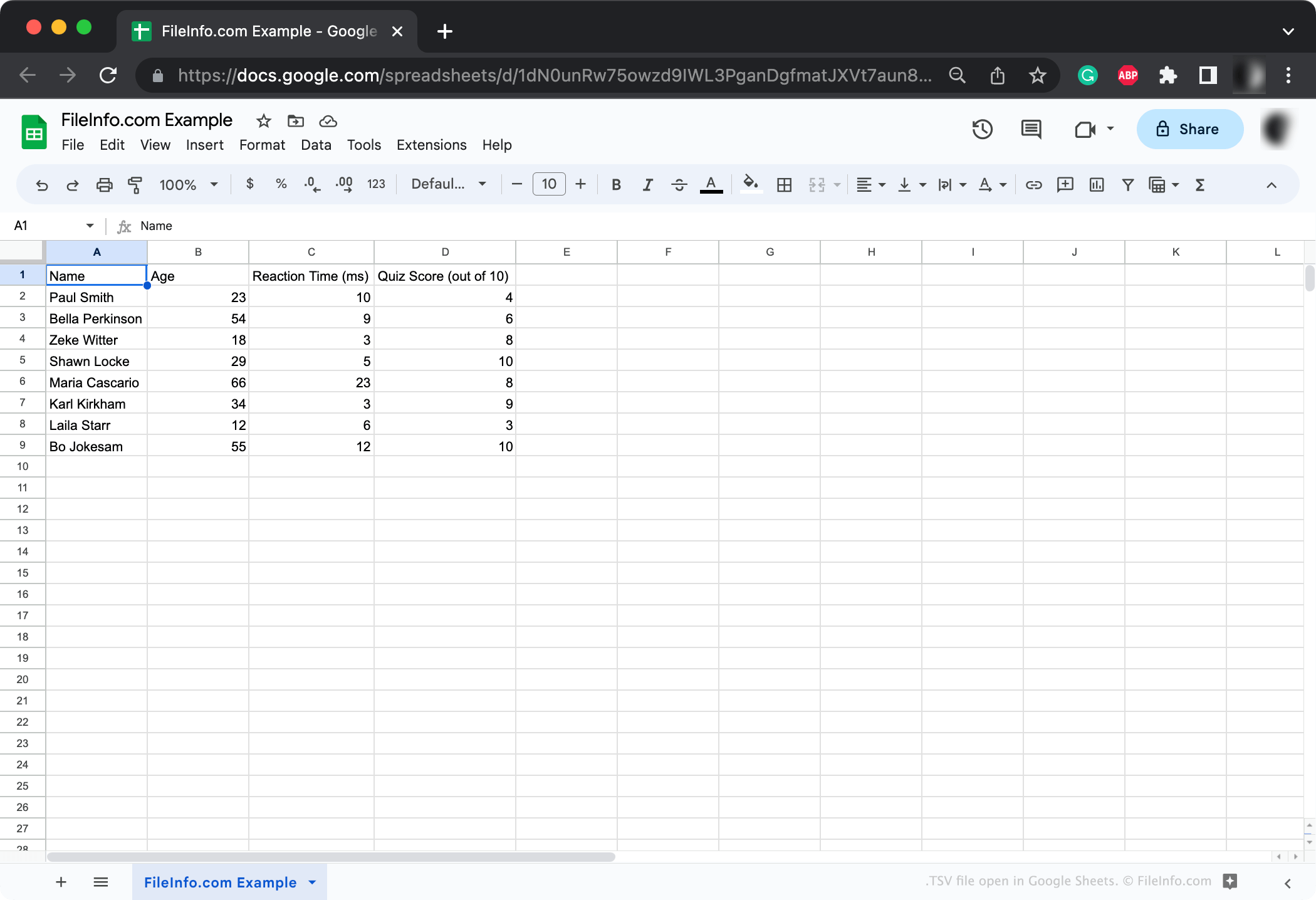
Google Sheets에서 열린 .tsv 파일의 스크린샷
Google Sheets에서 열린 TSV 파일

TSV is a standard, widely-supported format used primarily for transferring data between applications and databases. For example, a researcher whose results are saved in a proprietary database format may export those results as a TSV file. They can then share this TSV file with others, who will be able to open it in any spreadsheet application.

Each TSV file contains one or more data tables. These tables are structured using tabs, which delineate columns, and line breaks, which delineate rows. Typically, each table begins with a header row, which describes the data that follows.

TSV files are similar to and used in much the same way as .CSV (Comma-Separated Values) files. (The primary difference between the two formats is that CSV files use commas, rather than tabs, to separate columns.) Most applications that support the TSV format also support the CSV format, and vice-versa.

참고: On occasion, TSV files may be saved with the .TAB extension.

How to create a TSV file

Most spreadsheet and database applications that allow you to export datasets allow you to export in the TSV format. For example, Google Sheets and the desktop versions of Microsoft Excel and Apple Numbers allow you to export spreadsheets as TSV files.

If necessary, you can also manually create a TSV file using Microsoft Notepad, Apple TextEdit, or any other text editor (though doing so may take a lot of work if your dataset includes a lot of data).

TSV 파일을 여는 방법

TSV file open in Apple TextEdit

Usually, it's best to open TSV files with Microsoft Excel, Apple Numbers, Google Sheets, or another spreadsheet application. These applications show the data a TSV file contains in a structured, easy-to-parse format. They also allow you to easily edit and manipulate the data your TSV file contains, or convert the file to another spreadsheet format if necessary.

However, you can also open TSV files with Microsoft Notepad, Apple TextEdit, or any other text editor. These programs will show you the data table(s) your TSV file contains, but will not format them as nicely as spreadsheet applications do.

TSV 파일을 변환하는 방법

Spreadsheet applications like Microsoft Excel, Apple Numbers, and Google Sheets can convert TSV files to several other formats, including various spreadsheet and document formats. For example, the Windows and Mac versions of Microsoft Excel can convert TSV files to the following formats:

  • .XLSX - Microsoft Excel Spreadsheet
  • .XLS - Microsoft Excel Spreadsheet (Legacy)
  • .XLSB - Microsoft Excel Binary Spreadsheet
  • .ODS - OpenDocument Spreadsheet
  • .DIF - Data Interchange Format
  • .PDF - Portable Document Format
  • .RTF - Rich Text Format
  • .TXT - Plain Text
  • .HTM, .HTML - HTML Webpage
  • .XML - Extensible Markup Language
  • .MHT, .MHTML - MIME HTML Archive
  • .XPS - XML Paper Specification (Windows only)

TSV 파일을 여는 프로그램

Windows
Mac
OS에 포함됨
무료 체험판
OS에 포함됨
Linux
Web
무료 체험판
iOS
OS에 포함됨
Android
Chrome OS
카테고리: 데이터
업데이트: 2023-06-16

Digital Receiver Video Recording

개발사 N/A
인기도
3.5  |  18 투표
 

A TSV file contains a recording of a television program. Various digital and satellite TV receivers, such as Tiger I555 and Freeview, create TSV files when a user records a program. The receivers then use the TSV file to play back the recorded program.

추가 정보

TSV files store video in the Advanced Video Coding (AVC) format, audio in the MPEG-1 format, and text in the Teletext subtitle format. Most TSV files are encrypted, so they can be played back only by the receiver that created them.

TSV 파일을 여는 방법

If your TSV file is encrypted, you can play it only using the TV receiver that created it. However, if your TSV file is not encrypted, you can play it using VideoLAN VLC media player (multiplatform). You can also install the K-Lite Codec Pack and use it to play an unencrypted TSV file in Media Player Classic (Windows) or Windows Media Player (Windows).

TSV 파일을 변환하는 방법

You can use VideoLAN VLC media player or Aiseesoft Free Video Converter to convert unencrypted TSV files to other video formats. For example, VLC can convert TSV videos to:

  • .MP4 - MPEG-4 Video
  • .WEBM - WebM Video
  • .TS - Video Transport Stream
  • .ASF - Advanced Systems Format

TSV 파일을 여는 프로그램

Windows
Supported by the TV receiver that created the TSV file
Mac
Supported by the TV receiver that created the TSV file
Linux
Supported by the TV receiver that created the TSV file
카테고리: 비디오
업데이트: 2022-05-04

검증자 FileInfo.com

FileInfo.com 팀 이 페이지에 나열된 모든 파일 형식과 소프트웨어 프로그램을 독자적으로 조사했습니다. 저희의 목표는 100% 정확성이며, 검증한 파일 유형에 대한 정보만 게시합니다.

이 페이지에 추가하거나 업데이트할 내용을 제안하고 싶으시면 알려 주세요.