

.TSV Dateiendung
Tabulatorgetrennte Werte-Datei
| Entwickler | k. A. |
| Beliebtheit |
3,6 | 109 Stimmen |
Was ist eine TSV-Datei?
Eine TSV-Datei enthält eine Klartext-Datentabelle, die im Format für tabulatorgetrennte Werte gespeichert ist. Die Tabelle ist in Spalten unterteilt, die durch Tabulatoren getrennt sind, und in Zeilen, die durch Zeilenumbrüche getrennt sind. Üblicherweise öffnen Benutzer TSV-Dateien mit Microsoft Excel, Google Sheets und anderen Tabellenkalkulationsprogrammen, um die darin enthaltenen Daten als Tabelle anzuzeigen.
Weitere Informationen
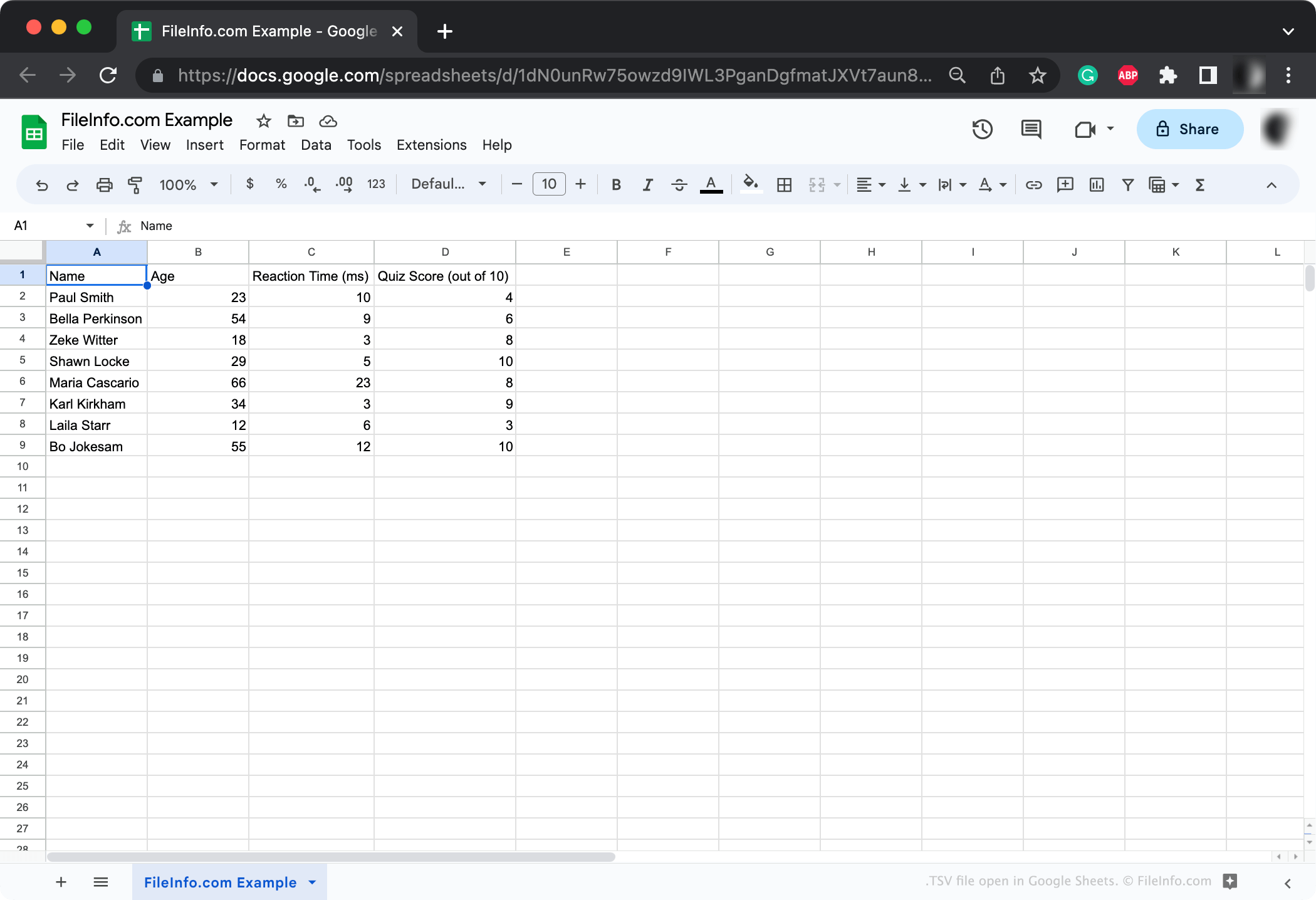
TSV ist ein standardisiertes, weit verbreitetes Format, das hauptsächlich zur Übertragung von Daten zwischen Anwendungen und Datenbanken verwendet wird. Beispielsweise kann ein Forscher, dessen Ergebnisse in einem proprietären Datenbankformat gespeichert sind, diese Ergebnisse als TSV-Datei exportieren. Anschließend kann er diese TSV-Datei mit anderen teilen, die sie in jedem Tabellenkalkulationsprogramm öffnen können.
Jede TSV-Datei enthält eine oder mehrere Datentabellen. Diese Tabellen sind mithilfe von Tabulatoren strukturiert, die Spalten abgrenzen, und Zeilenumbrüchen, die Zeilen abgrenzen. Typischerweise beginnt jede Tabelle mit einer Kopfzeile, die die darauffolgenden Daten beschreibt.
TSV-Dateien ähneln .CSV-Dateien (Comma-Separated Values, durch Kommas getrennte Werte) und werden auf ähnliche Weise verwendet. (Der wichtigste Unterschied zwischen den beiden Formaten besteht darin, dass CSV-Dateien Kommas statt Tabulatoren verwenden, um Spalten zu trennen.) Die meisten Anwendungen, die das TSV-Format unterstützen, unterstützen auch das CSV-Format und umgekehrt.
HINWEIS: Gelegentlich werden TSV-Dateien mit der Erweiterung .TAB gespeichert.
So erstellen Sie eine TSV-Datei
Die meisten Tabellenkalkulations- und Datenbankanwendungen, mit denen Sie Datensätze exportieren können, ermöglichen den Export im TSV-Format. Beispielsweise können Sie mit Google Sheets sowie den Desktopversionen von Microsoft Excel und Apple Numbers Tabellen als TSV-Dateien exportieren.
Falls erforderlich, können Sie eine TSV-Datei auch manuell mit Microsoft Notepad, Apple TextEdit oder einem anderen Texteditor erstellen (dies kann jedoch viel Arbeit verursachen, wenn Ihr Datensatz viele Daten enthält).
So öffnen Sie eine TSV-Datei

Normalerweise öffnen Sie TSV-Dateien am besten mit Microsoft Excel, Apple Numbers, Google Sheets oder einem anderen Tabellenkalkulationsprogramm. Diese Anwendungen zeigen die in einer TSV-Datei enthaltenen Daten in einem strukturierten, leicht lesbaren Format an. Außerdem können Sie die in Ihrer TSV-Datei enthaltenen Daten problemlos bearbeiten und verarbeiten oder die Datei bei Bedarf in ein anderes Tabellenformat konvertieren.
Sie können TSV-Dateien jedoch auch mit Microsoft Notepad, Apple TextEdit oder einem anderen Texteditor öffnen. Diese Programme zeigen Ihnen die Datentabelle(n) Ihrer TSV-Datei an, formatieren sie jedoch nicht so übersichtlich wie Tabellenkalkulationsprogramme.
So konvertieren Sie eine TSV-Datei
Tabellenkalkulationsprogramme wie Microsoft Excel, Apple Numbers und Google Sheets können TSV-Dateien in mehrere andere Formate konvertieren, darunter verschiedene Tabellen- und Dokumentformate. Beispielsweise können die Windows- und Mac-Versionen von Microsoft Excel TSV-Dateien in die folgenden Formate konvertieren:
- .XLSX - Microsoft-Excel-Tabelle
- .XLS - Microsoft-Excel-Tabelle (älter)
- .XLSB - Binäre Microsoft-Excel-Tabelle
- .ODS - OpenDocument-Tabelle
- .DIF - Datenaustauschformat
- .PDF - Portable Document Format
- .RTF - Rich-Text-Format
- .TXT - Klartext
- .HTM, .HTML - HTML-Webseite
- .XML - Extensible Markup Language
- .MHT, .MHTML - MIME-HTML-Archiv
- .XPS - XML Paper Specification (nur Windows)