

.WPS Extension de fichier
Document du traitement de texte Microsoft Works
| Développeur | Microsoft |
| Popularité |
3,6 | 98 Votes |
Qu'est-ce qu'un fichier WPS ?
Un fichier WPS est un document texte créé par Microsoft Works Word Processor, le logiciel de traitement de texte qui a précédé Microsoft Word. Il est très similaire à un document Word (fichier .DOC). Cependant, les fichiers WPS ne peuvent pas contenir certaines des fonctionnalités de mise en forme avancées des documents Word, ni de macros.
Plus d'informations
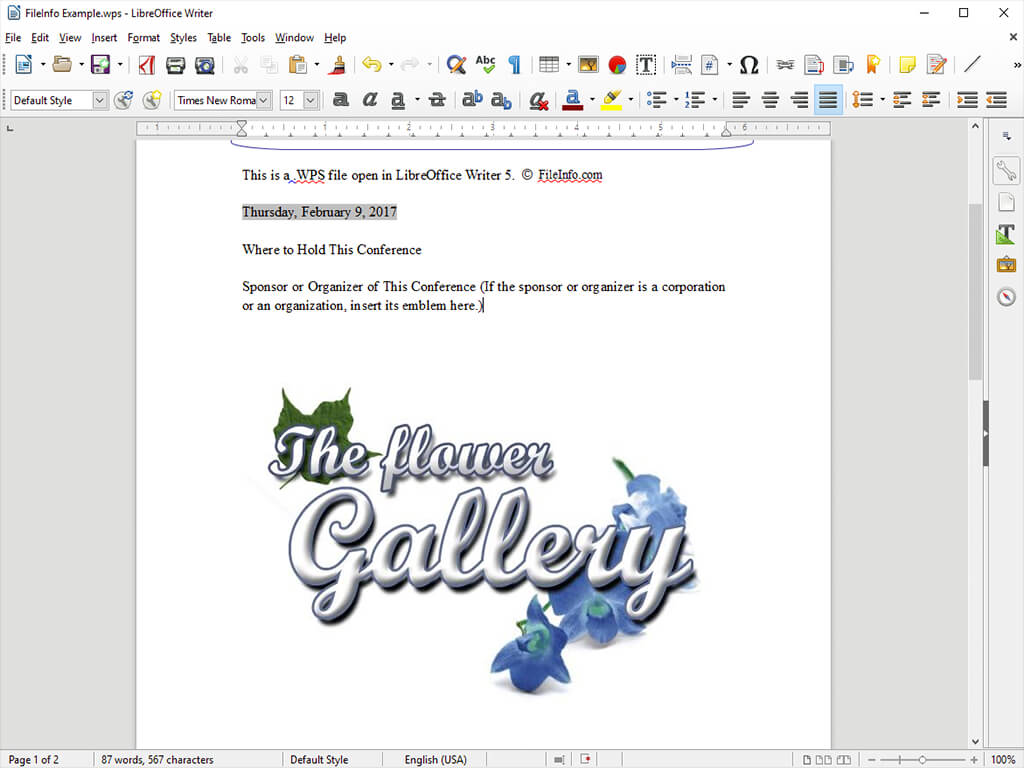
À la fin des années 1980 et au début des années 1990, de nombreuses personnes utilisaient Microsoft Works Word Processor pour créer des dissertations, des lettres, des invitations, des rapports financiers, des CV, des bulletins d’information et d’autres documents. Ces documents étaient enregistrés sous forme de fichiers WPS. Cependant, à mesure que Microsoft Word et le format DOC devenaient plus populaires, l’utilisation du format WPS a diminué.
En 2006, Microsoft a officiellement abandonné le format WPS et l’a remplacé par le format DOC. Microsoft a retiré Microsoft Works en 2009, Works 9 étant la dernière version du logiciel.
Comment ouvrir un fichier WPS
Si vous avez encore accès à Microsoft Works Word Processor, vous pouvez ouvrir tous les fichiers WPS avec ce logiciel. Si vous n’avez pas accès à Works Word Processor, vous pouvez ouvrir la plupart des fichiers WPS avec Microsoft Word. Word 2010 et les versions ultérieures peuvent ouvrir les fichiers WPS créés par les versions 6 à 9 de Works Word Processor. Pour ouvrir un fichier WPS dans Word :
- Sélectionnez .
- Dans le menu déroulant , sélectionnez All Files (*.*).
- Accédez à votre fichier WPS et ouvrez-le.
Vous pouvez également ouvrir les fichiers WPS dans le traitement de texte Writer inclus avec LibreOffice, Apache OpenOffice, Planamesa NeoOffice et OxygenOffice Professional.
Comment convertir un fichier WPS
La plupart des logiciels de traitement de texte capables d’ouvrir les fichiers WPS peuvent les convertir vers d’autres formats. Par exemple, LibreOffice Writer peut convertir les fichiers WPS vers les formats suivants (et bien d’autres) :
- .ODT - Document texte OpenDocument
- .DOCX, .DOC - Document Microsoft Word
- .RTF - Format de texte enrichi
- .TXT - Texte brut
- .XML - Langage de balisage extensible
- .HTML - Langage de balisage hypertexte
- .PDF - Format de document portable
- .EPUB - Livre électronique ouvert
- .JPG - Image JPEG
- .PNG - Graphique portable réseau
Programmes qui ouvrent les fichiers WPS
Document Kingsoft Writer
| Développeur | Kingsoft |
| Popularité |
3,4 | 71 Votes |
Un fichier WPS est un document texte créé avec Kingsoft Writer, un logiciel de traitement de texte inclus dans la suite WPS Office de Kingsoft. Il contient du texte mis en forme ; il peut également inclure des images, des tableaux, des graphiques et d'autres éléments. Les fichiers WPS sont similaires aux documents Microsoft Word (fichiers .DOC ou .DOCX).
Plus d'informations

WPS Office est une suite bureautique gratuite comparable à Microsoft Office. Elle comprend un logiciel de traitement de texte nommé Writer. Par défaut, Writer enregistre les documents des utilisateurs au format WPS.
Les utilisateurs peuvent créer des fichiers WPS à partir de zéro ou à partir de modèles .WPT, qui contiennent une mise en forme et des éléments de document par défaut. Writer inclut certains modèles, et les utilisateurs peuvent télécharger des modèles supplémentaires depuis le WPS Template Store.
Comment ouvrir un fichier WPS
Vous pouvez utiliser Kingsoft Writer, inclus dans Kingsoft WPS Office, pour ouvrir et modifier des fichiers WPS. Dans le menu Accueil de WPS Office, sélectionnez . Accédez ensuite à votre fichier WPS et ouvrez-le.
Comment convertir un fichier WPS
Kingsoft Writer peut convertir les fichiers WPS dans les formats suivants :
- .DOC, .DOCX - Document Microsoft Word
- .DOT, .DOTX - Modèle de document Microsoft Word
- .RTF - Format de texte enrichi
- .TXT - Texte brut
- .DOCM - Document Microsoft Word prenant en charge les macros
- .DOTM - Modèle de document Microsoft Word prenant en charge les macros
- .XML - Extensible Markup Language
- .MHTML - HTML MIME
- .HTML - Hypertext Markup Language
- .PDF - Portable Document Format