

.LWS Extension de fichier
Scène LightWave 3D
| Développeur | LightWave Digital |
| Popularité |
3,5 | 4 Votes |
Qu'est-ce qu'un fichier LWS ?
Un fichier LWS est une scène tridimensionnelle créée avec LightWave 3D, un logiciel de modélisation, d’animation et de rendu 3D. Il contient des informations sur les positions et les mouvements des objets, les caméras et leurs mouvements, ainsi que des références aux emplacements des fichiers .LWO qui stockent les objets 3D apparaissant dans la scène. Les fichiers LWS sont enregistrés au format LightWave 3D Scene (LWS), qui stocke les informations de la scène en texte brut.
Plus d'informations

LightWave 3D est utilisé dans différents secteurs, notamment la télévision, le cinéma, l’architecture, la publicité et le développement de jeux vidéo, pour créer des graphismes et des animations 3D. Lorsque vous créez une scène avec LightWave 3D, l’application l’enregistre au format LWS par défaut, que vous pouvez fermer et rouvrir pour continuer à la modifier.
Le format LWS est similaire à un fichier d’assemblage CAO, comme un fichier Autodesk Inventor Assembly (.IAM) ou Parametric Pro/ENGINEER Assembly (.ASM). Comme les fichiers d’assemblage CAO, les fichiers LWS peuvent contenir des références à d’autres fichiers utilisés dans la scène (des fichiers d’objets 3D LWO dans le cas des fichiers LWS). Si vous déplacez l’emplacement des fichiers LWS référencés, les objets n’apparaîtront pas dans la scène LWS lorsque vous l’ouvrirez dans LightWave 3D.
REMARQUE : NewTek a initialement développé LightWave 3D, mais LightWave Digital a acquis le logiciel et en assure actuellement le développement.
Comment ouvrir un fichier LWS
Vous pouvez ouvrir les fichiers LWS avec LightWave 3D sous Windows et macOS. Par exemple, pour ouvrir un fichier LWS dans l’utilitaire Layout inclus avec LightWave 3D, sélectionnez .
Ouverture d’un fichier LWS avec un éditeur de texte
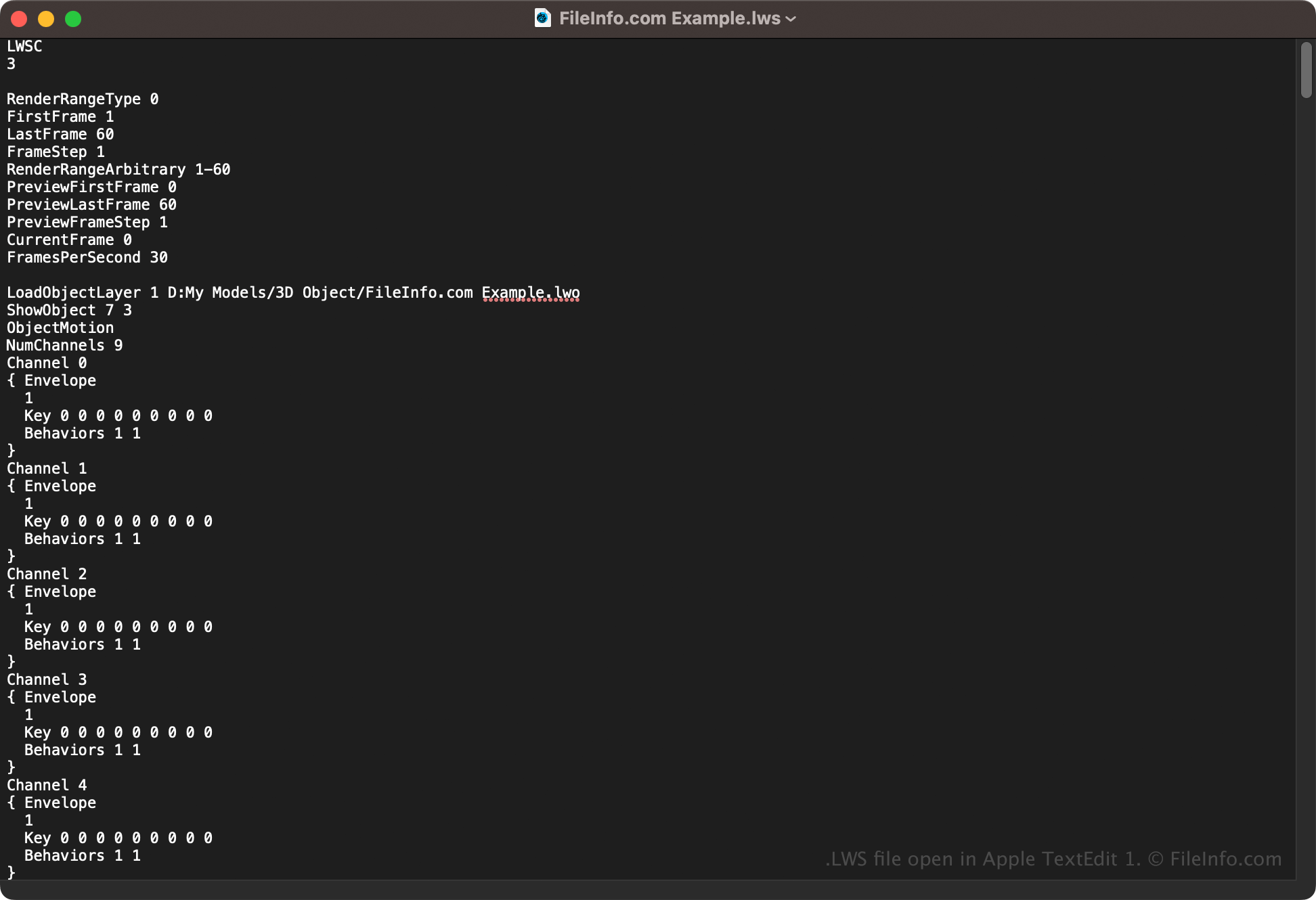
Comme les fichiers LWS stockent les informations de la scène en texte brut, vous pouvez également les ouvrir avec un éditeur de texte, tel que Microsoft Notepad (Windows) ou Apple TextEdit (macOS). Vous devrez peut-être renommer l’extension du fichier en .txt pour que l’éditeur de texte le reconnaisse. De plus, vous risquez d’endommager le fichier de scène LWS si vous le modifiez incorrectement.