

.PSDC Rozszerzenie pliku
Adobe Photoshop Document Cloud
| Deweloper | Adobe |
| Popularność |
4,0 | 12 Głosów |
Czym jest plik PSDC?
Plik PSDC to dokument Adobe Photoshop zapisany w formacie Adobe Photoshop Document Cloud (PSDC). Zawiera obraz w tym samym formacie co plik .PSD, w tym warstwy, adnotacje i efekty, ale jest przechowywany w chmurze za pośrednictwem systemu dokumentów w chmurze firmy Adobe. Program Photoshop automatycznie aktualizuje plik PSDC, gdy użytkownik otwiera go i modyfikuje na różnych urządzeniach.
Więcej informacji
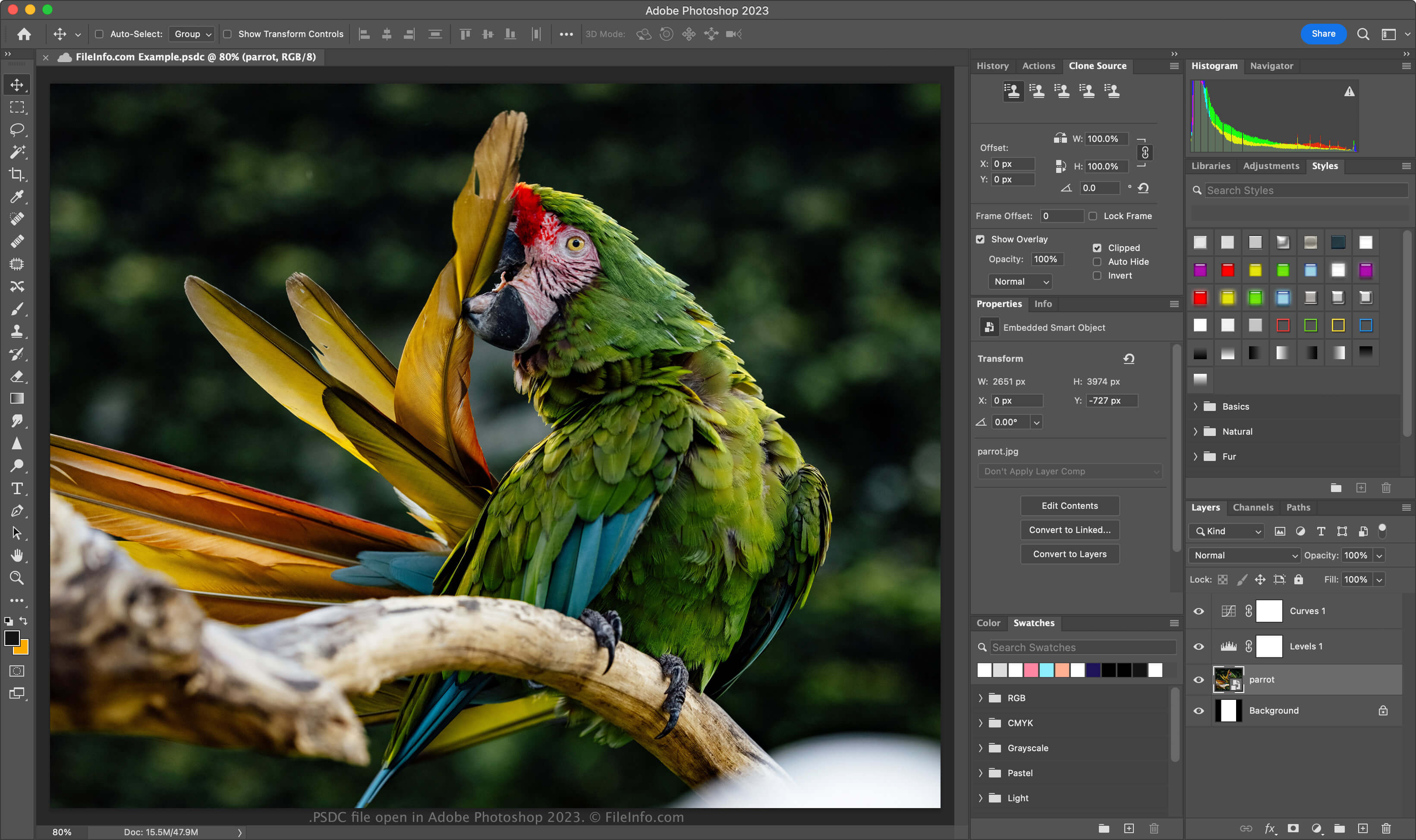
Firma Adobe wprowadziła format PSDC w listopadzie 2019 roku, gdy wydała program Photoshop na iPada oraz Photoshop CC 2020 dla systemów Windows i macOS. Celem tego formatu jest umożliwienie użytkownikom pracy nad tym samym dokumentem PSD na komputerze lub iPadzie oraz synchronizowanie wprowadzonych zmian, aby dokument był zawsze aktualny.
Format pliku PSDC jest taki sam jak format PSD, który obsługuje warstwy obrazu, warstwy dopasowania, maski warstw, adnotacje i inne elementy charakterystyczne dla programu Photoshop. Format PSDC obsługuje jednak także buforowanie zmian wprowadzonych w dokumencie, gdy użytkownik pracuje nad nim offline. Następnie zmiany są synchronizowane po ponownym połączeniu użytkownika z Internetem.
Jak utworzyć plik PSDC
Aby utworzyć plik PSDC w programie Adobe Photoshop, wybierz lub . Jeśli pojawi się monit o zapisanie dokumentu na komputerze, kliknij przycisk , nadaj plikowi PSDC nazwę, a następnie kliknij . Jeśli pojawi się monit o zapisanie dokumentu w przestrzeni dyskowej dokumentów w chmurze, nadaj plikowi PSDC nazwę, a następnie kliknij .
Jak otworzyć plik PSDC
Plik PSDC można otworzyć za pomocą programu Adobe Photoshop (wieloplatformowego). Aby otworzyć w programie Photoshop plik PSDC zapisany na koncie Adobe w chmurze, wybierz , kliknij , a następnie wybierz plik PSDC.
Format pliku PSDC obsługuje przyrostowe tworzenie kopii zapasowych i przywracanie. Aby wyświetlić historię wersji dokumentu PSDC w chmurze Adobe, wybierz (wersje wygasają po 30 dniach, chyba że oznaczysz je do zachowania).
Możesz także zalogować się do usługi Adobe Assets Web za pomocą konta Adobe, a następnie wybrać , wybrać plik PSDC i kliknąć , aby wyświetlić wszystkie zapisane wersje dokumentu.
Jak przekonwertować plik PSDC
Program Adobe Photoshop może konwertować pliki PSDC na wiele typów plików, w tym na następujące formaty:
- .PSD - Dokument Adobe Photoshop
- .PSB - Photoshop Large Document Format
- .PDF - Portable Document Format
- .JPG - Obraz JPEG
- .PNG - Obraz PNG
- .TIF - Tagged Image File Format
- .GIF - Graphical Interchange Format
- .WEBP - Obraz WebP
- .AI - Grafika Adobe Illustrator
- .BMP - Obraz bitmapowy
- .DCM - Obraz DICOM
- .EPS - Encapsulated PostScript