.PKG Bestandsextensie

Symbian Package File

Ontwikkelaar Nokia
Populariteit
4.2  |  647 Stemmen
 

Wat is een PKG-bestand?

A PKG file is a configuration file required to build a Symbian OS installer (.SIS file). It contains plain text information that defines how a SIS creation program, such as CreateSIS and Easy SIS Creator, builds a SIS file. For example, PKG files typically define an application's supported languages, vendor name, software dependencies, files to copy, and digital signature details.

Meer informatie

Symbian OS is a discontinued operating system used on old mobile devices, such as Palm PDAs and Nokia, Ericsson, and Motorola phones. You will most likely encounter Symbian PKG files only if you have previously or are currently developing a Symbian OS application.

As part of building a Symbian application installer, Symbian developers must create a PKG file that defines many of the application's properties. When they're ready to build their installer, developers use CreateSIS's makesis command (or another SIS creation program) to load information from their PKG file and create a SIS file.

OPMERKING: The Nokia 808 PureView, released in 2012, was the last official Symbian OS device.

Een PKG-bestand openen

Since PKG files are plain text files, you can open and edit them in any text editor, such as Microsoft Notepad (Windows) or Apple TextEdit (Mac). If you cannot open your PKG file in a text editor, you likely have a different type of PKG file. Other file types, such as macOS Installers and PlayStation Store Download Packages, also use the .pkg extension.

Open meer dan 400 bestandsformaten met File Viewer Plus.Gratis downloaden

Programma's die PKG-bestanden openen

Windows
Mac
Linux

PlayStation Store Downloaded Package

Ontwikkelaar Sony
Populariteit
4.1  |  367 Stemmen
 

A PKG file is a package downloaded from Sony's PlayStation Store, an online content store available on PlayStation consoles since the PS3. It contains a game, add-on, demo, or other content. PKG files are encrypted, and they can be opened only on compatible Sony devices.

Meer informatie

The PlayStation Store allows PlayStation console owners to download purchased games and add-ons, as well as free demos, to their consoles. This content is saved in PKG files.

While most PlayStation owners will never have to manually view or manage their PKG files, some gamers distribute and download PKG files online. To use these files, you must transfer them to a compatible PlayStation console and install them. For example, if you have acquired a PKG file that contains a PS3 game, you must transfer that file to a PS3 and install it.

Een PKG-bestand openen

PlayStation Store PKG files must be transferred to an appropriate PlayStation device to be opened and installed. Often, gamers use homebrew applications to install PKG files they've downloaded online. In most cases, PKG files must be paired with an accompanying RAP file, which contains game licensing information.

Programma's die PKG-bestanden openen

All Platforms
Transfer to the appropriate PlayStation console and install
Categorie: Spel
Bijgewerkt: 2022-05-09

macOS Installer Package

Ontwikkelaar Apple
Populariteit
4.1  |  159 Stemmen
 

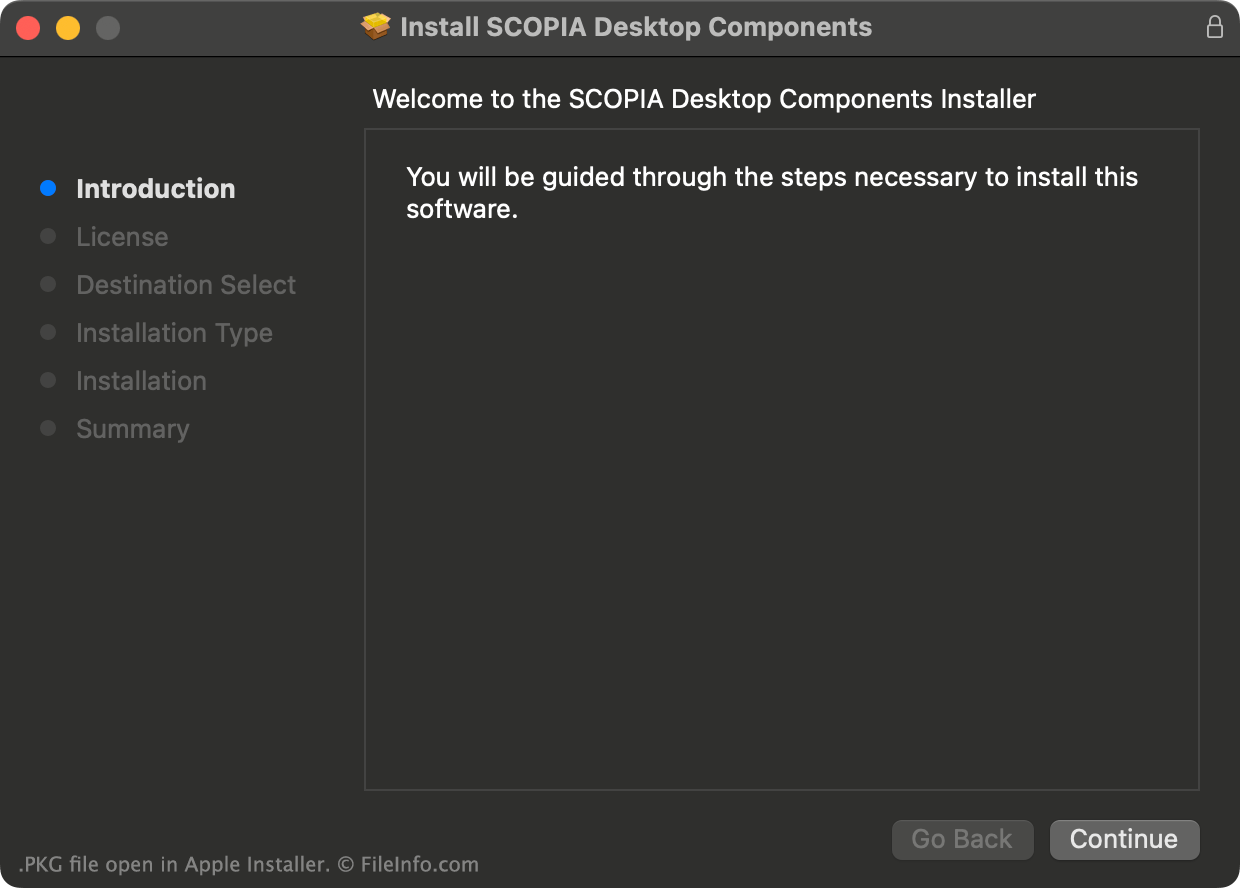
A PKG file is a package of compressed files used to install a macOS application. When you double-click a PKG file, Apple Installer beings installing the application the file contains.

Meer informatie

Schermafbeelding van een .pkg-bestand in Apple Installer
PKG-bestand geopend in Apple Installer

MacOS applications can be distributed and installed in many different ways. One way developers distribute macOS applications is by packaging them in PKG files, which macOS recognizes as application installers. Each PKG file includes all the files needed to install the application it contains.

How to check what files a PKG file contains

Before using a PKG file to install an application, you may want to check what files the PKG file contains. For example, if you download a PKG file from an online source, you may want to verify that the file does not contain malware.

You can view some PKG files' contents by right-clicking them and selecting Show Package contents. You can also:

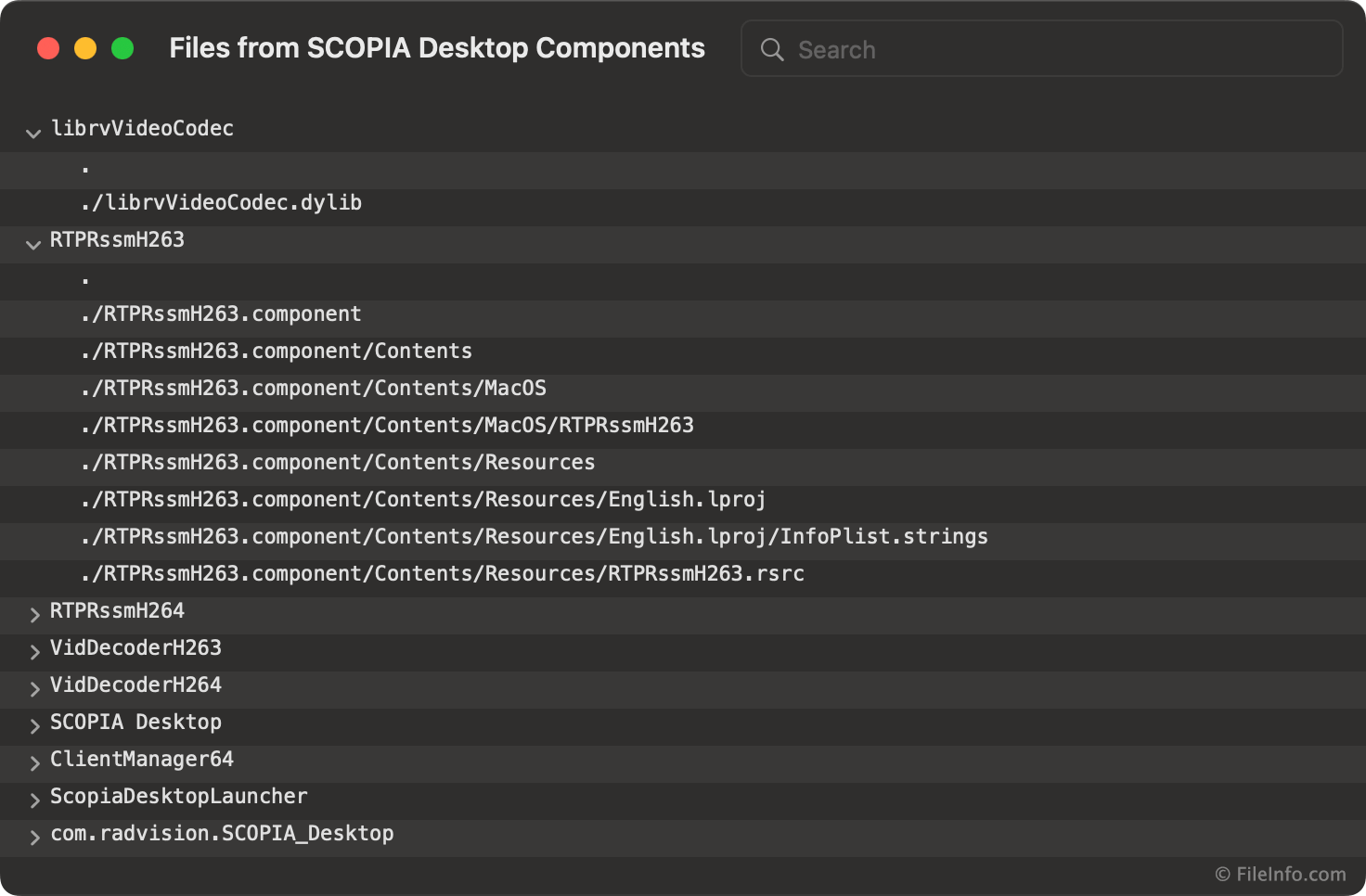
What appears when you press CMD + I in Apple Installer
  • View the files a PKG file contains using the pkgutil --expand command in Apple Terminal
  • View a list of files the PKG file will install by pressing CMD + I on your keyboard during the installation process

OPMERKING: macOS applications are now more commonly distributed as .APP files.

Een PKG-bestand openen

You can use Apple Installer to install the app a PKG file contains. To do so, either double-click the PKG file, or right-click it and select Open With → Installer.

If you want to view the files your PKG file contains, refer to the How to check what files a PKG file contains section above.

Programma's die PKG-bestanden openen

Mac
Apple Installer

Midtown Madness 2 3D Model

Ontwikkelaar Microsoft
Populariteit
3.9  |  71 Stemmen
 

A PKG file is a 3D model used in Midtown Madness 2 (MM2), a racing game published by Microsoft. It contains geometry data used to show a car, building, or other object in-game. PKG files are stored in MM2's .AR game archives.

Meer informatie

Midtown Madness 2 is a popular open-world racing game that was developed by Angel Studios and published by Microsoft. It allows players to race through recreations of London and San Francisco in a variety of vehicles.

The 3D models MM2 uses to show vehicles and structures in-game are saved as PKG files. Like most of MM2's game assets, these files are saved in AR archives.

Most players will never see or need to open MM2's PKG files. However, MM2 modders may want to extract PKG files from MM2's game data archives, so they can view and edit the files' contents.

Een PKG-bestand openen

You can open a PKG file in Zanoza ZModeler (Windows), a 3D modeling app that specializes in opening video game vehicle models. Select File → Open... from the program's menu bar, and then navigate to and open your PKG file.

You can also open a PKG file in Blender (multiplatform) with the PKGImportExport add-on (linked below) installed.

Een PKG-bestand converteren

After opening a PKG file in Zanoza ZModeler (Windows), you can export the model the file contains in the following common 3D model formats:

  • .3DS - 3D Studio Scene
  • .DAE - Digital Asset Exchange File
  • .FBX - Autodesk FBX Interchange File
  • .OBJ - Wavefront 3D Object File

You can also export the model in some game-specific formats, for use in those games.

Programma's die PKG-bestanden openen of ernaar verwijzen

CoCreate OneSpace Modeling Package

Ontwikkelaar Parametric Technology
Populariteit
3.8  |  74 Stemmen
 

A PKG file is a modeling package created by Parametric Technology CoCreate Modeling. It contains all the files needed to load a 3D model, packaged and saved in a compressed format. Saving models as PKG files reduces their file size, making them easier to transfer over the Internet.

Meer informatie

Parametric Technology (PTC) CoCreate Modeling is a 3D CAD program that allows engineers and product designers to create 3D models. It was previously known as:

  • CoCreate OneSpace Modeling
  • OneSpace Designer Modeling
  • SolidDesigner

It has since been replaced by Creo Elements/Direct Modeling.

CoCreate Modeling 2005 and later versions compress PKG files using proprietary or CPIO compression. CoCreate Modeling 2006 and later versions compress PKG files using Zip compression.

Een PKG-bestand openen

You can open a PKG file in CoCreate Modeling, Creo Elements/Direct Modeling, or Creo Elements/Direct Modeling Express (Windows). Express is free and can be downloaded from PTC's website.

If your PKG file is compressed using Zip compression, you can also decompress it using any Zip archive utility, to view the file's contents.

Een PKG-bestand converteren

You can use Creo Elements/Direct Modeling to convert PKG files to the following 3D formats:

  • .STL - Stereolithography File
  • .WRL - VRML World
  • .EASM - eDrawings Assembly

Programma's die PKG-bestanden openen

All Platforms
Rename .pkg to .zip; decompress with any Zip archive utility

Roku Channel Package

Ontwikkelaar Roku
Populariteit
3.5  |  2 Stemmen
 

A PKG file is a Roku channel package. It contains the source code, images, fonts, and other assets needed to install a channel on a Roku device. PKG files are encrypted, so users cannot extract any proprietary content they contain.

Meer informatie

Roku TVs (and other Roku devices) use a proprietary operating system called Roku OS. Developers can create new channels for use on Roku OS, which allow Roku owners to select from and stream associated content.

After a developer finishes developing their Roku channel, they use the Roku Development Application Installer to package the channel's source code and assets as a PKG file. Developers can then either upload the channel to the Roku Channel Store as a beta channel, available to only specific testers, or a public channel, available to all Roku users.

Each PKG file is encrypted using a signing key stored on the Roku device used to create it. PKG files' contents are also typically compressed using Camfs or Squashfs.

Een PKG-bestand openen

PKG files are not meant to be opened. Instead, they are meant to be submitted to the Roku Channel Store, for beta testing or public use. Refer to Roku's official developer documentation for more information on how to create, publish, and install PKG files.

Programma's die PKG-bestanden openen of ernaar verwijzen

All Platforms
Publish to Roku Channel Store from Roku device with Developer Settings enabled

Midori-OS Application

Ontwikkelaar Autz64
Populariteit
1.8  |  4 Stemmen
 

A PKG file is an application that can be run on a Nintendo 3DS or Switch using SmileBASIC and Midori-OS. It contains an app that is written using the BASIC (Beginners' All-purpose Symbolic Instruction Code) programming language and compiled for use with Midori-OS. PKG files are loaded in Midori-OS using the LOAD command and PKG Loader.

Meer informatie

SmileBASIC is a program that allows developers to create BASIC programs on their Nintendo 3DS, Wii U, or Switch. Midori-OS is a mock operating system that SmileBASIC users can install to make creating and executing programs easier. For example, Midori-OS allows users to import and execute precompiled SmileBASIC applications. These applications are saved as PKG files. Midori-OS also allows users to create and load additional PKG files, housing their own SmileBASIC applications.

OPMERKING: The R-OS Forever and Sakakibara UI SmileBASIC mock operating systems can also load Midori-OS PKG files.

Een PKG-bestand openen

Midori-OS PKG files are meant to be loaded on a Nintendo video game console that has SmileBASIC and Midori-OS installed. They are not meant to be opened on a PC. It is unlikely that you will encounter a Midori-OS PKG file on a PC.

Programma's die PKG-bestanden openen

Geen programma's beschikbaar
Categorie: Spel
Bijgewerkt: 2021-06-14

Geverifieerd door FileInfo.com

Het FileInfo.com-team heeft onafhankelijk onderzoek gedaan naar alle bestandsformaten en softwareprogramma's die op deze pagina worden vermeld. Ons doel is 100% nauwkeurigheid en we publiceren alleen informatie over bestandstypen die we hebben geverifieerd.

Als u aanvullingen of updates voor deze pagina wilt voorstellen, kunt u het ons laten weten.