.APP Bestandsextensie
macOS Application Bundle
| Ontwikkelaar | Apple |
| Populariteit |
4.0 | 434 Stemmen |
Wat is een APP-bestand?
An APP file is a macOS application bundle. It contains the files needed to run a macOS application, including the app's executable, resources, and other ancillary files. In macOS, you can run the application an APP file contains by double-clicking the file.
Meer informatie
In practice, macOS APP files are most similar to Windows .EXE files. However, while APP files behave as executable files when double-clicked, they are actually macOS packages.
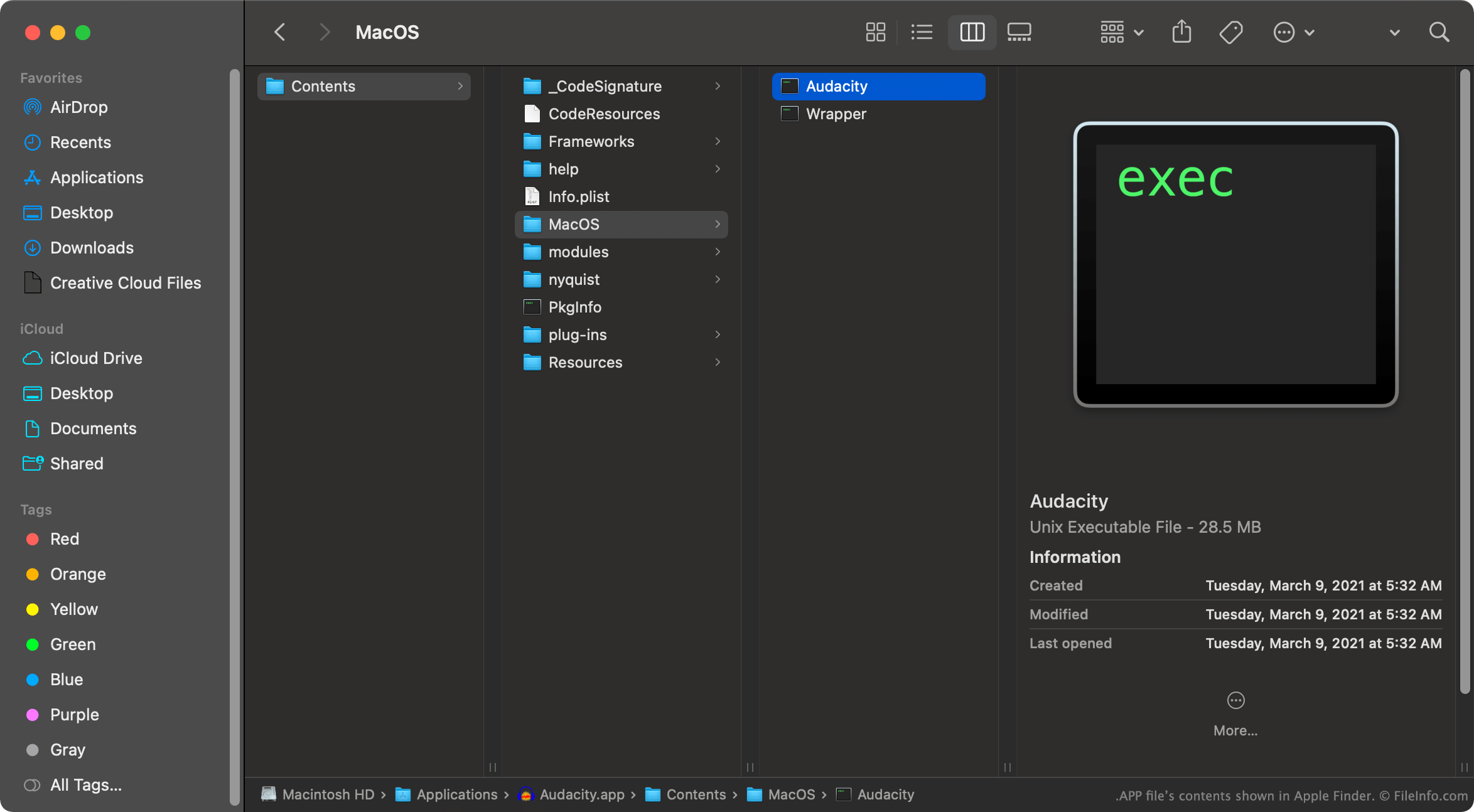
In macOS, you can right-click an APP file and select Show Package Contents to view the package's constituent directories and files. For example, each APP file contains a .PLIST file, which lists application properties and configuration settings. Each APP file also contains a Contents, Resources, Frameworks, and MacOS directory. The MacOS directory contains the application's actual executable file(s).
OPMERKING: Do not edit or move an APP file's contents. Doing so can break the program the file contains.
Een APP-bestand openen
In macOS, you can double-click an APP file to run the program it contains. You can also right-click the file and select Show Package Contents to view its constituent files.
In Windows and Linux, you can view an APP file's contents as though the file were a folder. You may also be able to extract some of the bundle's contents using WinRAR or another archive utility.
Programma's die APP-bestanden openen
Symbian OS Application
| Ontwikkelaar | Nokia |
| Populariteit |
3.3 | 62 Stemmen |
Software program written for the Symbian OS, an operating system for mobile phones and smartphones; comprises a Symbian application together with a .RSC resource file; can be compiled using a Symbian OS software development kit (SDK).
Meer informatie
The Symbian OS is used by phones from Nokia, Sony Ericsson, Samsung, and FOMA.
Programma's die APP-bestanden openen
FoxPro Generated Application
| Ontwikkelaar | N.v.t. |
| Populariteit |
3.2 | 70 Stemmen |
Application used by FoxPro to automate procedures (i.e. creating new label sizes, transforming data values, analyzing code, etc); may be included with FoxPro or custom built by the user from a project (.PJX) file using the BUILD APP command
Programma's die APP-bestanden openen
Wii U Game Data File
| Ontwikkelaar | N/A |
| Populariteit |
3.3 | 23 Stemmen |
An APP file contains encrypted data dumped from a Nintendo Wii U video game. It stores a section of the game data, along with other APP files, that when decrypted and pieced together, can be opened and played on a computer using a Wii U emulator.
Meer informatie
APP files are used by gamers who enjoy playing and altering Wii U games on their computers. Since APP files contain pieces of a Wii U game to reduce file sizes, all the APP files need to be present in order to play the Wii U game.
Also, Wii U APP files are encrypted and must be decrypted before they can be opened and played. A Title Metadata .TMD file, which stores metadata and the title key for the APP game, is required in order to decrypt the APP file.
APP files are named according to the number of files to which the game data was split. The files start at 0 (00000000.app), then increase from there to 00000001.app, 00000002.app, etc.
Programma's die APP-bestanden openen of ernaar verwijzen
Nintendo Wii WAD Archive
| Ontwikkelaar | Nintendo |
| Populariteit |
3.3 | 13 Stemmen |
An APP file is an archive used by a downloaded Nintendo Wii channel, or .WAD file. It contains application or game data compressed using Yaz0 or LZ77 compression and saved in the U8 archive format. APP files are typically not meant to be opened.
Meer informatie
The Nintendo Wii gave players access to an online marketplace called WiiWare, which they could use to download additional games and applications for their console. The Wii downloaded these games and applications as WAD files which, when installed, became new Nintendo Wii channels. Each WAD file included a handful of compressed APP archives, which contained files used to install and access the new channel.
Nintendo discontinued the WiiWare marketplace at the beginning of 2019. However, homebrew gamers and Wii emulator users still use WAD files and the APP files contained within them to install Wii games and other applications.
Een APP-bestand openen
Typically, Nintendo Wii players should not open the APP files included within a WAD file. However, homebrew gamers and emulator users may wish to view or extract the files contained within a channel's APP archives. To do so, you can decompress the archive using a U8 decompression tool, such as U8 Tool or Sharpii.
Programma's die APP-bestanden openen
HarmonyOS App Pack
| Ontwikkelaar | Huawei |
| Populariteit |
3.4 | 9 Stemmen |
Meer informatie
Many Huawei smartphones, tablets, smartwatches, and smart TVs use the company's proprietary HarmonyOS operating system. HarmonyOS allows users to install compatible Android apps, packaged as .APK files, and HarmonyOS-specific apps, packaged as APP files. In Huawei's AppGallery, HarmonyOS-specific apps are often marked with the HMOS label, allowing users to distinguish HarmonyOS apps from Android apps.
Developers package HarmonyOS apps into APP files at the end of the app development and publishing process. Prior to being packaged in an APP file, the app's modules are saved as one or more HAP files. Developers typically perform their development and testing using HAP files, and they use APP files only to publish their finalized app to Huawei AppGallery.
How do I package a HarmonyOS app into an APP file?
To package a HarmonyOS app into an APP file in Huawei DevEco Studio:
- Open your app development project in Huawei DevEco Studio.
- Select Build → Build Hap(s)/APP(s) → Build APP(s)
DevEco Studio will then create a release sub-directory in your project's build directory. This sub-directory will contain your app's APP file(s).
Een APP-bestand openen
APP files are not meant to be manually opened. Developers can use Huawei AppGallery Connect to upload their APP files and distribute them to users. Users can download and install APP-based HarmonyOS applications from Huawei AppGallery.