.VCP 파일 확장자

eMbedded Visual C++ Project File

개발사 Microsoft
인기도
2.0  |  4 투표
 

VCP 파일이란 무엇인가요?

Software development project created by eMbedded Visual C++ (eVC), a Microsoft application used to develop programs for the Windows CE (Compact Edition) platform; contains project settings as well as references to source code files and project assets.

추가 정보

VCP files are used for saving and loading development progress, as well as building Windows CE applications. They can be converted into .VCPROJ files using Visual Studio 2005 and later.

File Viewer Plus(으)로 400개 이상의 파일 형식을 여세요.무료 다운로드

VCP 파일을 여는 프로그램

카테고리: 개발자
업데이트: 2010-07-08

Casio ClassPad Data File

개발사 Casio
인기도
2.0  |  2 투표
 

A VCP file is a data file used by Casio ClassPad graphing calculators, which include ClassPad 300, ClassPad 330, and fx-CP400 calculators. It may contain eActivity data or a backup of all the data on a ClassPad device. VCP files are saved in the proprietary Virtual ClassPad (VCP) format and are only supported by the ClassPad graphing calculator and ClassPad software.

추가 정보

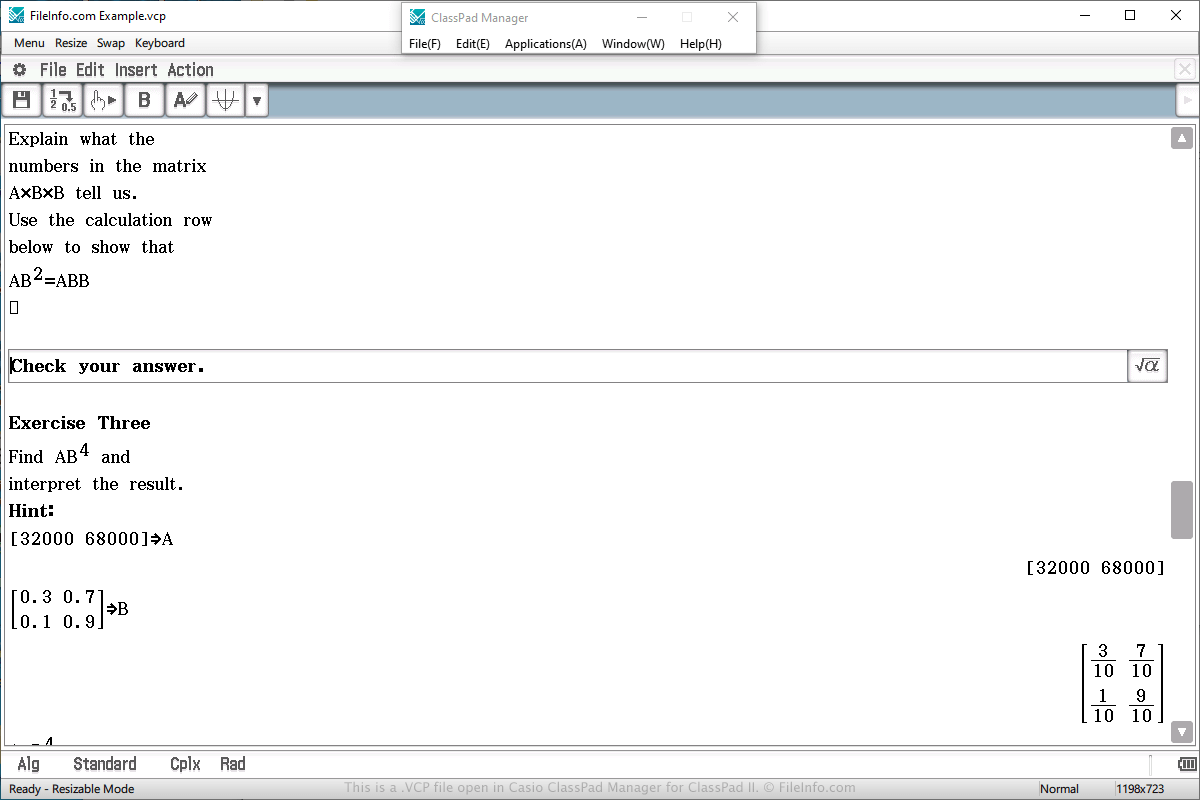
Casio ClassPad Manager for ClassPad II에서 열린 .vcp 파일의 스크린샷
Casio ClassPad Manager for ClassPad II에서 열린 VCP 파일

You will most likely only encounter a VCP data file if you own a Casio ClassPad graphing calculator. You may also encounter the file if you use the ClassPad Manager for ClassPad II program, which emulates the calculator in Windows or macOS.

VCP files are often used to save an eActivity, which is similar to a document created by a word processor, but more simplified for a calculator. It is designed to enhance the presentation of information on the calculator and supports text, images, tables, graphs, and equations.

To create a VCP file that stores eActivity data, select "eActivity" from the main menu on the calculator or software, compose the document, select File → Save, choose the save location, name the file, and click Save.

To open a VCP file that stores eActivity data, select "eActivity" from the main menu on the calculator or software, compose the document, select File → Open, choose the file, and click Open.

On a ClassPad calculator, eActivity VCP files are saved in the "Flash memory" area of the calculator. eActivity VCP files created by ClassPad Manager for ClassPad II software are saved on the hard drive on the computer.

To open a VCP file that stores backup data, select "System" from the main menu on the calculator or software, choose the "View Storage & Import" option and click Select, choose the VCP back up file, and click Import.

VCP 파일을 여는 프로그램

카테고리: 데이터
업데이트: 2020-04-03

검증자 FileInfo.com

FileInfo.com 팀 이 페이지에 나열된 모든 파일 형식과 소프트웨어 프로그램을 독자적으로 조사했습니다. 저희의 목표는 100% 정확성이며, 검증한 파일 유형에 대한 정보만 게시합니다.

이 페이지에 추가하거나 업데이트할 내용을 제안하고 싶으시면 알려 주세요.