.CUBE 파일 확장자

2개의 파일 유형.cube 확장자를 사용합니다.

Gaussian Cube File

개발사 해당 없음
인기도
3.8  |  22 투표
 

CUBE 파일이란 무엇인가요?

Gaussian cube format created by the cubegen and cubman programs included with the Gaussian distribution; stores volumetric properties, which are the X-, Y-, and Z-coordinates that are mapped on to a 3D grid associated to a molecular system; may also contain the number of atoms and the number of voxels along the the axes.

추가 정보

Gaussian is an electronic structure program used for computational chemistry. The application uses the ".cube" and ".cub" extensions to save data in the Cube format.

File Viewer Plus(으)로 400개 이상의 파일 형식을 여세요.무료 다운로드

CUBE 파일을 여는 프로그램

Windows
무료
무료
Mac
무료
무료
Linux
무료
무료
카테고리: 데이터
업데이트: 2015-11-06

Luminar Lookup Table

개발사 Skylum Software
인기도
2.0  |  1 투표
 

A CUBE file is a lookup table used by various versions of Luminar, a digital photo editor. It contains settings used to remap an image's colors and adjust its tone. Luminar includes default CUBE files, and photographers can create or load custom CUBE files.

추가 정보

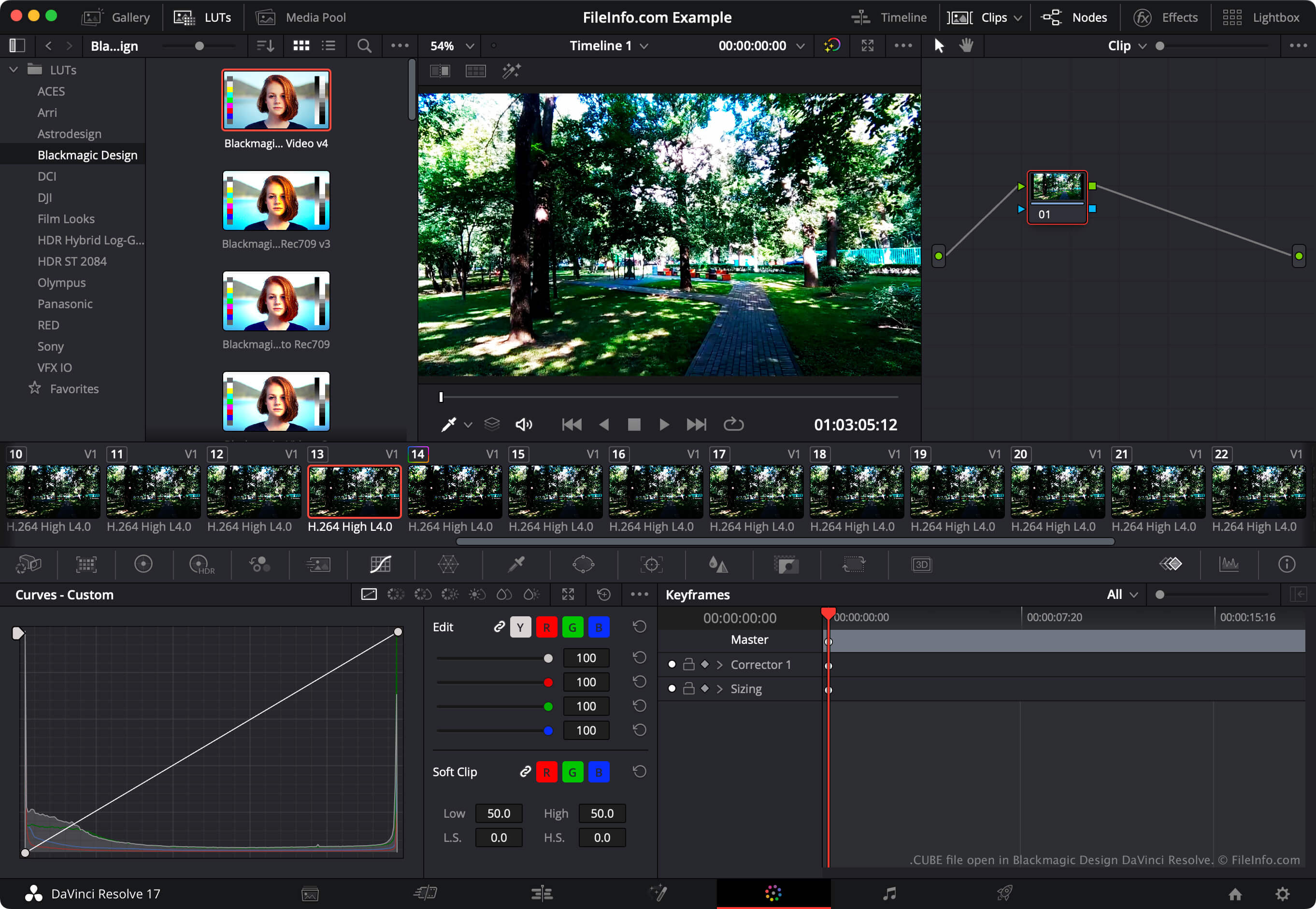
Blackmagic Design DaVinci Resolve에서 열린 .cube 파일의 스크린샷
Blackmagic Design DaVinci Resolve에서 열린 CUBE 파일

Photographers use Luminar to edit digital photos. The program is published by Skylum Software and available for Windows and macOS.

In Luminar 2018, the program gained the ability to load and apply lookup tables (LUTs). Using the program's LUT Mapping tool, photographers can select a lookup table to automatically remap an image's colors to a new set of colors, defined in the LUT. Photographers can then use the LUT Mapping tool's Amount, Contrast, and Saturation settings to refine this remapping.

Luminar LUTs are saved as CUBE files. Several succeeding versions of Luminar, including Luminar AI and Neo, also use LUTs saved as CUBE files. However, to load CUBE files in these versions, photographers use the Color Styles (LUT) or Mood tool, not the LUT Mapping tool.

참고: The video editing program DaVinci Resolve can also import and export LUT lookup tables.

CUBE 파일을 여는 방법

You can open a CUBE file with Luminar 2018 and later versions (Windows, Mac). To do so, select your version of Luminar's LUT tool (such as LUT Mapping, Color Styles, or Mood). Then select, Choose LUT → Load Custom LUT File.... Finally, navigate to and open your CUBE file. After you do, Luminar will apply the LUT your CUBE file contains.

To use a CUBE file with Blackmagic Design DaVinci Resolve, place the file in the directory from which DaVinci Resolve loads LUTs and then update the app's LUT list:

  1. Open a project and select File → Project Settings....
  2. Select Color Management.
  3. Click Open LUT Folder.
  4. Place your CUBE file in any of the LUT directory's sub-directories.
  5. Click Update Lists.
  6. Click Save.
  7. The LUT your CUBE file contains will then appear in DaVinci Resolve's LUTs panel (within the sub-directory in which you placed it).

CUBE 파일을 여는 프로그램

Windows
무료 체험판
무료 체험판
Mac
무료 체험판
무료 체험판
카테고리: 설정
업데이트: 2023-08-15

검증자 FileInfo.com

FileInfo.com 팀 이 페이지에 나열된 모든 파일 형식과 소프트웨어 프로그램을 독자적으로 조사했습니다. 저희의 목표는 100% 정확성이며, 검증한 파일 유형에 대한 정보만 게시합니다.

이 페이지에 추가하거나 업데이트할 내용을 제안하고 싶으시면 알려 주세요.