.MSS ファイル拡張子

Microprocessor Software Specification File

開発元 Xilinx
人気度
3.3  |  6 
 

MSSファイルとは?

File used by Xilinx Platform Studio (XPS), a program used to design software for microprocessors; specifies the input/output devices, interrupt handler routines, and other software features for a microprocessor.

詳細情報

MSS files define the software that can be used with a microchip designed with Xilinx Platform Studio (XPS). They are used as input into the Library Generator, which creates a software library for an embedded processor instance.

File Viewer Plusで400種類以上のファイル形式を開けます。無料ダウンロード

MSSファイルを開く、または参照するプログラム

Windows
無料体験版
カテゴリ: 開発者
更新日: 2010-04-28

MyScreenSaver Builder File

開発元 MSB
人気度
3.3  |  3 
 

Car data file created by MyScreenSaver Builder, a program used to make screen savers and browse and share car information; stores car images and data in a proprietary format; may include car information such as the make, model, year, price, and dimensions.

詳細情報

MSS files are used to package images into categorized collections for viewing, distribution, and screen saver generation. MyScreenSaver Builder can import both .GIF and .JPG image formats into MSS files.

MSS files may be viewed with the MSS Viewer, a tool included with MyScreenSaver Builder used to browse the pictures and information in MSS packages.

MSSファイルを開くプログラム

Windows
カテゴリ: データ
更新日: 2010-04-28

CartoCSS Map Stylesheet

開発元 Mapbox
人気度
2.5  |  2 
 

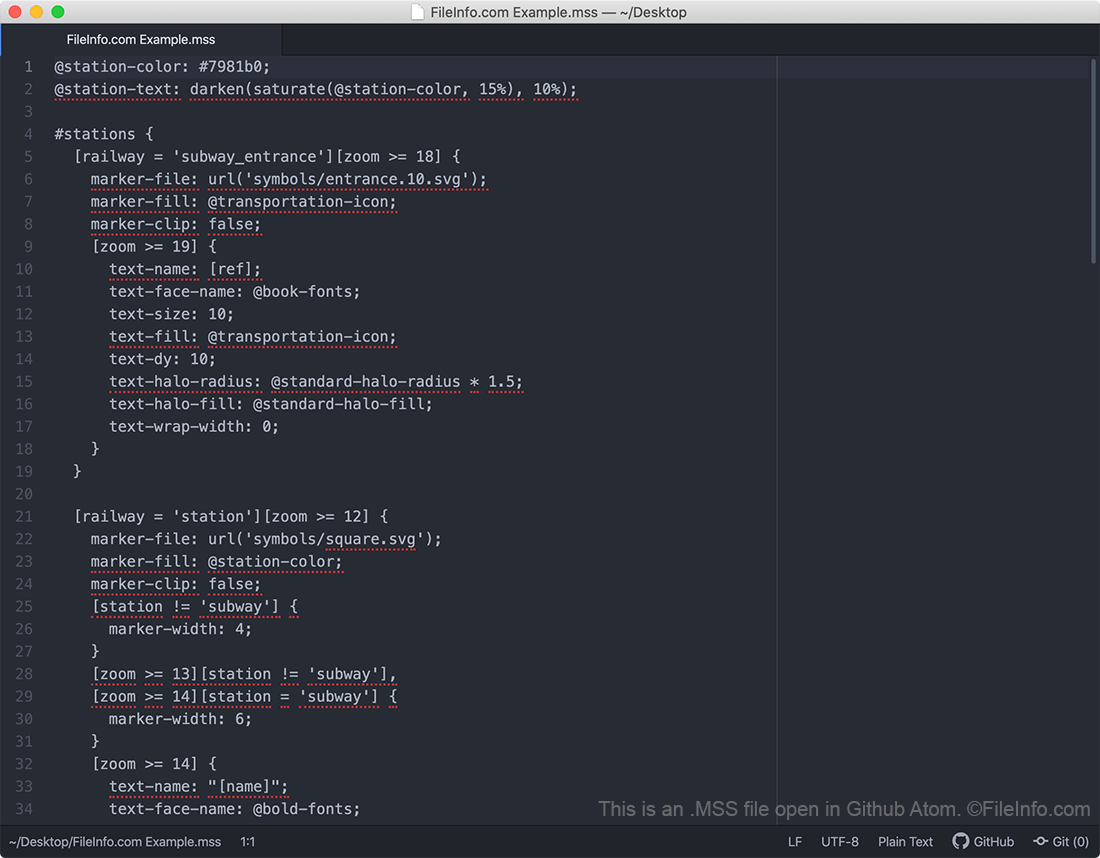
An MSS file is a stylesheet used by CartoCSS-based mapping programs, such as Mapbox, OpenStreetMap, TileMill, and Mapnik. It contains map styling information written in the CartoCSS styling language. MSS files determine how content appears on a map (e.g. what roads should be shown, what colors those roads should appear in, how wide the roads should appear, etc.).

詳細情報

Github Atomで開いた.mssファイルのスクリーンショット
Github Atomで開いたMSSファイル

CartoCSS is a CSS-based styling language that developers use to create open source street maps. Map developers can either write their maps directly in CartoCSS, using the CartoCSS code installation package and the development environment of their choice, or they can create CartoCSS-based maps using a map design application like Kosmtik, Mapbox Studio Classic, or TileMill.

As they create a map, developers must choose how roads, text, and other items appear on it. Developers use MSS files to specify, among other things, what roads should appear on their map, what color and width those roads should appear in, what symbols to use for certain types of landmarks, and how text should appear on their map.

In 2016, the Mapbox team announced they were replacing the CartoCSS styling language with the Mapbox GL Style Specification, a JSON-based styling language. Mapbox's newer map creation applications use Mapbox GL stylesheets, which are saved with the .JSON extension. However, the mapping community continues to maintain CartoCSS and many of the map creation programs that use it.

MSSファイルの開き方

You should open an MSS file in a Carto-CSS based map creation program, such as Mapbox Studio Classic, TileMill, or Kosmtik. These programs contain helpful features that will help you understand the styling information contained within the file. However, because MSS files are plain text documents, you can also open and edit an MSS file in any text editor if needed.

MSSファイルを開く、または参照するプログラム

Windows
Linux

MuseScore Style Definition

開発元 The MuseScore Team
人気度
2.0  |  1 
 

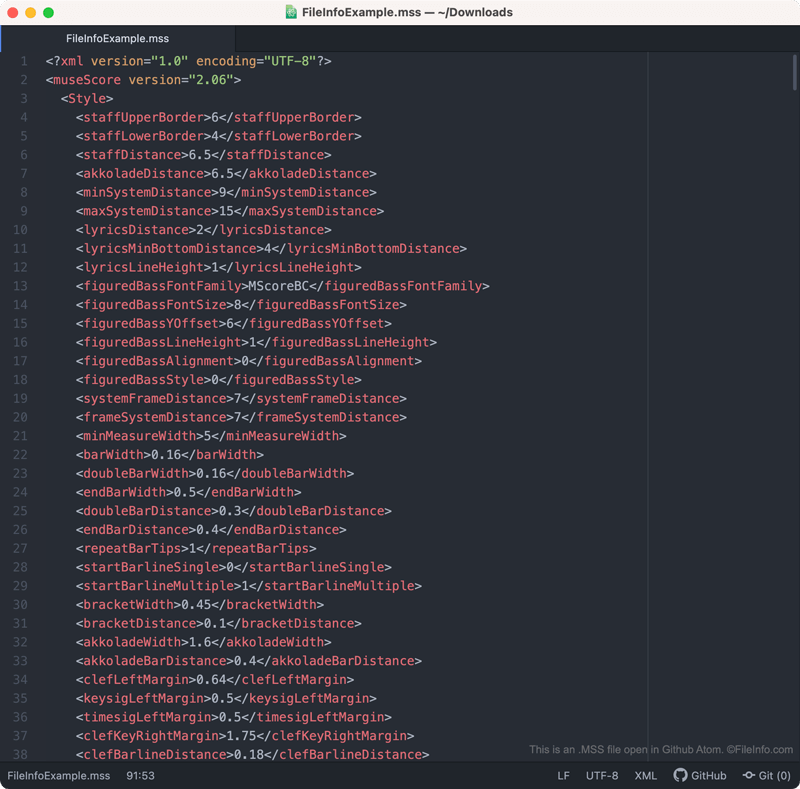
An MSS file is a MuseScore style definition. It contains XML-based settings that define how a musical score appears in MuseScore. Specifically, MSS files control how notes, rests, measures, staffs, text, and other visual elements appear within a piece of a music.

詳細情報

Github Atomで開いた.mssファイルのスクリーンショット
Github Atomで開いたMSSファイル

MuseScore is a free music composition and notation program that composers can use to create, edit, and share musical scores. As composers create a piece of music, they can adjust the way notes, rests, measures, staffs, text, and other visual elements appear in that piece of music.

If the composer wants to save these settings (perhaps to apply them to another score in the future), they can do so by selecting Format → Save Style... from MuseScore's menu bar. When they do, MuseScore creates an MSS file, which contains the composer's custom style settings.

MSS files contain style settings saved in an XML format. As such, they are human-readable. So, if you do not have access to MuseScore (or want to preview the settings contained within an MSS file before applying them), you can open an MSS file in a text editor to view the settings it contains.

MSSファイルの開き方

You can open an MSS file (and apply the style settings it contains to a piece of music) in MuseScore. To do so, select Format → Load Style... from the program's menu bar.

If you want to view the settings an MSS file contains before applying those settings in MuseScore, you can open the file in any text editor, such as Microsoft Notepad, Apple TextEdit, or Github Atom.

MSSファイルを開くプログラム

Windows
Mac
Linux
Web
無料
カテゴリ: 設定
更新日: 2020-11-16

検証者 FileInfo.com

FileInfo.comチーム は、このページに掲載されているすべてのファイル形式とソフトウェアについて独自に調査しました。 私たちの目標は100%の正確性であり、検証済みのファイルタイプに関する情報のみを公開しています。

このページへの追加や更新をご提案いただける場合は、お知らせください。