.CLP Dateiendung

CrazyTalk Clip File

Entwickler Reallusion
Beliebtheit
3.8  |  12 Stimmen
 

Was ist eine CLP-Datei?

Motion clip created by CrazyTalk, a facial animation program used for synchronizing speech audio with facial movements; saves a short clip of a facial expression recorded in real-time; used for inserting pre-recorded facial movements in the animation timeline.

Weitere Informationen

CLP files can be used for saving rolling eyes, mouth gestures, and other expressions that convey facial emotions.

Über 400 Dateiformate öffnen mit File Viewer Plus.Kostenloser Download

Programme, die .CLP-Dateien öffnen

Windows
Kostenlose Testversion
Mac
Kostenlose Testversion
Kategorie: Daten
Aktualisiert: 2020-10-01

Windows Clipboard File

Entwickler k. A.
Beliebtheit
3.8  |  6 Stimmen
 

Information copied to the Windows clipboard; typically copied by selecting an object or section of text and pressing Control-C or choosing "Copy" from the Edit menu; can be pasted into an open window or document by pressing Control-V or selecting "Paste" from the Edit menu.

Programme, die .CLP-Dateien öffnen

Windows
Kostenlose Testversion
Kostenlos
Kategorie: Daten
Aktualisiert: 2018-03-22

Finale Clip

Entwickler MakeMusic
Beliebtheit
2.8  |  6 Stimmen
 

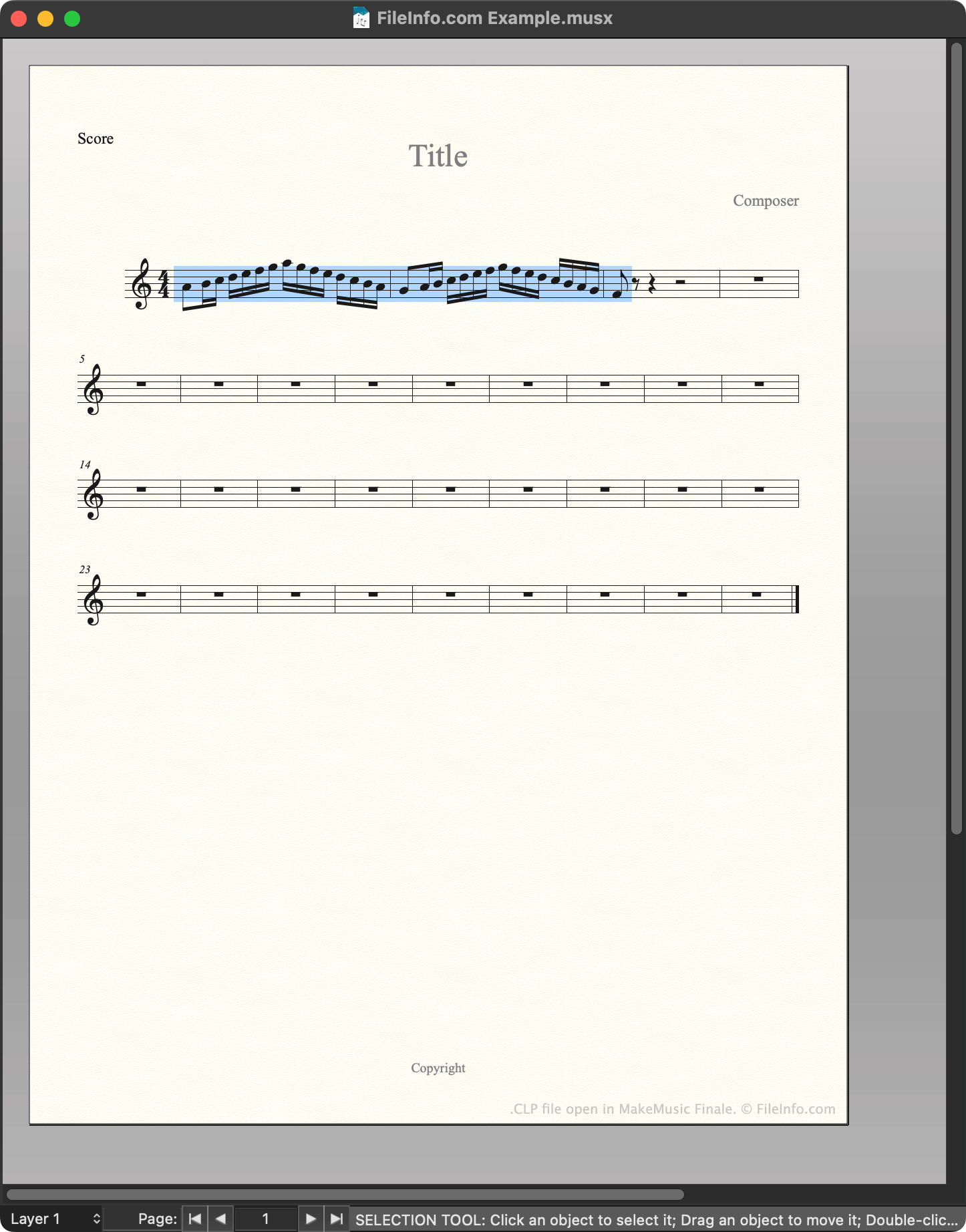
A CLP file is a MakeMusic Finale clip file. It contains a motif, passage, or other section of music that a composer saved as a clip. Saving notation as a CLP file allows composers to quickly insert a copy of that notation into a score.

Weitere Informationen

Screenshot einer .clp-Datei in MakeMusic Finale
CLP-Datei geöffnet in MakeMusic Finale

MakeMusic Finale is a scorewriter for Windows and macOS. Composers use Finale to create, edit, and play back musical scores.

While creating a score, composers can save a section of that score as a clip, or CLP file. This allows them to quickly insert or paste the saved clip into their current score or future scores. For example, if a composer knows they'll use the same motif in multiple related pieces of music, they may save that motif as a CLP file, to make it easier to insert in multiple scores.

How to create a CLP file

To save a section of a score as CLP file:

  1. Select that section of the score (such that it is highlighted).
  2. Press and hold CTRL (Windows) or OPTION (Mac) on your keyboard.
  3. Right-click on the selected section and click Copy to Clip File....
  4. Name and save your CLP file.

So öffnen Sie eine CLP-Datei

You can open a CLP file with MakeMusic Finale (Windows, Mac). To do so:

  1. Open or create a musical score.
  2. Press and hold CTRL (Windows) or OPTION (Mac) on your keyboard.
  3. Right-click on the point in your score to which you want to add the clip.
  4. Select Insert from Clip File... or Paste from Clip File.... (Insert inserts the clip between existing measures; Paste overwrites the existing music.)

Programme, die .CLP-Dateien öffnen

Windows
Kostenlose Testversion
Mac
Kostenlose Testversion
Kategorie: Audio
Aktualisiert: 2023-02-23

Clipper Compiler Instructions File

Entwickler Grafx Software Development Tools
Beliebtheit
1.7  |  3 Stimmen
 
🔍Öffnen Sie .CLP-Dateien direkt in Ihrem Webbrowser mit File Helper.Online ansehen

A CLP file is a plain text file that contains instructions for Clipper, a compiler used to generate programs from source code. Its instructions tell Clipper how to combine multiple programming modules into a single object so that it can be used to produce a final running program.

Weitere Informationen

HINWEIS: Clipper is an older xBase-based compiler which is not frequently used anymore.

Programme, die .CLP-Dateien öffnen

Windows
Web

Geprüft von FileInfo.com

Das FileInfo.com-Team hat alle auf dieser Seite aufgeführten Dateiformate und Softwareprogramme unabhängig recherchiert. Unser Ziel ist 100% Genauigkeit, und wir veröffentlichen nur Informationen zu Dateitypen, die wir überprüft haben.

Wenn Sie Ergänzungen oder Aktualisierungen zu dieser Seite vorschlagen möchten, teilen Sie es uns bitte.