.SPL Přípona souboru

FutureSplash Animation

Vývojář Adobe
Popularita
3.4  |  19 Hlasů
 

Co je soubor SPL?

An SPL file is an animation created by FutureWave FutureSplash Animator, a now-discontinued multimedia authoring tool from the mid-1990s. It stores vector-based information about an animation, including text, shapes, graphics, colors, and metadata.

Další informace

FutureWave designed FutureSplash Animator to create compact and scalable animations that developers could embed into websites or users could view in compatible players. Macromedia acquired FutureWave in 1996, which Adobe later acquired in 2005. Adobe turned FutureSplash Animator into Adobe Flash, which supported SPL files until Adobe discontinued it when modern web standards like HTML5, CSS3, and JavaScript became prevalent.

Jak otevřít soubor SPL

You can open SPL files with Adobe Flash and Adobe Flash Player, although both programs are discontinued. To open an SPL file with either program, select File → Open.

Otevřete více než 400 formátů souborů pomocí File Viewer Plus.Stáhnout zdarma

Programy, které otevírají soubory SPL

Windows
Zkušební verze zdarma
Mac
Zkušební verze zdarma

Windows Print Spool File

Vývojář Microsoft
Popularita
3.2  |  9 Hlasů
 

An SPL file is a file created by Windows when a user submits a print job. It contains the spooled print data, which includes the digital document contents sent to the printer for printing. SPL files save data in a raw printer format and are used as a temporary data store for the print job, which is emptied when the job completes.

Další informace

SPL files are saved to the following directory when a print job is submitted: C:\​Windows\​System32\​spool\​PRINTERS\​.

POZNÁMKA: Windows also saves an .SHD file to the same directory as the SPL file when printing. This "shadow" file allows the print job to be resubmitted if it is interrupted.

Jak otevřít soubor SPL

You can open an SPL file and view its contents in EMF Printer Spool File Viewer (Windows) and SPLViewer (Windows). You can also use these applications to print the print job described in your SPL file.

Programy, které otevírají nebo odkazují na soubory SPL

Windows
Kategorie: Systém
Aktualizováno: 2021-12-14

sPlan Schematic Diagram File

Vývojář ABACOM
Popularita
3.3  |  3 Hlasů
 

An SPL file is a schematic diagram created by sPlan, a schematic editor for Windows. It contains a schematic circuit diagram, which consists of circuit components such as fuses, diodes, resistors, switches, contacts, transistors, relays, connectors, hydraulics, and capacitors.

Další informace

Snímek obrazovky souboru .spl v ABACOM sPlan 7.0
Soubor SPL otevřený v ABACOM sPlan 7.0

When you create a diagram and save it by selecting File → Save, sPlan creates an SPL file to store the contents of the diagram. You can also to choose to save the diagram as a template by selecting File → Template... → Save as template. sPlan templates are also saved as SPL files.

If you come across an SPL file on your computer you can use sPlan to open the file. You can also use sPlan Viewer, which is available for free.

POZNÁMKA: SPL files were replaced by SPL7 files with the release of sPlan 7.0. However, SPL files can

Programy, které otevírají soubory SPL

Windows
Zkušební verze zdarma

Splunk Application Package

Vývojář Splunk
Popularita
3.0  |  2 Hlasů
 

An SPL file is a Splunk application package used by Splunk Enterprise, a program used to search, analyze, and visualize business data. It stores all the files that make up the application, which may include scripted and modular inputs, reports, custom UI dashboards, event types, field extractions, and workflows. SPL files are used to upload apps to Splunkbase, which is the Splunk app store, to distribute them to other Splunk users.

Další informace

You can open SPL files using Splunk Enterprise or Splunk Cloud, which is the web version of Splunk Enterprise. Some examples of Splunk apps include User Role Checker, PyDen Manager, Slack Notification Alert, Cisco Network App for Splunk, and Palo Alto Networks App for Splunk.

SPL files are the same as .TAR.GZ files but use the .spl file extension instead of the .tar.gz extension. They store the application files in TAR archives (tarballs), which are compressed with the standard GNU zip (gzip) compression algorithm.

You can package your Splunk app as an SPL package by opening a command prompt and navigating to the following directory:

$SPLUNK_HOME/​bin/​

Then, enter one of the following commands depending on the computer you are using:

  • Windows - splunk package app your_app_name
  • macOS - ./splunk package app your_app_name

Programy, které otevírají soubory SPL

Windows
Zkušební verze zdarma
Mac
Zkušební verze zdarma
Linux
Zkušební verze zdarma
Web
Zkušební verze zdarma

Shakespeare Programming Language Source Code

Vývojář Karl Wiberg and Jon Åslund
Popularita
3.0  |  2 Hlasů
 

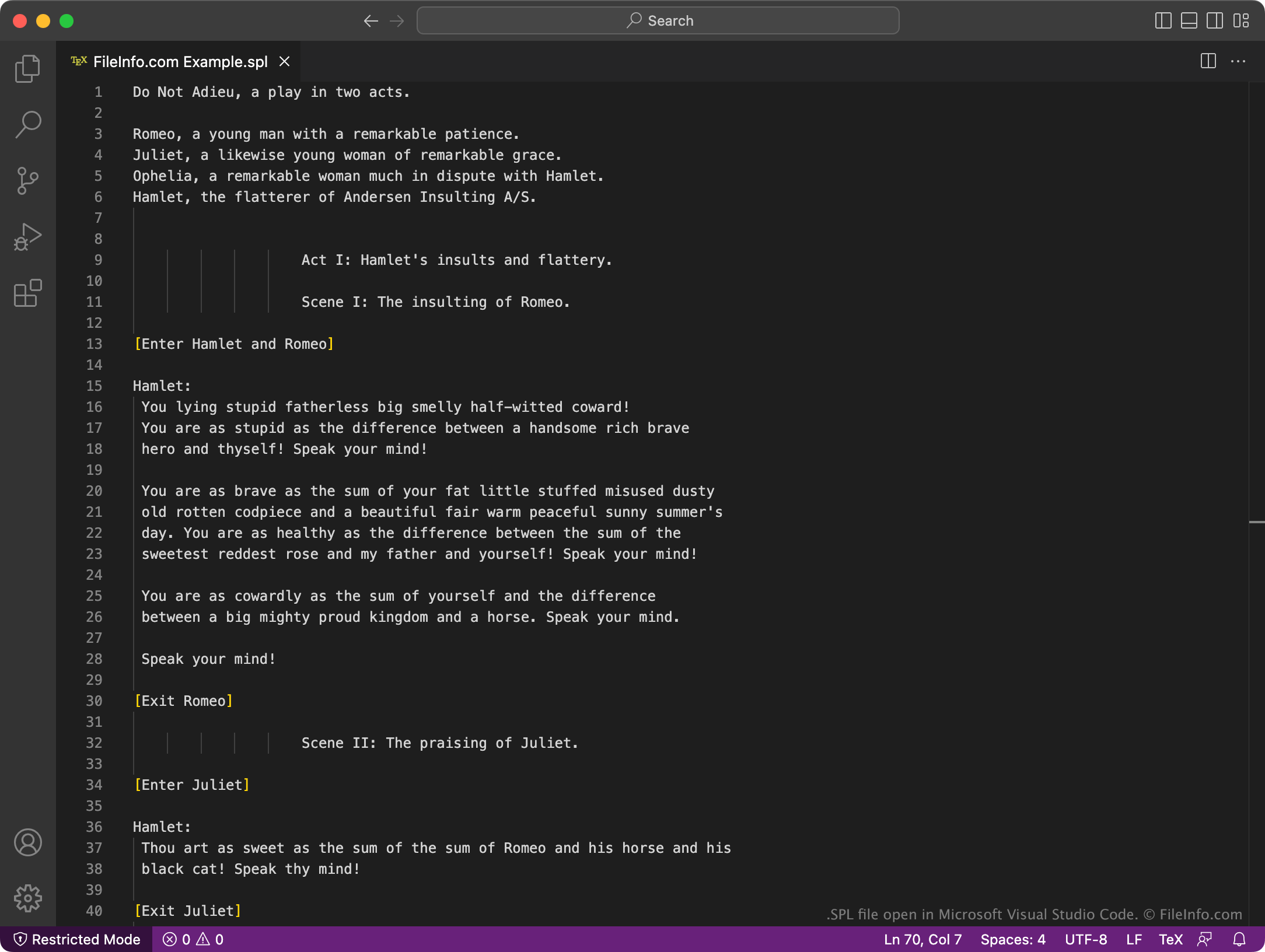
An SPL file contains a program written in the Shakespeare Programming Language (SPL). The program consists of source code that resembles the script of a play. It can be run with the shakespearelang interpreter.

Další informace

Snímek obrazovky souboru .spl v Microsoft Visual Studio Code
Soubor SPL otevřený v Microsoft Visual Studio Code

The Shakespeare Programming Language is an esoteric programming language whose structure is modeled after the Bard's plays. Each program contains characters, acts, scenes, actions, and dialogue that determines its output, by adding positive values to characters using positive nouns and adjectives and adding negative values to characters using negative nouns and adjectives.

For example, an SPL file might introduce Romeo and Juliet, have them enter a scene, speak, and exit the scene. When run using an SPL interpreter, this program would likely output a simple line of text.

Jak otevřít soubor SPL

You can open and edit an SPL file with Microsoft Visual Studio Code (multiplatform) or any other text editor. You can use the shakespearelang interpreter (multiplatform) to run the program an SPL file contains.

Programy, které otevírají soubory SPL

Vim Spelling Dictionary

Vývojář Neuvedeno
Popularita
2.0  |  1 Hlas
 

An SPL file is a spelling dictionary used by Vim, a popular Linux text editor. It contains a language-specific dictionary used to provide spell check functionality in Vim. SPL files are stored in Vim's ~/​vim/​runtime/​spell directory.

Další informace

Like many text editors, Vim (and its variants) contains spell check functionality that highlights users' spelling mistakes. To turn on spell check, Vim users must either enter the command setlocal spell in Vim's command line or add the set spell command to their .VIMRC file.

By default, Vim uses English spelling dictionary files, named en.characterset.spl, to check users' spelling. However, users can modify their VIMRC file's set spelllang setting to use other languages' spelling dictionaries. Vim contains over 100 SPL dictionaries, grouped into over 50 languages. In addition to these SPL files, Vim uses SUG and DIFF files to highlight misspelled words and show spelling suggestions.

Jak otevřít soubor SPL

Vim SPL files are not meant to be opened. If you want to use an SPL file as your Vim spelling dictionary, you can do so by:

  1. Opening your Vim VIMRC file.
  2. Updating the set spelllang setting to use your SPL file's language code. For example, if your SPL file is named fr.latin1.spl, update the setspelllang setting to read set spellang=fr

Programy, které otevírají nebo odkazují na soubory SPL

Windows
Zdarma
Mac
Zdarma
Zdarma
Linux
Zdarma

Ověřil FileInfo.com

Tým FileInfo.com nezávisle prozkoumal všechny formáty souborů a programy uvedené na této stránce. Naším cílem je 100% přesnost a zveřejňujeme pouze informace o typech souborů, které jsme ověřili.

Pokud chcete navrhnout doplnění nebo aktualizaci této stránky, dejte nám vědět.