.JAM Přípona souboru

Jam STAPL File

Vývojář Altera
Popularita
3.5  |  15 Hlasů
 

Co je soubor JAM?

A JAM file is a CAD file created in the Jam Standard Test and Programming Language (STAPL) format, a standard file format used for programming PLDs (Programmable Logic Devices). It includes the data and algorithm needed to program a PLD. JAM files enable vendor-specific programming requirements to be communicated to PLD programmers in a recognized format.

Další informace

JAM files are typically generated by a vendor-specific software program, referred to as the "Jam Composer." PLD vendors then distribute JAM files to customers (device programmers), who program and test a PLD using the "Jam Player." The Jam Player reads the JAM file and provides the facilities needed to program the device in a standard JTAG (Joint Test Action Group) chain. This process used to be carried out using separate command-line tools provided by Altera, but it is now encapsulated in Altera's Quartus design software.

POZNÁMKA: JAM files are stored in an ASCII text format. They can be compiled into .JBC byte-code files for a binary representation.

Otevřete více než 400 formátů souborů pomocí File Viewer Plus.Stáhnout zdarma

Programy, které otevírají soubory JAM

Windows
Kategorie: CAD
Aktualizováno: 2022-03-22

FigJam Board

Vývojář Figma
Popularita
4.3  |  4 Hlasů
 

A JAM file is a board created by the team-collaboration Figma app to organize ideas. It is saved in the proprietary FigJam (FIG) format, storing design elements that make up the whiteboard or diagram, including text, shapes, icons, images, sticky notes, and tables. Figma users save their boards as JAM files to preserve their ideas and then share them with other Figma users or export them to other formats, such as .JPG images or .PDF documents.

Další informace

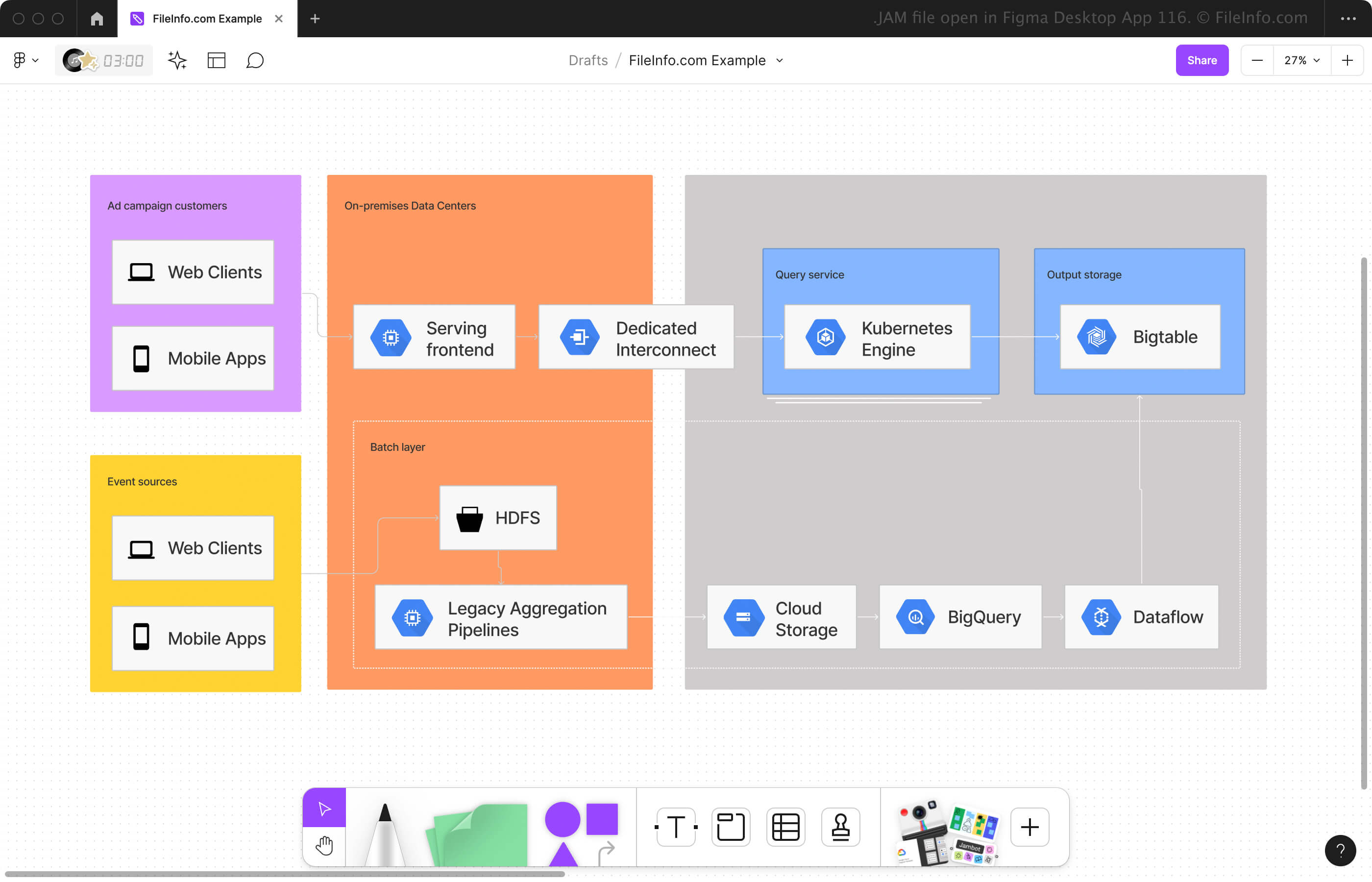
Snímek obrazovky souboru .jam v Figma Desktop App 116
Soubor JAM otevřený v Figma Desktop App 116

Figma is a two-pronged collaborative tool that provides the following workspaces:

  • FigJam - Create and share online whiteboards for meetings, brainstorming sessions, diagrams, and more.
  • Figma design - Mock up designs for websites, apps, digital products, and other types of user experiences.

Most users access Figma online in their web browsers, but they can also use the desktop app on Windows and macOS (an iOS version was available but is now discontinued). When creating a whiteboard in the FigJam workspace, you can add various design elements to organize and diagram your plans, ideas, etc., then save it to your online account or as a JAM file on your computer.

To save a JAM file with Figma in a web browser or desktop app, click the Figma icon in the upper-left corner and select File → Save local copy (the web browser automatically downloads the JAM file). You can also save your design to the version history associated with your online account by selecting Save to version history instead of Save local copy.

Jak otevřít soubor JAM

You can open a JAM file with Figma in a web browser or the Windows or macOS desktop app. For example, you can open a JAM file with the desktop version of Figma by selecting the Home icon in the upper-left corner and then clicking Import in the upper-right corner.

Jak převést soubor JAM

Figma can convert JAM files to various file types, including the following formats:

  • .JPG - JPEG Image
  • .PNG - Portable Network Graphic
  • .SVG - Scalable Vector Graphic
  • .CSV - Comma-Separated Values File
  • .PDF - Portable Document Format

To convert a JAM file in Figma's FigJam workspace, click the app icon in the upper-left corner, then select File → Export as.

Programy, které otevírají soubory JAM

Windows
Zdarma
Mac
Zdarma
Web
Zdarma
Kategorie: Různé
Aktualizováno: 2024-01-05

Line 6 Device Recording

Vývojář Line 6
Popularita
2.8  |  8 Hlasů
 

Audio recording or loop created with a Line 6 product such as the Spider Jam amp or JM4 Looper pedal; may include sounds for guitars, drums, and other instruments; can also include effects and other audio settings; used for saving loop audio on portable storage cards inserted in Line 6 devices.

Další informace

JAM files can be converted to .WAV files using the Jam2Wav program.

Programy, které otevírají nebo odkazují na soubory JAM

Windows
Zdarma
Mac
Zdarma
Kategorie: Zvuk
Aktualizováno: 2011-01-03

JAM Musical Score

Vývojář Pyva.net
Popularita
2.0  |  2 Hlasů
 

Musical score saved in a human-readable, text-based format; represents notes and chords using text descriptions, such as "G7," "Bdim," and "Fmaj7."

Další informace

JAM files can be played back in Pyva.net JAM using instrument voices from a software synthesizer. The data can also be output to a MIDI device. Since JAM files are text-based, they can be edited with a text editor.

JAM files can be used to play back audio samples, but do not contain actual audio data.

Programy, které otevírají soubory JAM

Windows
Pyva.net JAM
Kategorie: Zvuk
Aktualizováno: 2009-06-24

PS3 Unreal Tournament 3 Mod File

Vývojář Sony
Popularita
1.3  |  3 Hlasů
 

Modification or add-on for the Playstation 3 version of Unreal Tournament 3 (UT3); may contain modifications to the characters, objects, maps, or the gameplay itself; typically named "USERDATA.JAM."

Další informace

JAM files must be saved on a memory card or USB flash drive and transferred to a PS3 console in order to work. They are not meant to be used on a PC.

Programy, které otevírají nebo odkazují na soubory JAM

Windows
Transfer to a PlayStation 3
Kategorie: Hra
Aktualizováno: 2008-09-16

Ověřil FileInfo.com

Tým FileInfo.com nezávisle prozkoumal všechny formáty souborů a programy uvedené na této stránce. Naším cílem je 100% přesnost a zveřejňujeme pouze informace o typech souborů, které jsme ověřili.

Pokud chcete navrhnout doplnění nebo aktualizaci této stránky, dejte nám vědět.