

.IGQ Přípona souboru
Soubor fronty Indigo
| Vývojář | Glare Technologies |
| Popularita |
3,5 | 2 hlasy |
Co je soubor IGQ?
Soubor IGQ je soubor fronty vytvořený aplikacemi Indigo Renderer a Indigo RT, které se používají ke generování fotorealistických obrázků. Ukládá seznam jedné nebo více scén ve formátu Indigo Queue (IGQ), který určuje, jak aplikace vykreslí více scén. Soubory IGQ také obsahují nastavení procesu vykreslování včetně výstupních cest a nastavení ukončení pro snímky.
Další informace
Indigo Renderer a Indigo RT jsou multiplatformní aplikace pro 3D vykreslování, které používají především profesionální umělci k vytváření fotorealistických obrázků, například modelů budov nebo fantastických scén pro vědeckofantastický film. Indigo Renderer nabízí více funkcí než Indigo RT a je také dražší. Indigo Renderer je k dispozici jako samostatná aplikace nebo jako zásuvný modul pro jiné 3D CAD programy.
Soubor IGQ můžete vytvořit v aplikaci Indigo Renderer a uložit tak frontu pro sdílení s jiným uživatelem aplikace Indigo Renderer nebo pro pozdější použití. Soubor IGQ také umožňuje vykreslovat scény z projektů vytvořených v jiných aplikacích, například 3DS Max nebo iClone, ve kterých je nainstalován zásuvný modul Indigo Renderer. Projekt můžete exportovat do souboru IGQ snímek po snímku a Indigo pak vykreslí každý snímek samostatně. Vykreslené obrázky můžete následně spojit do animace.
Jak vytvořit soubor IGQ pomocí aplikace Indigo Renderer nebo Indigo RT
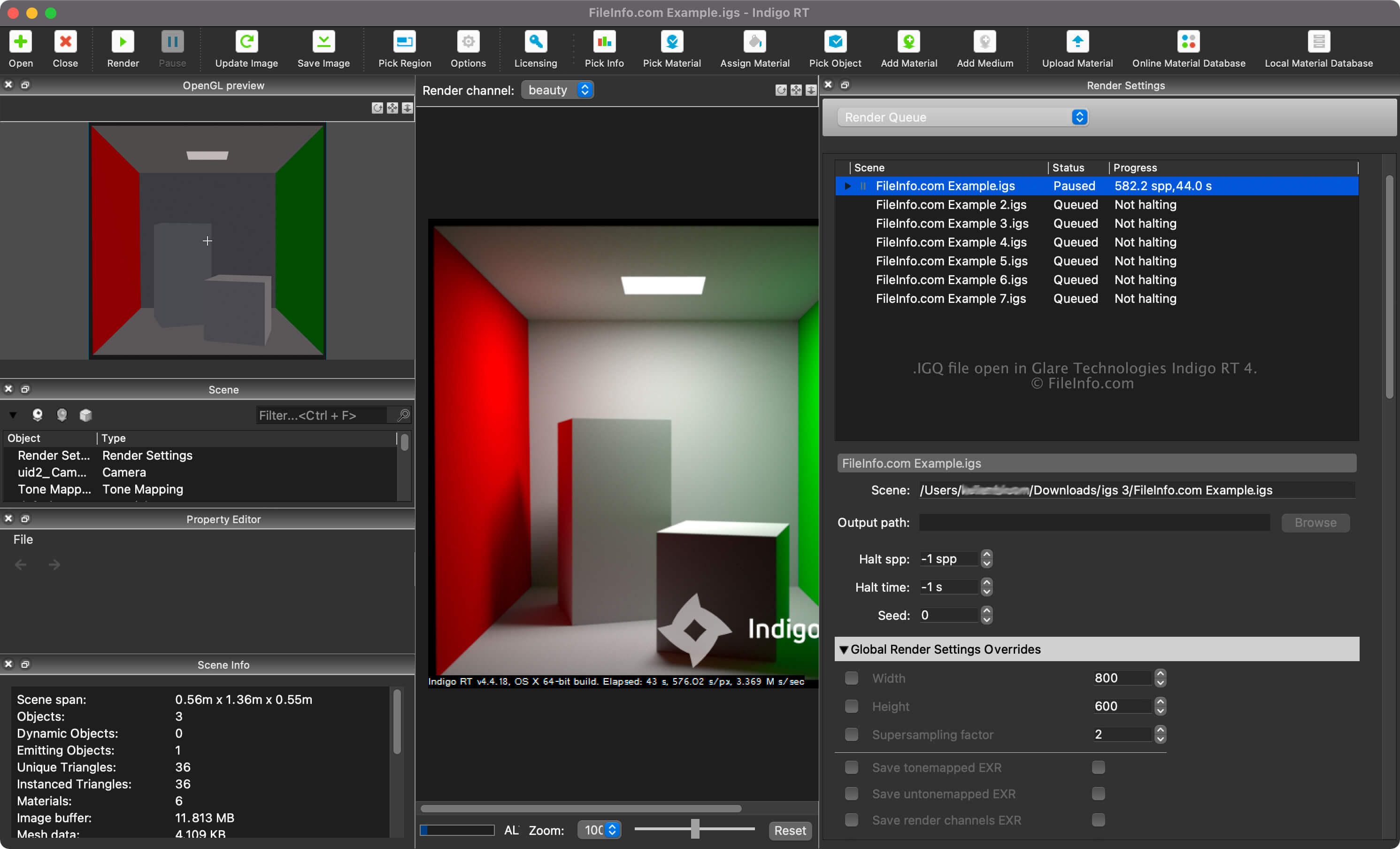
Frontu vykreslování svých scén můžete zobrazit výběrem možnosti "Render Queue" z rozbalovací nabídky v podokně "Render Settings". Ve frontě vykreslování můžete přidávat a odebírat scény a upravovat další nastavení, například cesty ke scénám a výstupům a nastavení ukončení.
Chcete-li vytvořit soubor IGQ pomocí aplikace Indigo Renderer nebo Indigo RT, vyberte možnost .
Cesty ke scénám a výstupům v souborech IGQ
Cesta ke scéně v souboru IGQ odkazuje na umístění souboru .IGS, ze kterého se scény vykreslují, zatímco výstupní cesta odkazuje na umístění, kam budou vytvořeny soubory (s největší pravděpodobností .PNG). Výstupní cesta může být relativní vzhledem k cestě ke scéně nebo absolutní.
Jak otevřít soubor IGQ
Soubor IGQ můžete otevřít pomocí aplikací Glare Technologies Indigo Renderer (multiplatformní) a Indigo RT (multiplatformní). Chcete-li soubor otevřít v aplikaci Indigo Renderer, vyberte možnost .
Po otevření souboru IGQ můžete zobrazit frontu vykreslování svých scén výběrem možnosti "Render Queue" z rozbalovací nabídky v podokně "Render Settings".