.ZIP 文件扩展名

2 种文件类型使用 .zip 扩展名。

Zipped File

开发者 Phil Katz
受欢迎程度
3.9  |  3001 
 

什么是 ZIP 文件?

A ZIP file is an archive that contains one or more files compressed or "zipped" with Zip compression. It stores files separately from each other, allowing the files to be compressed using different methods and extracted without compressing or decompressing the entire archive.

更多信息

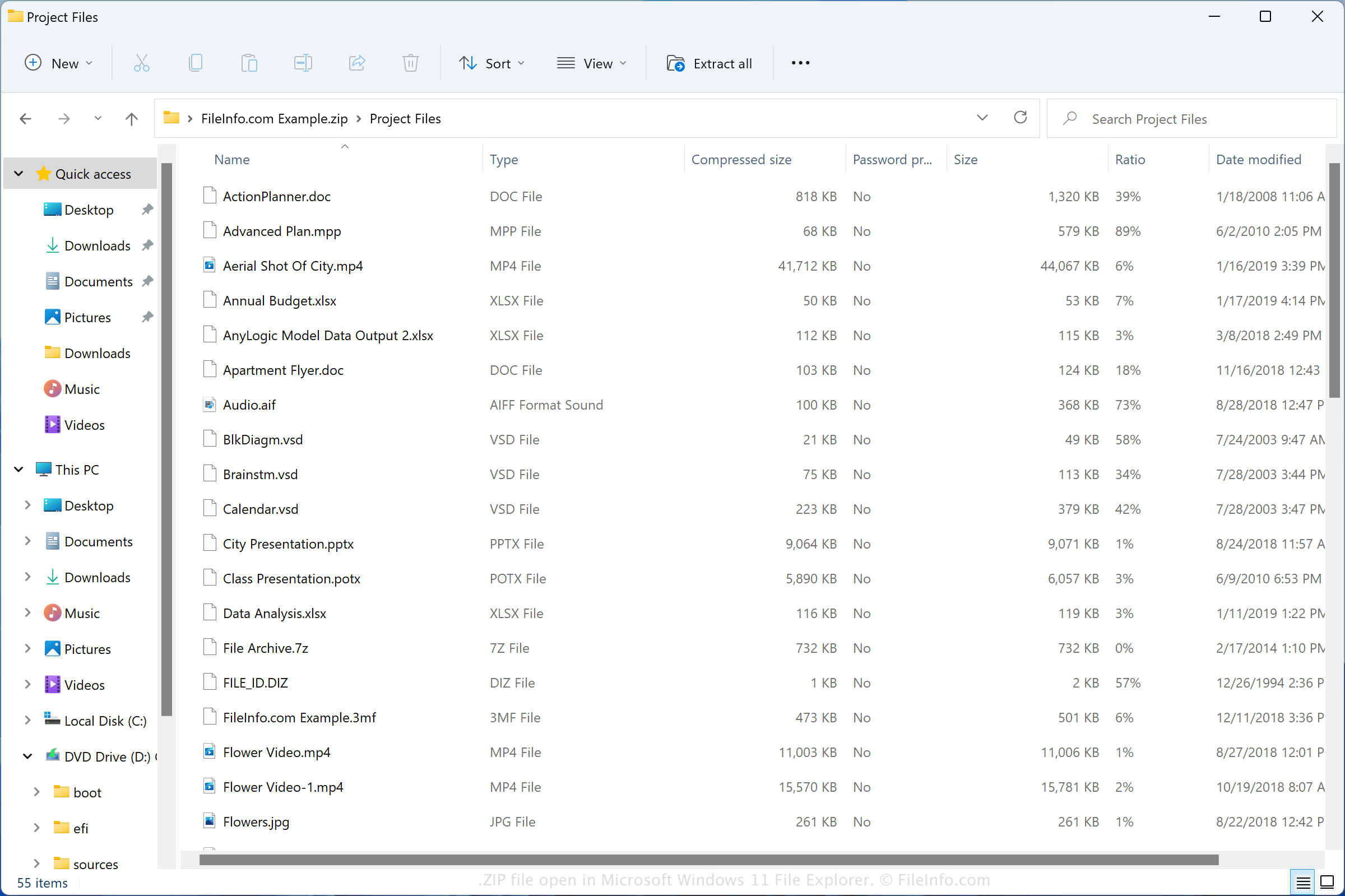
在 Microsoft Windows 11 File Explorer 中打开的 .zip 文件截图
在 Microsoft Windows 11 File Explorer 中打开的 ZIP 文件

The Zip format was created in 1989 by Phil Katz and was used in the PKZIP utility developed by PKWARE, Inc. The format grew in popularity and is now supported by most file compression/decompression programs.

You may encounter ZIP files in various ways, such as receiving compressed files via email from a friend or co-worker, downloading files online, or exploring backup files that have been compressed with Zip compression. Both Windows and macOS come with programs that can compress and decompress ZIP files.

How to create a ZIP file

Windows users can create ZIP archives by right-clicking a file and selecting Send to → Compressed (zipped) folder. macOS users can create ZIP archives by right-clicking a file and selecting Compress "[filename]".

常见 .ZIP 文件名

New Compressed (zipped) Folder.zip - The name Microsoft Windows gives to new ZIP files created via the context menu (right-click and choose New → Compressed (zipped) Folder).

如何打开 ZIP 文件

In Windows, you can open a ZIP file with File Explorer, also known as "Windows Explorer," simply by double-clicking the file. You can then choose one, multiple, or all of the files to extract from the Zip archive. In macOS, you can open a ZIP file with Apple Archive Utility by double-clicking the file.

You can also open ZIP files with other compression utilities, such as Corel WinZip (Windows), Corel WinZip Mac (macOS), RARLAB WinRAR (Windows), and 7-Zip (Windows).

如何转换 ZIP 文件

Many compression utilities, such as ConeXware PowerArchiver, Corel WinZip, and 7-Zip, can convert ZIP files by extracting their contents and then compressing them in a different archive format.

For example, the Windows version of PowerArchiver can extract the contents of a ZIP file, then compress them as various archive types, including the following formats:

  • .7Z - 7-Zip Compressed File
  • .TAR - Consolidated Unix File Archive
  • .CAB - Windows Cabinet File
  • .LZH - LZH Compressed File
  • .RAR - WinRAR Compressed Archive
  • .PA - PowerArchiver Compressed File
  • .BH - BlakHole Archive
使用File Viewer Plus打开并查看 .zip 文件。免费下载

可打开 ZIP 文件的程序

Windows
操作系统自带
免费试用
免费试用
免费
免费
Linux
免费
免费
免费
Chrome OS
操作系统自带
分类: 压缩
更新时间: 2022-12-12

MAME Game ROM

开发者 The MAME Team
受欢迎程度
3.4  |  276 
 

A ZIP file is a ROM used by MAME and other arcade video game emulators. It may contain the entire contents of an arcade game, or it may be supplemented by a .CHD (Compressed Hunks of Data) file. ZIP files are compressed using Zip compression.

更多信息

Video game system emulators like MAME (short for Multiple Arcade Machine Emulator) allow gamers to play classic video games on their PCs and mobile devices. MAME specializes in emulating arcade games, originally played in arcade cabinets.

Players distribute MAME ROMs, which contain the contents of an arcade game, as ZIP files. If the ROM was created from an arcade game stored on a chip, its entire contents may be stored in a ZIP file. If the ROM was created from an arcade game stored on a hard drive, it is likely split into a ZIP and CHD file. If the ROM is split into two files, you need both to open it in MAME.

如何打开 ZIP 文件

You can open a ZIP file in MAME (multiplatform) and related emulators. To open a ZIP file in MAME, place the file in MAME's Roms directory. If your ZIP file is paired with a CHD file, place the CHD file in a subdirectory named for your ZIP file (e.g. for a ZIP file named MyGame.zip, place your CHD file in Roms/​MyGame/​).

可打开 ZIP 文件的程序

Windows
免费
免费试用
免费
Mac
免费
免费
免费
免费
Linux
免费
免费
iOS
免费
Android
免费
分类: 游戏
更新时间: 2022-05-26

验证者 FileInfo.com

FileInfo.com 团队 独立研究了本页面列出的所有文件格式和软件程序。 我们的目标是达到 100% 的准确率,并且仅发布我们已验证过的文件类型信息。

如果您想为此页面提出新增或更新建议,请告诉我们