.RAW Extensão de arquivo

Raw Image Data

Desenvolvedor N/D
Popularidade
3.8  |  234 Votos
 
🔍Abra arquivos .RAW diretamente no seu navegador com File Helper.Ver on-line

O que é um arquivo RAW?

A RAW file is a photo created by a digital camera, such as a Panasonic, Leica, or Casio camera. It contains raw image data captured by a digital camera's CCD. Professional photographers often work with RAW files, since they can more accurately edit images stored in the RAW format.

Mais informações

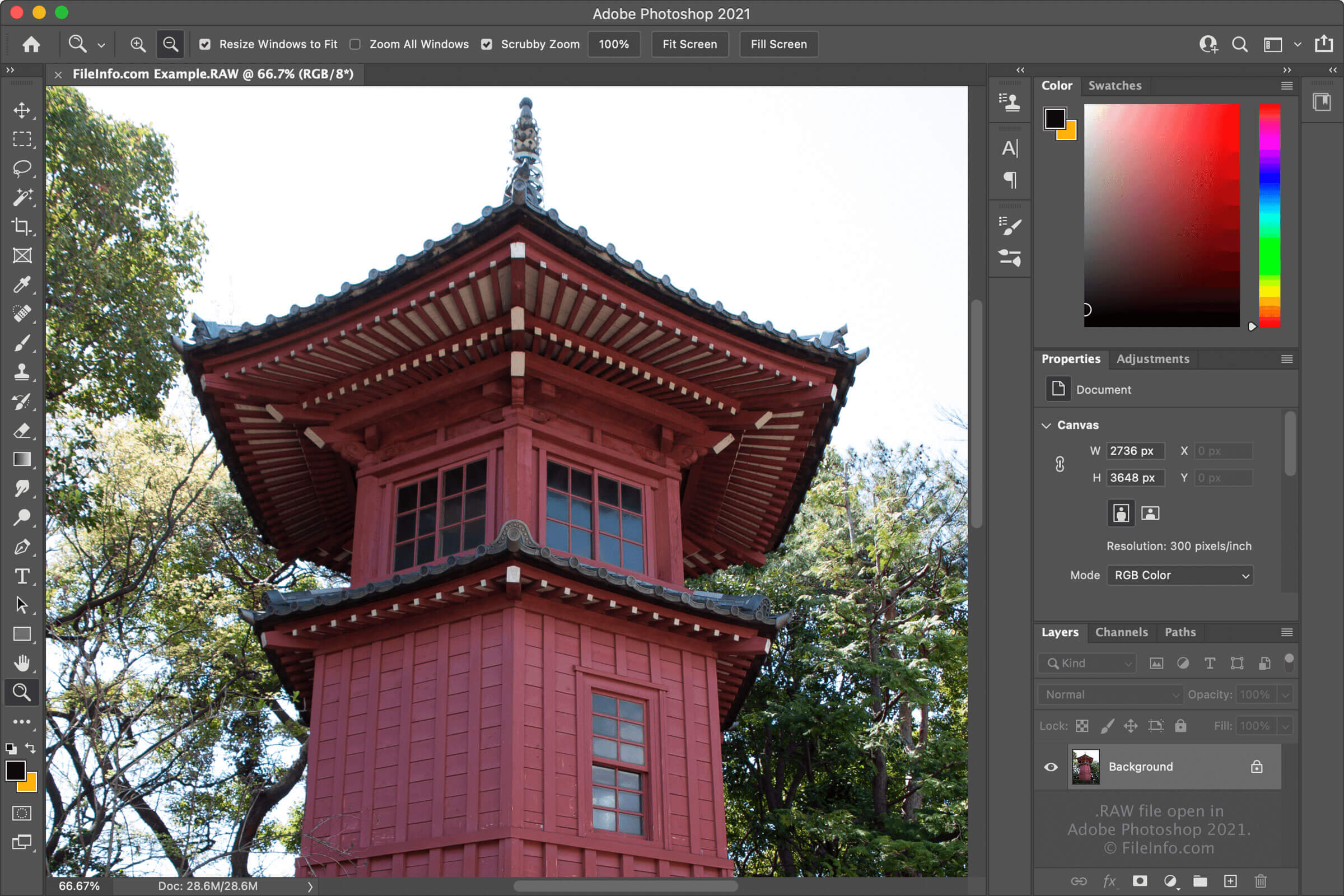
Captura de tela de um arquivo .raw em Adobe Photoshop 2021
Arquivo RAW aberto em Adobe Photoshop 2021

Because the images that RAW files contain are either uncompressed or losslessly-compressed, they are higher quality than lossy-compressed images, like .JPG and .PNG files. However, because RAW files retain all this image data, their file sizes are often quite large. This is the tradeoff between lower-quality, smaller images and higher-quality, larger images.

RAW files are one of many raw camera image formats. Some other common formats are Digital Negative Images (.DNG files), Canon Raw Images (.CR2 files), Sony Digital Camera Images (.ARW files), Kodak RAW Images (.DCR files), Nikon RAW Images (.NRW files), and Nikon Electronic Format Images (.NEF files).

NOTA: RAW files may also be created by image generation software instead of digital cameras, although this is not as common.

Como abrir um arquivo RAW

You can open RAW files with various image-editing and -viewing applications. Some options include Adobe Photoshop (Windows and macOS), Adobe Photoshop Elements (Windows and macOS), Corel PaintShop Pro (Windows), ACD Systems ACDSee (Windows), and RawTherapee (multiplatform).

Como converter um arquivo RAW

Many image editors, including Adobe Photoshop and Corel PaintShop Pro, can convert RAW files to other formats. For example, Photoshop can convert RAW files to the following formats (and several others):

  • .PNG - Portable Network Graphic
  • .JPEG - JPEG Image
  • .GIF - Graphical Interchange Format
  • .PSD - Adobe Photoshop Document
  • .BMP - Bitmap Image
  • .PCX - Paintbrush Bitmap Image
  • .TGA - Targa Graphic
  • .TIFF - Tagged Image File Format

Programas que abrem arquivos RAW

Windows
Incluído com o sistema operacional
Mac
Incluído com o sistema operacional
Linux
Grátis
Grátis
Web
Android

Dolphin Virtual SD Card

Desenvolvedor Dolphin Team
Popularidade
3.6  |  33 Votos
 

A RAW file is a virtual SD card created for use with the Dolphin video game console emulator. It contains data that would typically be stored on a Nintendo Wii's SD card, such as saved games. RAW files are typically named sd.raw.

Mais informações

Dolphin is a multiplatform program that allows gamers to play Nintendo GameCube and Wii video games on their PCs. It allows players to load game- and console-related data from, and save data to, many different types of files, including RAW files.

Each RAW file acts as a virtual Nintendo Wii SD card. Dolphin can load data from and save data to this file, just as a real Wii would load data from and save data to an SD card. For example, players can load saved games from an sd.raw file. They also can load data required by certain homebrew applications, which need an SD card (and data stored on that SD card) to function.

How to create an SD.RAW file

Gamers can use Dolphin itself or the Virtual SD Card Maker utility (multiplatform) to create an sd.raw file. For complete instructions, refer to Dolphin's documentation.

Nomes de arquivo .RAW comuns

sd.raw - The typical name assigned to Dolphin virtual SD cards.

Como abrir um arquivo RAW

To mount an sd.raw file in Dolphin (multiplatform):

  1. Open Dolphin and select Options → Configuration → Wii.
  2. In the SD Card Settings section, click the ... button that appears next to SD Card Path:.
  3. Navigate to and select your sd.raw file.

You can also use Dolphin to edit an sd.raw file's contents as though the file were an actual SD card. For more information, refer to Dolphin's documentation.

Programas que abrem ou fazem referência a arquivos RAW

Windows
Grátis
Mac
Grátis
Linux
Grátis
Categoria: Jogo
Atualizado: 2022-11-16

Raw Audio Data

Desenvolvedor N/D
Popularidade
3.4  |  29 Votos
 

A RAW file contains uncompressed digital audio created using Pulse-Code Modulation (PCM). This raw data is saved in a binary format. RAW files do not contain a file header or use an audio codec.

Mais informações

Because RAW files do not contain a file header, you may have trouble playing them in some media players. These media players require metadata that would typically be stored in an audio file's header to play audio correctly. Thus, they cannot play RAW files.

Many more-common types of audio files, including .WAV and .AIFF files, contain audio data created using Pulse-Code Modulation. However, these files contain a file header and use a recognized audio container format, allowing most popular media players to play them correctly.

Como abrir um arquivo RAW

You can open a RAW file with Audacity (multiplatform), MPlayer (multiplatform), or Adobe Audition (Windows, Mac).

Como converter um arquivo RAW

Audacity, Adobe Audition, and FMJ-Software Awave Studio can convert RAW files to other audio formats. For example, Audacity can convert RAW files to the following formats:

  • .AIFF - Audio Interchange File Format
  • .WAV - WAVE Audio
  • .OGG - Ogg Vorbis Audio
  • .FLAC - Free Lossless Audio Codec
  • .MP2 - MP2 Audio
  • .M4A - MPEG-4 Audio
  • .AC3 - Audio Codec 3
  • .AMR - Adaptive Multi-rate Codec
  • .OPUS - Opus Audio
  • .WMA - Windows Media Audio

Programas que abrem arquivos RAW

Windows
Grátis
Teste grátis
Grátis
Mac
Grátis
Teste grátis
Grátis
Linux
Grátis
Grátis
Categoria: Áudio
Atualizado: 2022-11-16

Fedora Linux Disk Image

Desenvolvedor The Fedora Project
Popularidade
3.5  |  4 Votos
 

A RAW file is a disk image used to install a Fedora Linux operating system. It contains a raw, binary copy of the operating system's data. RAW files are typically named for the operating system they are used to install and the architecture of the machine on which they are meant to be installed.

Mais informações

Fedora Linux is a popular Linux distribution. Users can install various versions of the operating system on PCs, servers, and other devices.

Users install Fedora Linux using disk images that contain a raw copy of the operating system. These images are saved in many formats, including .ISO, .QCOW2, and RAW.

RAW files' filenames include the operating system they are used to install and the architecture on which they are meant to be installed. For example, a RAW file named Fedora-Server-25-1.2.aarch64.raw contains a copy of the Fedora Server operating system that is meant to be installed on an AArch64 machine.

Como abrir um arquivo RAW

You can use a RAW disk image to install the Fedora Linux operating system it contains on an appropriate device. To do so, boot your device from a USB or other drive containing the RAW disk image.

Programas que abrem ou fazem referência a arquivos RAW

All Platforms
Boot your device from a drive containing the RAW file to install Fedora Linux

X-ray Diffractometer Results

Desenvolvedor N/D
Popularidade
2.7  |  3 Votos
 

A RAW file is a data file created by an X-ray diffractometer. It contains the results of an X-ray diffraction analysis, used to determine a material's composition and structure. Several companies' X-ray diffractometers save results as RAW files.

Mais informações

An X-ray diffractometer shoots X-rays at a material and measures the resulting scattering pattern to determine the material's structure. Various scientists, including material scientists and structural biologists, use diffractometers to analyze materials' composition.

After performing a diffractometer analysis, scientists can often save the results of that analysis as a file. Several models of X-ray diffractometers, including devices produced by Siemens, Bruker, DiffracPlus, STOE, and MAC Science, save analysis results as RAW files. Scientists can use various programs and utilities to open these files, analyze the results they contain (usually shown as a spectrum and graph), and convert them to other formats.

Como abrir um arquivo RAW

You can open RAW files with ICDD JADE Pattern Converter (Web), PowDLL (Windows), MacDiff (Mac), and other X-ray diffractometer results analysis and conversion utilities. Note that, because different diffractometers save results differently, these programs may be able to open some types of RAW files but not others.

Como converter um arquivo RAW

You can use ICDD JADE Pattern Converter (Web), PowDLL (Windows), and MacDiff (Mac) to convert RAW files to other X-ray diffractometer results formats and, often, the .TXT format.

Programas que abrem arquivos RAW

Windows
Grátis
Mac
MacDiff  —  Descontinuado
Grátis
Categoria: Dados
Atualizado: 2023-04-13

Verificado por FileInfo.com

A equipe do FileInfo.com pesquisou de forma independente todos os formatos de arquivo e programas listados nesta página. Nosso objetivo é 100% de precisão, e só publicamos informações sobre tipos de arquivo que verificamos.

Se quiser sugerir adições ou atualizações a esta página, avise-nos.