

.PXD Extensão de arquivo
Imagem do Pixelmator Pro
| Desenvolvedor | Pixelmator Team |
| Popularidade |
4,4 | 5 Votos |
O que é um arquivo PXD?
Um arquivo PXD é um arquivo de imagem criado pelo Pixelmator Pro, um programa profissional de edição de imagens. Esse é o formato nativo para salvar imagens no Pixelmator Pro e inclui camadas de imagem, ajustes, efeitos e outras edições feitas na imagem. Somente o Pixelmator Pro pode abrir arquivos PXD; o Pixelmator Classic e o Pixelmator para iOS não são compatíveis com o formato.
Mais informações
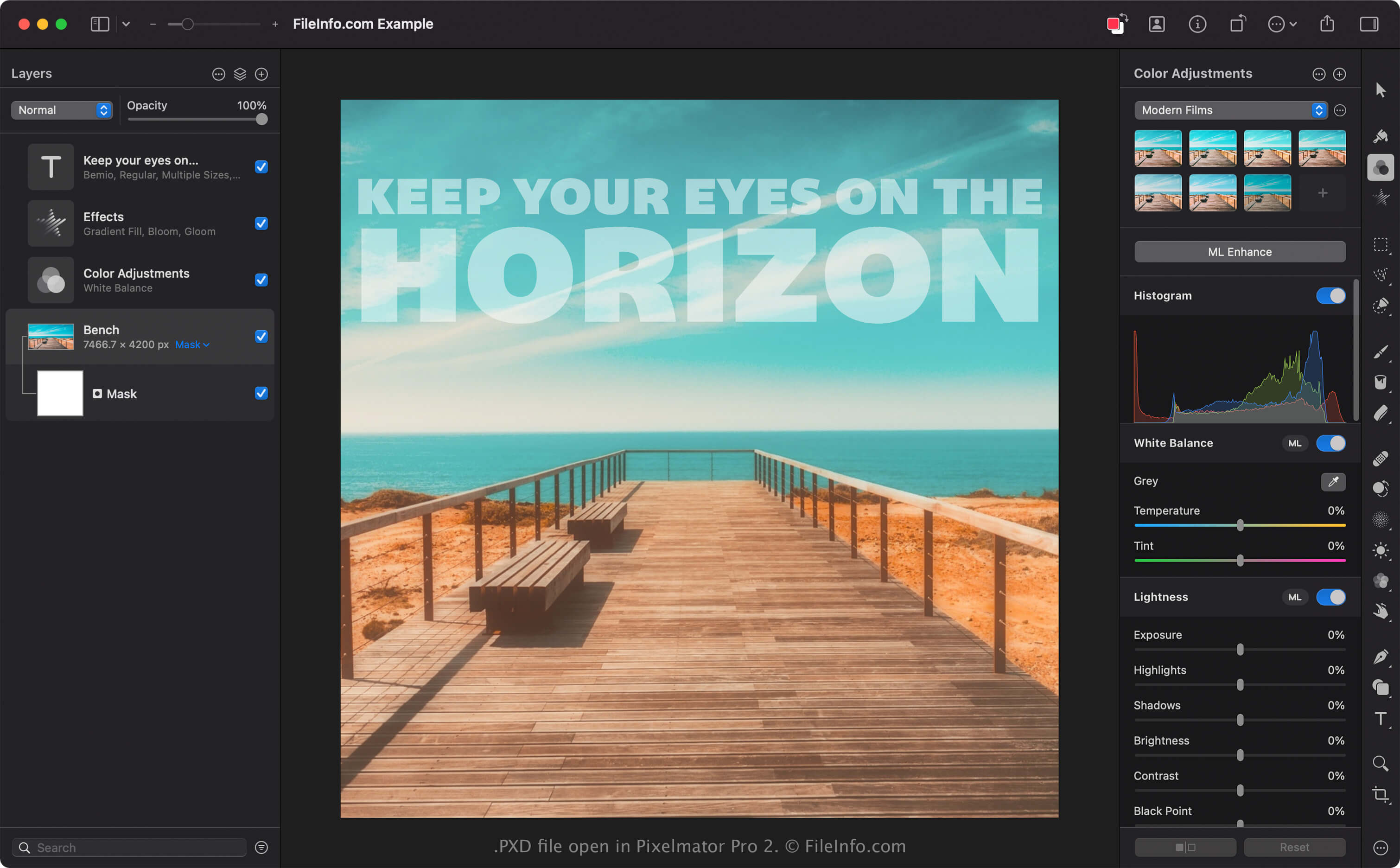
O Pixelmator Pro é uma alternativa ao Adobe Photoshop que permite que fotógrafos e designers gráficos façam edições não destrutivas baseadas em camadas em suas imagens. Você pode editar imagens, adicionar elementos de design gráfico, remover imperfeições indesejadas e até mesmo criar e desenhar imagens do zero com o Pixelmator Pro.
Quando você salva uma imagem com o Pixelmator Pro, o aplicativo a salva como um arquivo PXD. Os arquivos PXD não armazenam apenas dados de imagem, mas também contêm um registro das edições aplicadas à imagem. Você pode salvar, fechar e reabrir uma imagem e continuar ajustando edições anteriores. Por exemplo, se você adicionar uma camada de texto a uma imagem antes de salvá-la como um arquivo PXD e fechar o Pixelmator Pro, ainda poderá ajustar essa camada depois de reabrir o arquivo PXD.
Como abrir um arquivo PXD
Você pode abrir um arquivo PXD com o Pixelmator Pro no macOS. Para abrir um arquivo PXD com o Pixelmator Pro, selecione .
O formato PXD é semelhante, mas não igual, ao formato .PXM usado pelo Pixelmator Classic e pelo Pixelmator para iOS. É importante observar que não é possível abrir um arquivo PXD no Pixelmator Classic ou no Pixelmator para iOS. Você só pode abrir um arquivo PXD no Pixelmator Pro.
Como converter um arquivo PXD
O Pixelmator Pro pode converter arquivos PXD para vários tipos de arquivo, incluindo os seguintes formatos:
Programas que abrem arquivos PXD
Imagem em camadas do Pixlr
| Desenvolvedor | Inmagine |
| Popularidade |
3,2 | 14 Votos |
Um arquivo PXD é uma imagem baseada em camadas criada pelos editores de imagem Pixlr X ou Pixlr E. Ele contém alguma combinação de camadas de imagem, texto, ajuste, filtro e máscara. Os arquivos PXD são semelhantes aos arquivos .PSD usados pelo Adobe Photoshop, mas só podem ser abertos no Pixlr.
Mais informações

O Pixlr é um conjunto de aplicativos de edição de imagens principalmente baseado na web que designers gráficos e fotógrafos usam para criar e editar imagens. O Pixlr é semelhante ao Adobe Photoshop, exceto pelo fato de que a versão web do Pixlr funciona inteiramente no navegador da web do usuário.
Se um usuário quisesse salvar um projeto de edição do Pixlr em andamento no PC ou dispositivo móvel, anteriormente ele poderia salvar o projeto como um arquivo PXD. Os arquivos PXD preservam as edições baseadas em camadas que um usuário fez em uma imagem, para que ele possa continuar ajustando as camadas da imagem conforme necessário. Em contraste, salvar uma imagem do Pixlr como um arquivo .JPG, .PNG ou .WEBP achata a imagem em uma única camada.
Em 2021, o formato de arquivo .PXZ substituiu o formato de arquivo PXD, e o Pixlr passou a salvar os projetos dos usuários como arquivos PXZ. No entanto, os usuários do Pixlr ainda podem abrir arquivos PXD criados anteriormente no Pixlr.
NOTA: A Autodesk adquiriu o Pixlr em 2011, e a Inmagine adquiriu o Pixlr da Autodesk em 2017.
Como abrir um arquivo PXD
Você pode abrir um arquivo PXD no Pixlr X ou Pixlr E (Web, Windows, Mac). Para abrir um arquivo PXD na versão web do Pixlr X ou Pixlr E:
- No navegador da web, acesse https://pixlr.com e selecione ou na barra de menu do site. Editores de imagens iniciantes devem selecionar , enquanto editores experientes devem selecionar .
- Selecione .
- Navegue até o arquivo PXD e abra-o.