

.WEBMANIFEST Rozszerzenie pliku
Manifest progresywnej aplikacji internetowej
| Deweloper | W3C |
| Popularność |
3,8 | 6 Głosów |
Czym jest plik WEBMANIFEST?
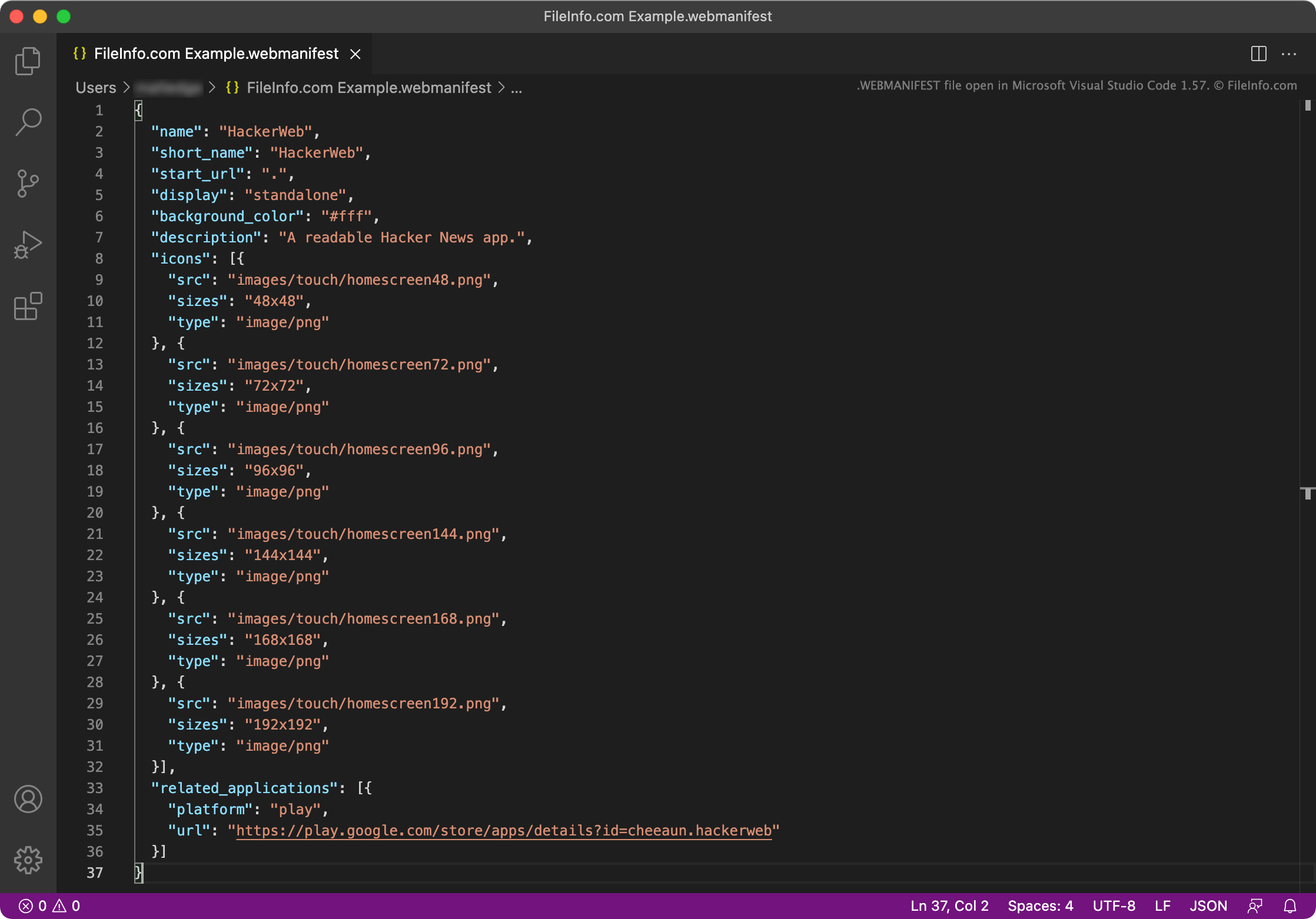
Plik WEBMANIFEST to plik metadanych używany przez progresywną aplikację internetową (PWA). Zawiera informacje o nazwie PWA, początkowym adresie URL, opisie, ustawieniach ekranu powitalnego, ikonach i domyślnej orientacji, a także o wielu innych ustawieniach. Pliki WEBMANIFEST składają się z obiektów JSON.
Więcej informacji
PWA to aplikacje internetowe, które można zainstalować na urządzeniu, zwykle na pulpicie urządzenia lub ekranie głównym. Dzięki temu użytkownicy mogą korzystać z aplikacji internetowej tak, jak z natywnej aplikacji systemu operacyjnego.
Na przykład w Google Chrome użytkownicy mogą przejść do witryny app.starbucks.com, otworzyć menu Ustawienia Google Chrome, a następnie wybrać opcję , aby zainstalować PWA Starbucks. Spowoduje to utworzenie aplikacji Starbucks, którą użytkownicy mogą otwierać i używać do składania zamówień za pośrednictwem witryny app.starbucks.com.
Każda PWA zawiera plik WEBMANIFEST, czyli plik JSON określający nazwę aplikacji, początkowy adres URL (adres URL używany do wczytania głównego ekranu aplikacji), ikony aplikacji oraz wiele innych ustawień. Każdy plik WEBMANIFEST może zawierać następujące obiekty JSON:
- background_color: Określa kolor tła ekranu wczytywania PWA
- categories: Określa kategorię lub kategorie, do których należy PWA
- description: Wyjaśnia przeznaczenie aplikacji
- dir: Określa domyślny kierunek wyświetlania tekstu przez PWA (od lewej do prawej lub od prawej do lewej)
- display: Określa preferowany tryb wyświetlania PWA; można ustawić wartość fullscreen, standalone, minimal-ui lub browser
- iarc_rating_id: Zawiera kod certyfikatu International Age Rating Coalition dla PWA
- icons: Określa obrazy używane jako ikony PWA
- lang: Określa główny język PWA
- name: Określa nazwę PWA
- orientation Określa domyślną orientację PWA; można ustawić wartość any, natural, landscape, landscape-primary, landscape-secondary, portrait, portrait-primary lub portrait-secondary
- prefer_related_applications: Określa, czy aplikacja/aplikacje wymienione w obiekcie related_applications powinny być preferowane i otwierane zamiast PWA
- protocol_handlers: Zawiera listę protokołów, które PWA może rejestrować i obsługiwać
- related_applications: Zawiera listę natywnych aplikacji, które system operacyjny może uruchomić zamiast PWA
- scope: Ogranicza strony internetowe, które można wyświetlać w PWA
- screenshots: Określa obrazy używane jako zrzuty ekranu PWA w sklepach z PWA
- short_name: Określa krótką nazwę PWA na wypadek, gdy nie można wyświetlić pełnej nazwy
- shortcuts: Określa adresy URL używane jako odnośniki do kluczowych zadań lub stron zawartych w PWA; służy do tworzenia menu kontekstowego
- start_url: Adres URL, który zostanie domyślnie wczytany po otwarciu PWA przez użytkownika
- theme_color: Określa domyślny kolor motywu PWA
Większość plików WEBMANIFEST zawiera tylko niektóre z powyższych ustawień. Deweloperzy zwykle umieszczają odwołanie do plików WEBMANIFEST w głównym pliku .HTML PWA.
Jak otworzyć plik WEBMANIFEST
Plik WEBMANIFEST można otwierać i edytować w dowolnym edytorze tekstu lub kodu źródłowego, w tym w programach Microsoft Visual Studio Code (wieloplatformowym), GitHub Atom (wieloplatformowym), Microsoft Notepad (Windows), Apple TextEdit (Mac) lub Vim (Linux).