

.CODE-WORKSPACE 파일 확장자
Microsoft Visual Studio Code 다중 루트 작업 영역
| 개발사 | Microsoft |
| 인기도 |
4.0 | 2 표 |
CODE-WORKSPACE 파일이란 무엇인가요?
CODE-WORKSPACE 파일은 Microsoft Visual Studio Code에서 만든 다중 루트 작업 영역입니다. 이 파일에는 Visual Studio Code 작업 영역에 포함된 루트 폴더에 대한 참조가 들어 있습니다. CODE-WORKSPACE 파일은 Visual Studio Code의 메뉴 모음에서 를 선택하여 만듭니다.
추가 정보
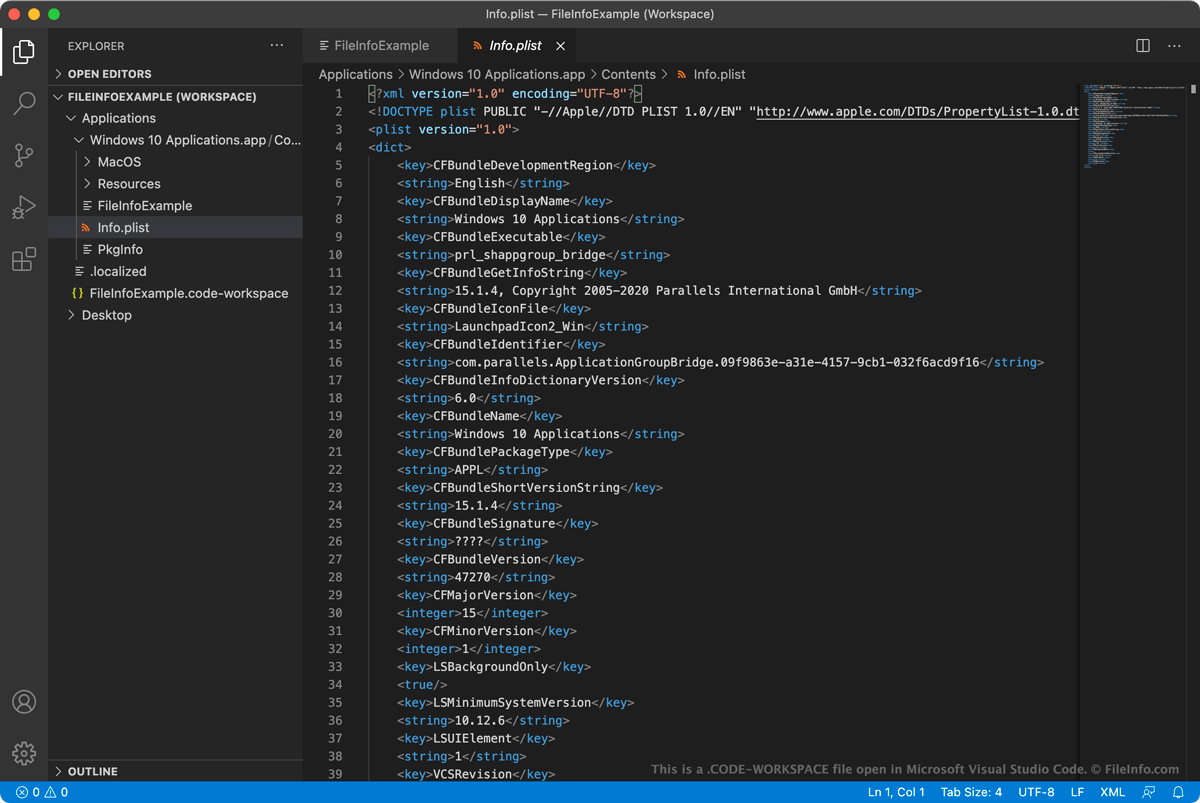
Microsoft Visual Studio Code(VS Code)는 개발자가 애플리케이션을 개발하고 디버깅하는 데 사용할 수 있는 오픈 소스 크로스 플랫폼 코드 편집기입니다. 개발자가 VS Code에서 여러 관련 프로젝트를 동시에 작업하려는 경우, 이러한 프로젝트를 다중 루트 작업 영역으로 그룹화할 수 있습니다. 이렇게 하면 각 프로젝트를 별도의 VS Code 인스턴스에서 여는 대신 VS Code의 EXPLORER 사이드바를 사용하여 관련 프로젝트를 열고 전환할 수 있습니다.
예를 들어 애플리케이션의 소스 코드와 해당 문서를 동시에 열고 편집하려는 개발자는 두 프로젝트를 모두 다중 루트 작업 영역에 추가할 수 있습니다. 그러면 개발자는 애플리케이션의 소스 코드를 업데이트하면서 해당 코드 변경 사항이 반영되도록 애플리케이션 문서도 업데이트할 수 있습니다.
사용자가 다중 루트 작업 영역을 저장하면(VS Code의 메뉴 모음에서 를 선택하여), 작업 영역은 CODE-WORKSPACE 파일로 저장됩니다. 이 파일은 작업 영역에 포함된 루트 디렉터리 목록이 들어 있는 JSON 파일입니다. 사용자가 작업 영역을 불러오면 VS Code는 이러한 참조를 사용하여 EXPLORER 사이드바에 표시할 폴더를 결정합니다.
Visual Studio Code 작업 영역에 폴더를 추가하려면 어떻게 하나요?
Visual Studio Code 작업 영역에 폴더를 추가하려면:
- Visual Studio Code의 메뉴 모음에서 를 선택합니다.
- 나타나는 창에서 추가하려는 폴더로 이동한 다음 를 선택합니다.
그러면 폴더가 Visual Studio Code 작업 영역에 추가됩니다.
CODE-WORKSPACE 파일을 여는 방법
CODE-WORKSPACE 파일을 사용하면 Microsoft Visual Studio Code(크로스 플랫폼)에서 다중 루트 작업 영역을 열 수 있습니다. 방법은 다음과 같습니다.
- VS Code의 메뉴 모음에서 를 선택합니다.
- CODE-WORKSPACE 파일을 선택하고 을 선택합니다.
그러면 CODE-WORKSPACE 파일이 참조하는 폴더가 VS Code의 EXPLORER 사이드바에 표시됩니다.
CODE-WORKSPACE 파일에 들어 있는 JSON 형식의 텍스트를 보려는 경우, 아무 텍스트 편집기에서나 파일을 열 수 있습니다. 예를 들어 VS Code에서 CODE-WORKSPACE 파일을 열지 못하는 경우 이렇게 할 수 있습니다.