.STATE ファイル拡張子

2個のファイルタイプ.state拡張子を使用しています。

RetroArch Game Save State

開発元 libretro
人気度
3.9  |  7 
 

STATEファイルとは?

A STATE file is a save state created by RetroArch, a cross-platform video game console emulator. It contains data that allows a player to resume an in-progress, emulated game. While STATE files save users' progress, they are different than .SAV files. STATE files can be opened only in RetroArch.

詳細情報

Nostalgic gamers can use a variety of video game console emulators to play old games on their PCs and other devices. RetroArch is one such emulator. When a gamer wants to save their progress while playing a game in RetroArch, they do so by creating a save state. A save state is a snapshot of a gamer's current game state, and it is saved in a STATE file. Most often, gamers create STATE files when they are about to quit an in-progress game, so they can resume the game at a later time.

Notably, RetroArch users can save different game states to different state slots within the same STATE file. This allows players to create multiple game saves and resume their progress from different points within a game. Players can select different state slots when saving or loading game states from RetroArch's quick menu.

While all video game emulators allow users to save in-progress games, most use different game save formats. For example, some Nintendo console emulators create SAV files that represent saved games. RetroArch is the only emulator that creates and loads STATE files.

注: RetroArch users can check where their STATE files are stored by selecting Settings → Directory from RetroArch's main menu.

STATEファイルの開き方

You can open a STATE file in RetroArch (cross-platform). To do so, you must:

  1. Possess both RetroArch and a .ROM file that contains the game your STATE file was created from.
  2. Move your STATE file to RetroArch's saves directory (or whatever directory your version of RetroArch stores STATE files in).
  3. Open your ROM in RetroArch.
  4. Pause your game and select Load State from RetroArch's quick menu.

Because RetroArch can save different game states in different state slots, you may have to change the state slot RetroArch loads data from to access a specific game state saved within your STATE file.

File Viewer Plusで400種類以上のファイル形式を開けます。無料ダウンロード

STATEファイルを開くプログラム

Windows
無料
Mac
無料
Linux
無料
カテゴリ: ゲーム
更新日: 2021-01-18

Luminar Edit Log File

開発元 Skylum Software
人気度
2.0  |  1 
 

A STATE file is an XML file created by Luminar 4, a digital photo-editing application. It contains a record of the layer-based edits a photographer has applied to a photo within Luminar 4. STATE files are stored in the History folder found within a Luminar catalog.

詳細情報

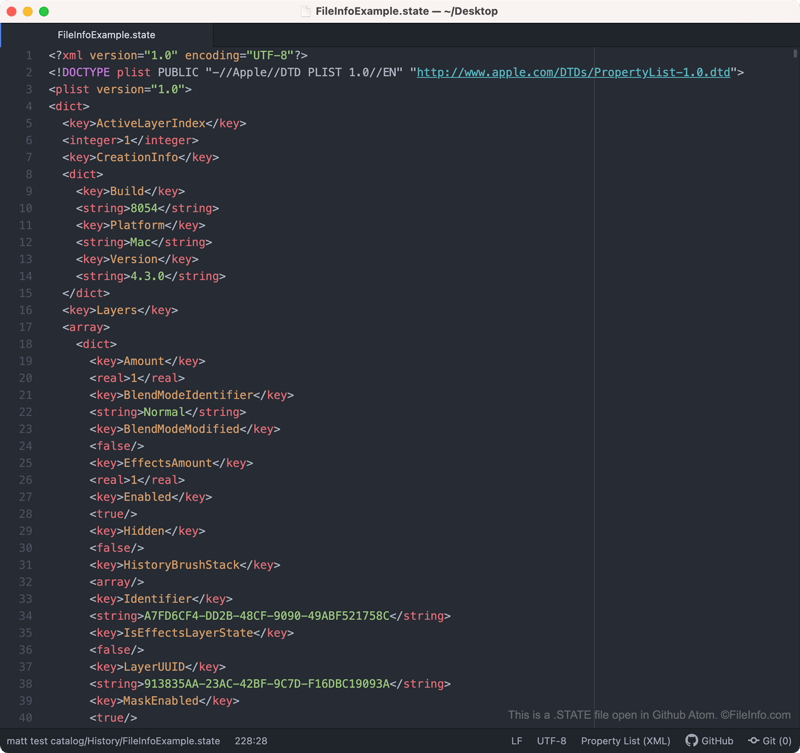
Github Atomで開いた.stateファイルのスクリーンショット
Github Atomで開いたSTATEファイル

Luminar is a digital photo-editing application that allows photographers to make layer-based edits to their photos. In Luminar 4, edited photos and a record of the edits made to those photos are saved in Luminar catalogs. The photos are saved as .TIFF files, and each photo's edit record is saved within numerous STATE files.

Each STATE file contains a record of the edits made to a photo up to a certain point. Each time you make an additional edit to a photo, Luminar 4 creates a new STATE file to record that edit (as well as all previous edits). As such, you will usually find many STATE files saved within each Luminar catalog.

STATEファイルの開き方

Luminar STATE files are not meant to be opened. However, if you want to view the XML that a STATE file contains, you can open it in any text editor, such as Microsoft Notepad, Apple TextEdit, or Github Atom.

STATEファイルを開く、または参照するプログラム

Windows
無料体験版
Mac
無料体験版
Linux
カテゴリ: データ
更新日: 2020-11-16

検証者 FileInfo.com

FileInfo.comチーム は、このページに掲載されているすべてのファイル形式とソフトウェアについて独自に調査しました。 私たちの目標は100%の正確性であり、検証済みのファイルタイプに関する情報のみを公開しています。

このページへの追加や更新をご提案いただける場合は、お知らせください。