
.MC File Extension

Molecular Constructor Molecule File

Developer Alexander Teplukhin
Popularity
4.0  |  3 Votes
 

What is an MC file?

An MC file is a 3D model created by Molecular Constructor, a free molecule building program. It is a plain text file that specifies atoms' positions and bonds within a molecule and, when loaded in Molecular Constructor, is used to show the molecule in 3D. Currently, MC files are created and used by only the mobile versions of Molecular Constructor. However, the program's developers say the desktop version of Molecular Constructor will soon support MC files.

More Information
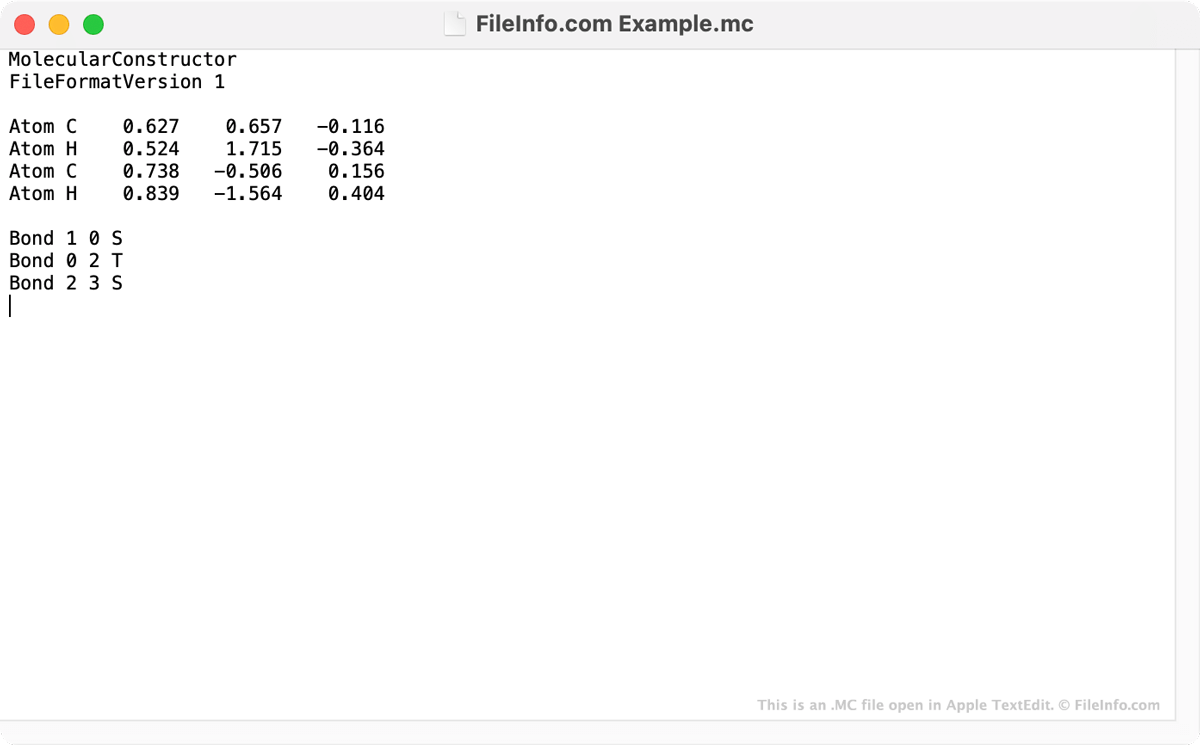
Screenshot of a .mc file in Apple TextEdit
MC file open in Apple TextEdit

Molecular Constructor is a 3D molecule builder that allows users to design molecules and optimize their geometry. In the mobile versions of Molecular Constructor, users' molecules are saved as MC files. While MC files are used to show 3D images in Molecular Constructor, the files are actually text files. When you open an MC file in a text editor, such as Microsoft Notepad, Apple TextEdit, or GitHub Atom, you can read the coordinates of each atom a Molecular Constructor molecule includes. You can also see the bonds the molecule includes.

Mobile Molecular Constructor users can use the program's File → Save feature to save their molecules as MC files and share them with other users. MC files can be opened in both the Android and iOS versions of Molecular Constructor and, according to the program's developers, will soon be supported in the program's Windows desktop version.

How to open an MC file

You can open an MC file in the Android and iOS versions of Molecular Constructor. To do so, open the app and select File → Browse. Then, find and open your MC file.

If you do not have access to the Android or iOS version of Molecular Constructor, you can open an MC file in any text editor to view the text it contains.

Open over 400 file formats with File Viewer Plus.Free Download

Programs that open MC files

Windows
Included with OS
Mac
Included with OS
Linux
Free
Android
Chrome OS
Included with OS

Macrocell Pattern

Developer N/A
Popularity
2.0  |  1 Vote
 

An MC file may also be a pattern file used by Conway’s Game of Life to store very large or complex patterns. It stores data in the Macrocell (MC) format, which saves cell-state patterns as reusable blocks rather than listing every cell, making the file much smaller and faster to load than simpler Life (.LIF) formats.

More Information

The Macrocell format was designed for performance and scalability, especially when working with patterns that contain repeating structures or vast empty areas. Instead of explicitly storing each live cell, an MC file defines blocks that can reference other blocks, creating a tree-like structure.

Simulation software expands these blocks dynamically as needed during viewing or simulation. This makes the format well-suited for large Life patterns, such as spaceships, oscillators, breeders, and engineered constructions, which would be difficult to store in simpler formats.

NOTE: Compared to older formats, such as LIF or .RLE, Macrocell is designed for speed and memory efficiency rather than human readability.

How to open an MC file

You can open MC files with Golly, a popular open-source cellular automaton simulator. The simulator provides native support for the Macrocell format and allows users to view, edit, and simulate patterns interactively.

Programs that open MC files

Windows
Free
Mac
Free

Verified by FileInfo.com

The FileInfo.com team has independently researched all file formats and software programs listed on this page. Our goal is 100% accuracy and we only publish information about file types that we have verified.

If you would like to suggest any additions or updates to this page, please let us know.