.MC 文件扩展名

Molecular Constructor Molecule File

开发者 Alexander Teplukhin
受欢迎程度
3.8  |  4 
 

什么是 MC 文件?

An MC file is a 3D model created by Molecular Constructor, a free molecule building program. It is a plain text file that specifies atoms' positions and bonds within a molecule and, when loaded in Molecular Constructor, is used to show the molecule in 3D. Currently, MC files are created and used by only the mobile versions of Molecular Constructor. However, the program's developers say the desktop version of Molecular Constructor will soon support MC files.

更多信息

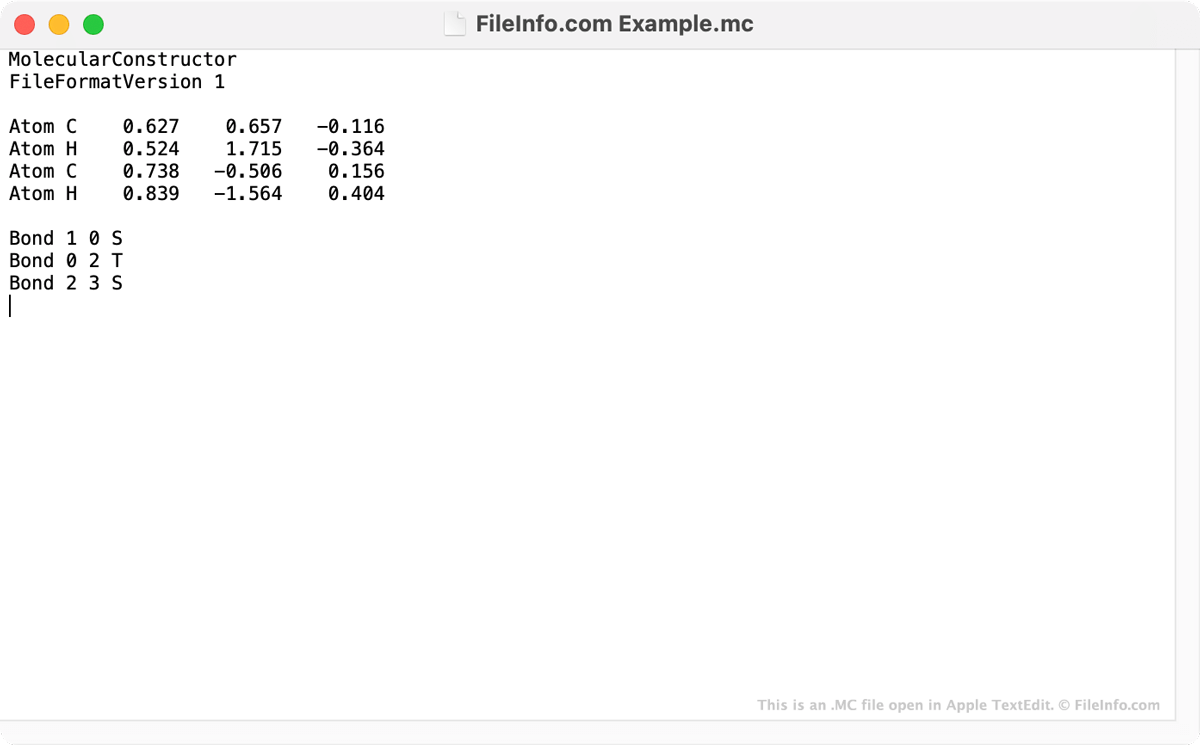
在 Apple TextEdit 中打开的 .mc 文件截图
在 Apple TextEdit 中打开的 MC 文件

Molecular Constructor is a 3D molecule builder that allows users to design molecules and optimize their geometry. In the mobile versions of Molecular Constructor, users' molecules are saved as MC files. While MC files are used to show 3D images in Molecular Constructor, the files are actually text files. When you open an MC file in a text editor, such as Microsoft Notepad, Apple TextEdit, or GitHub Atom, you can read the coordinates of each atom a Molecular Constructor molecule includes. You can also see the bonds the molecule includes.

Mobile Molecular Constructor users can use the program's File → Save feature to save their molecules as MC files and share them with other users. MC files can be opened in both the Android and iOS versions of Molecular Constructor and, according to the program's developers, will soon be supported in the program's Windows desktop version.

如何打开 MC 文件

You can open an MC file in the Android and iOS versions of Molecular Constructor. To do so, open the app and select File → Browse. Then, find and open your MC file.

If you do not have access to the Android or iOS version of Molecular Constructor, you can open an MC file in any text editor to view the text it contains.

使用File Viewer Plus打开 400 多种文件格式。免费下载

可打开 MC 文件的程序

Windows
操作系统自带
免费
Mac
操作系统自带
免费
Linux
免费
免费
Android
Chrome OS
操作系统自带
分类: 3D 图像
更新时间: 2021-02-18

Macrocell Pattern

开发者 不适用
受欢迎程度
3.5  |  2 
 

An MC file is a pattern file used by Conway’s Game of Life to store very large or complex patterns. It stores data in the Macrocell (MC) format, which saves cell-state patterns as reusable blocks rather than listing every cell, making the file much smaller and faster to load than simpler Life (.LIF) formats.

更多信息

The Macrocell format was designed for performance and scalability, especially when working with patterns that contain repeating structures or vast empty areas. Instead of explicitly storing each live cell, an MC file defines blocks that can reference other blocks, creating a tree-like structure.

Simulation software expands these blocks dynamically as needed during viewing or simulation. This makes the format well-suited for large Life patterns, such as spaceships, oscillators, breeders, and engineered constructions, which would be difficult to store in simpler formats.

注: Compared to older formats, such as LIF or .RLE, Macrocell is designed for speed and memory efficiency rather than human readability.

如何打开 MC 文件

You can open MC files with Golly, a popular open-source cellular automaton simulator. The simulator provides native support for the Macrocell format and allows users to view, edit, and simulate patterns interactively.

可打开 MC 文件的程序

Windows
免费
Mac
免费
分类: 数据
更新时间: 2025-12-16

验证者 FileInfo.com

FileInfo.com 团队 独立研究了本页面列出的所有文件格式和软件程序。 我们的目标是达到 100% 的准确率,并且仅发布我们已验证过的文件类型信息。

如果您想为此页面提出新增或更新建议,请告诉我们