.MC 파일 확장자

Molecular Constructor Molecule File

개발사 Alexander Teplukhin
인기도
3.8  |  4 투표
 

MC 파일이란 무엇인가요?

An MC file is a 3D model created by Molecular Constructor, a free molecule building program. It is a plain text file that specifies atoms' positions and bonds within a molecule and, when loaded in Molecular Constructor, is used to show the molecule in 3D. Currently, MC files are created and used by only the mobile versions of Molecular Constructor. However, the program's developers say the desktop version of Molecular Constructor will soon support MC files.

추가 정보

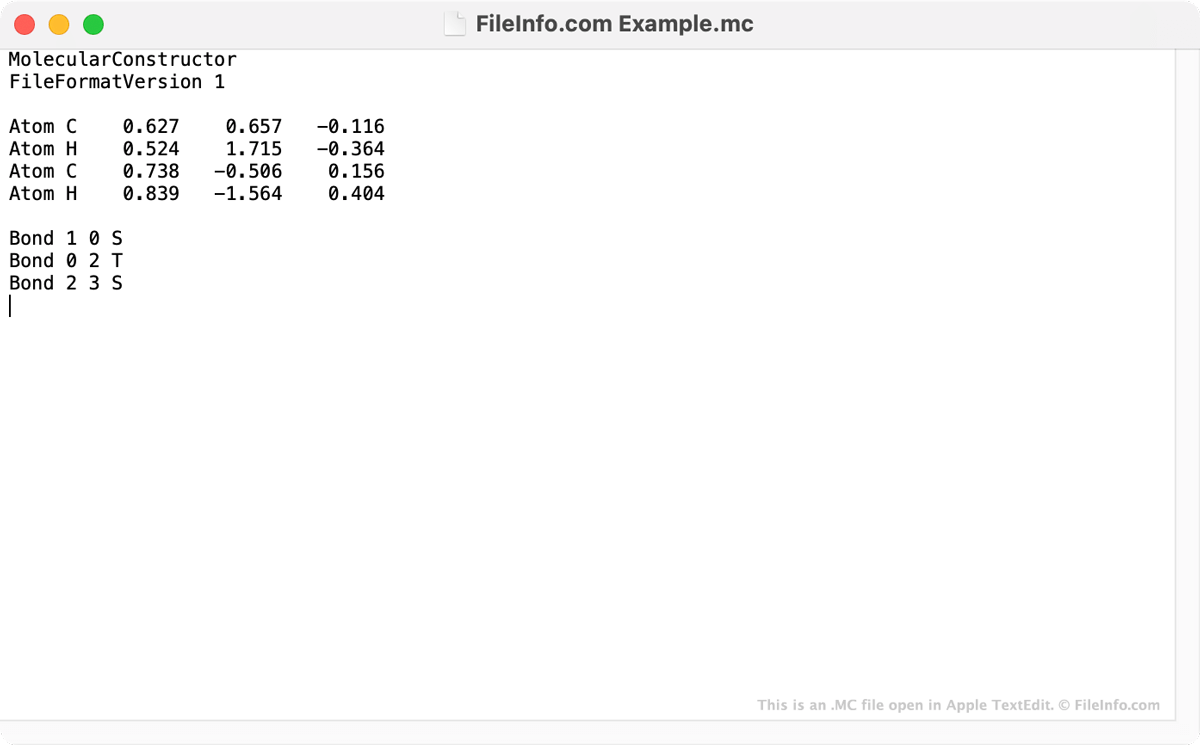
Apple TextEdit에서 열린 .mc 파일의 스크린샷
Apple TextEdit에서 열린 MC 파일

Molecular Constructor is a 3D molecule builder that allows users to design molecules and optimize their geometry. In the mobile versions of Molecular Constructor, users' molecules are saved as MC files. While MC files are used to show 3D images in Molecular Constructor, the files are actually text files. When you open an MC file in a text editor, such as Microsoft Notepad, Apple TextEdit, or GitHub Atom, you can read the coordinates of each atom a Molecular Constructor molecule includes. You can also see the bonds the molecule includes.

Mobile Molecular Constructor users can use the program's File → Save feature to save their molecules as MC files and share them with other users. MC files can be opened in both the Android and iOS versions of Molecular Constructor and, according to the program's developers, will soon be supported in the program's Windows desktop version.

MC 파일을 여는 방법

You can open an MC file in the Android and iOS versions of Molecular Constructor. To do so, open the app and select File → Browse. Then, find and open your MC file.

If you do not have access to the Android or iOS version of Molecular Constructor, you can open an MC file in any text editor to view the text it contains.

File Viewer Plus(으)로 400개 이상의 파일 형식을 여세요.무료 다운로드

MC 파일을 여는 프로그램

Windows
OS에 포함됨
무료
Mac
OS에 포함됨
무료
Linux
무료
무료
Android
Chrome OS
OS에 포함됨

Macrocell Pattern

개발사 해당 없음
인기도
3.5  |  2 투표
 

An MC file is a pattern file used by Conway’s Game of Life to store very large or complex patterns. It stores data in the Macrocell (MC) format, which saves cell-state patterns as reusable blocks rather than listing every cell, making the file much smaller and faster to load than simpler Life (.LIF) formats.

추가 정보

The Macrocell format was designed for performance and scalability, especially when working with patterns that contain repeating structures or vast empty areas. Instead of explicitly storing each live cell, an MC file defines blocks that can reference other blocks, creating a tree-like structure.

Simulation software expands these blocks dynamically as needed during viewing or simulation. This makes the format well-suited for large Life patterns, such as spaceships, oscillators, breeders, and engineered constructions, which would be difficult to store in simpler formats.

참고: Compared to older formats, such as LIF or .RLE, Macrocell is designed for speed and memory efficiency rather than human readability.

MC 파일을 여는 방법

You can open MC files with Golly, a popular open-source cellular automaton simulator. The simulator provides native support for the Macrocell format and allows users to view, edit, and simulate patterns interactively.

MC 파일을 여는 프로그램

Windows
무료
Mac
무료
카테고리: 데이터
업데이트: 2025-12-16

검증자 FileInfo.com

FileInfo.com 팀 이 페이지에 나열된 모든 파일 형식과 소프트웨어 프로그램을 독자적으로 조사했습니다. 저희의 목표는 100% 정확성이며, 검증한 파일 유형에 대한 정보만 게시합니다.

이 페이지에 추가하거나 업데이트할 내용을 제안하고 싶으시면 알려 주세요.