

.SB3 Dateiendung
Scratch 3.0-Projekt
| Entwickler | MIT |
| Beliebtheit |
4,2 | 2100 Stimmen |
Was ist eine SB3-Datei?
Eine SB3-Datei ist ein mit Scratch 3.0 erstelltes Projekt, einer visuellen Programmiersprache, die am Massachusetts Institute of Technology (MIT) zur Erstellung von Geschichten, kleinen Spielen und Animationen entwickelt wurde. Sie enthält ein Scratch-Programm aus Codeblöcken sowie Elemente wie Sprites, Sounds und Metadaten des Projekts. SB3-Dateien haben Scratch .SB2-Dateien ersetzt und werden in einem Zip-basierten Format gespeichert, das Projektdaten im JSON-Format speichert.
Weitere Informationen
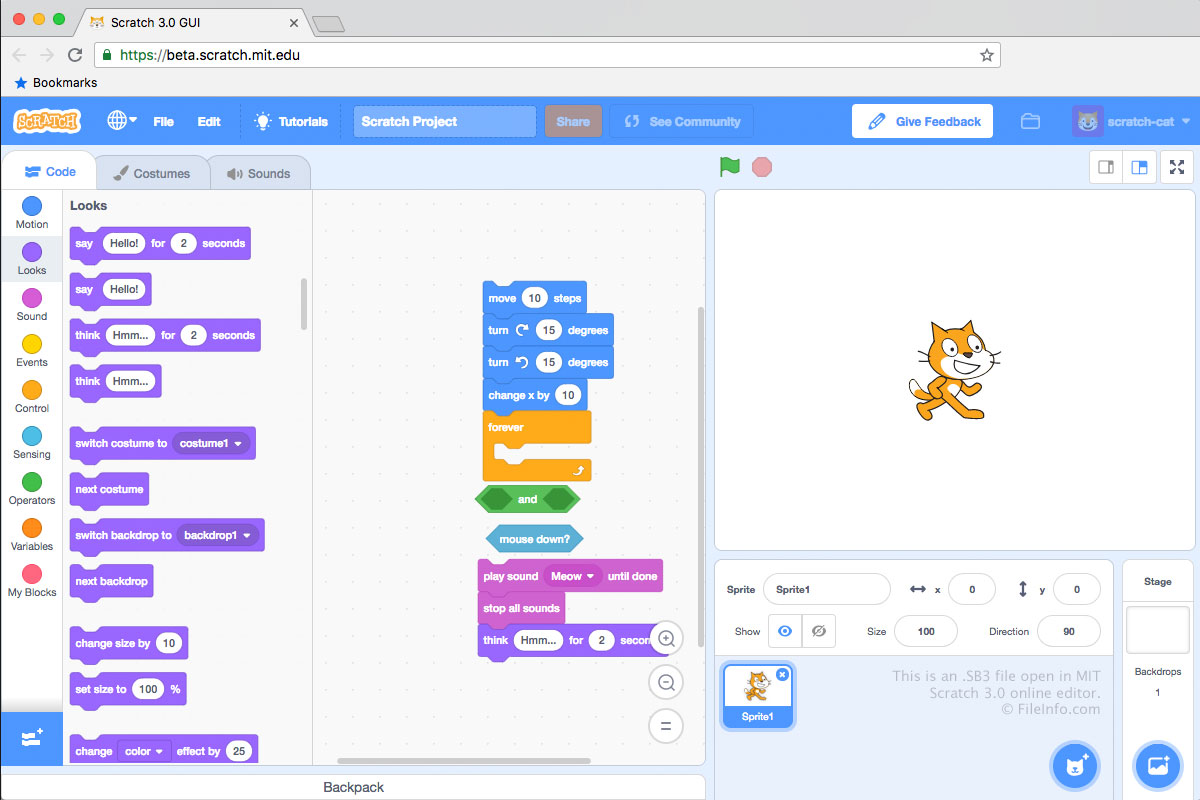
SB3-Dateien werden im Scratch-3.0-Dateiformat gespeichert, SB2-Dateien im Scratch-2.0-Dateiformat und .SB-Dateien im ursprünglichen Scratch-Dateiformat. Jede SB3-Datei ist ein .ZIP-Archiv, das die Inhalte eines Entwicklungsprojekts speichert, darunter eine .JSON-Datei (wahrscheinlich mit dem Namen project.json), Sprites, Skripte, Kostüme und Audiodateien.
So erstellen Sie eine SB3-Datei
Üblicherweise erstellen Entwickler SB3-Dateien, indem sie Projekte aus dem Online-Scratch-Editor des MIT auf ihrem Computer speichern. Dieser ist unter https://scratch.mit.edu/ verfügbar. So speichern Sie ein Scratch-Editor-Projekt als SB3-Datei:
- Öffnen Sie Ihr Projekt im Scratch-Editor.
- Wählen Sie aus.
- Geben Sie einen Dateinamen ein, wählen Sie einen Speicherort aus und klicken Sie auf .
Entwickler können SB3-Dateien auch in den Offline-Scratch-Editoren des MIT erstellen, die für Geräte mit Windows, macOS, Android und ChromeOS verfügbar sind.
HINWEIS: In SB3 steht das S für „Scratch“, das B für „Binary“ und die 3 für die Scratch-Version (3.0).
So öffnen Sie eine SB3-Datei
Sie können eine SB3-Datei mit Scratch Desktop (Windows, Mac), Scratch für Android und ChromeOS oder dem Online-Scratch-Editor des MIT (Web) öffnen. So öffnen Sie eine SB3-Datei im Online-Scratch-Editor:
- Öffnen Sie den Scratch-Editor in Ihrem Webbrowser.
- Wählen Sie aus.
- Navigieren Sie zu Ihrer SB3-Datei und öffnen Sie sie.
Sie können den Inhalt einer SB3-Datei auch mit einem beliebigen Dienstprogramm zur Dekomprimierung von Zip-Dateien extrahieren (z. B. 7-Zip oder Apple Archive Utility), nachdem Sie die Datei in .zip umbenannt haben.
So konvertieren Sie eine SB3-Datei
Mit TurboWarp Packager können Sie eine SB3-Datei in ein ausführbares Format umwandeln, sodass Sie das darin enthaltene Programm auf einem PC oder in einem Webbrowser ausführen können. TurboWarp Packager kann SB3-Dateien in die folgenden Formate exportieren: