.MPD 文件扩展名

Microsoft Project Database

开发者 Microsoft
受欢迎程度
3.5  |  23 
 

什么是 MPD 文件?

Database file created by Microsoft Project, a program used for project management; contains project data stored in a Microsoft Access-compliant format; used to save and load an entire project in a relational records-based database format.

更多信息

注: MPD files cannot be saved by Microsoft Project 2007 or later. However, existing MPD files may still be used as a basis for a new project.

使用File Viewer Plus打开 400 多种文件格式。免费下载

可打开 MPD 文件的程序

Windows
K-SOL Project Reader
分类: 数据库
更新时间: 2010-03-16

MPEG-DASH Media Presentation Description

开发者 Moving Picture Experts Group
受欢迎程度
4.0  |  5 
 

An MPD file is a text file that describes how an MPEG-DASH video is streamed. It contains XML-formatted text that a web client uses to deliver .M4S (or other) streamed videos to Internet users. MPD files define streamed videos' segment duration, codec, MIME type, maximum dimensions, and other settings.

更多信息

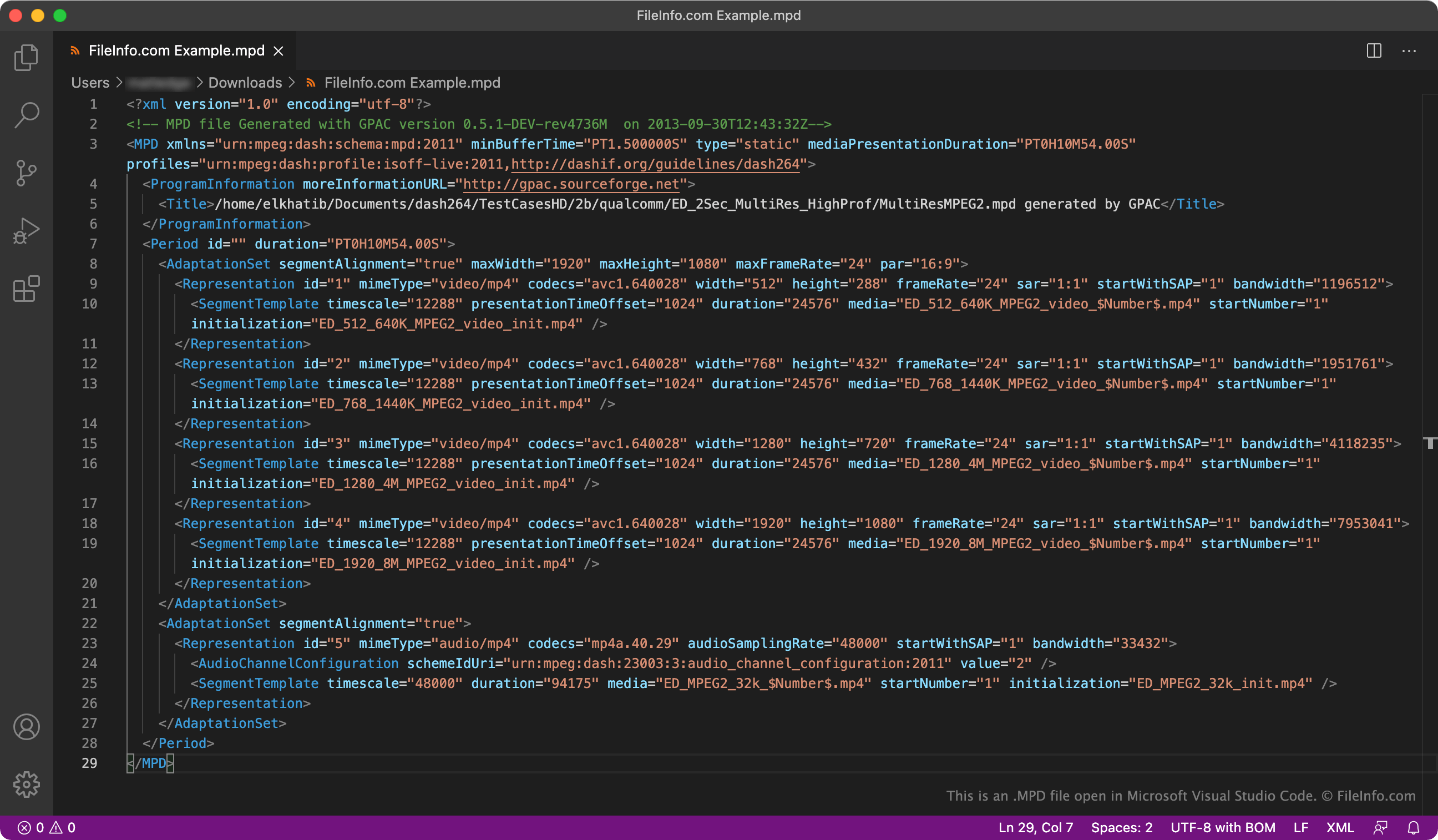
在 Microsoft Visual Studio Code 中打开的 .mpd 文件截图
在 Microsoft Visual Studio Code 中打开的 MPD 文件

MPEG-DASH is an adaptive bitrate streaming technique that allows users to stream high-quality video over the Internet using HTTP. Videos streamed using MPEG-DASH are divided into segments, which allows web clients to stream long videos without stalling or re-buffering.

MPD files define how a video streamed using MPEG-DASH is divided into segments and shown to users. While different MPD files contain different formatting and settings, all MPD files are XML files. They all also include the <MPD>, <Period>, <AdaptationSet>, <Representation>, and <SegmentTemplate> elements, which are used as follows:

  • <MPD>: Defines the streamed video's profile, minimum buffer time, total duration (if known), and segment duration
  • <Period>: Defines the streamed video's chapters and chapter duration
  • <AdaptationSet>: Defines the streamed video's alignment, maximum dimensions, maximum frame rate, language, and content type
  • <Representation>: Defines the resolutions and bitrates at which the streamed video is available
  • <SegmentTemplate>: Defines the time offset and duration of the streamed video's segments

如何打开 MPD 文件

You can use VideoLAN VLC media player to open an MPD file and play the video to which it points. If your MPD file is available at a URL, use the following instructions. Otherwise, open the file as you would normally.

  1. In VLC, select either Media → Open Network Stream (Windows, Linux) or File → Open Network... (Mac).
  2. Paste your MPD file's URL into the URL field.
  3. Select Play or Open.

Note that if the MPD file you are attempting to open is formatted incorrectly, or the video to which it points is no longer available, VLC will not play any video after you open your file.

You can also use yt-dlp, a command-line program, to download the video to which an MPD file points. To do so, use the following command (after installing yt-dlp):

yt-dlp -f https://URL/for/YourFile.mpd

Additionally, because MPD files are XML files, you can open them in any text or source code editor, including:

Doing so allows you to view and/or edit the file's text contents. Opening an MPD file in a source code editor will highlight the file's XML syntax, making its text easier to understand and edit.

可打开或引用 MPD 文件的程序

Chrome OS
操作系统自带
分类: 文本
更新时间: 2023-07-17

Melodyne Project

开发者 Celemony
受欢迎程度
3.3  |  3 
 

An MPD file is a project file created by Melodyne, an audio pitch correction tool. It contains a record of the edits a user has made to an accompanying audio file. It also contains a reference to the audio file's location, which Melodyne uses to load the file before applying edits to it.

更多信息

Audio producers use Melodyne to correct or otherwise modify an audio track's pitch and timing. Most commonly, producers use Melodyne to edit vocal tracks imported from a DAW. They then export the tracks back to their DAW for further editing, as part of a complete song.

When editing a track in Melodyne, producers can save their project as an MPD file. Doing so preserves the original audio file they are editing. This allows producers to easily revert changes they've made to the original file. In contrast, if a producer chooses to export their edited audio file as a .WAV or .AIF file, they cannot revert the edited file to its original state. They also must reimport the file into Melodyne and create a new project if they want to make further edits.

如何打开 MPD 文件

You can open an MPD file in Celemony Melodyne (Windows, Mac). To do so, select File → Open from the program's menu bar. If the audio file your MPD file references is missing, Melodyne will prompt you to update the path to the audio file.

如何转换 MPD 文件

You can use Melodyne to export the audio project an MPD file contains as a .WAV or .AIF file. To do so, open your MPD file, and then select File → Export... from the program's menu bar.

可打开 MPD 文件的程序

Windows
Mac
分类: 音频
更新时间: 2022-09-06

File List Creator Playlist

开发者 WenSoftware
受欢迎程度
2.5  |  6 
 

File used by File List Creator (FLC), a utility that helps users manage and track their computer files; stores a list of files; commonly used to store a playlist of .MP3 files; may also store lists of digital photos, compressed files, and other file types.

更多信息

While MPD files track lists of files, they only contain file references, not the actual files themselves.

注: MPD is also short for "Music Player Daemon," a music player for Unix that can play audio files from remote systems.

可打开或引用 MPD 文件的程序

Windows
WenSoftware File List Creator
分类: 数据
更新时间: 2010-03-16

验证者 FileInfo.com

FileInfo.com 团队 独立研究了本页面列出的所有文件格式和软件程序。 我们的目标是达到 100% 的准确率,并且仅发布我们已验证过的文件类型信息。

如果您想为此页面提出新增或更新建议,请告诉我们