

.MPD Extension de fichier
Description de présentation multimédia MPEG-DASH
| Développeur | Moving Picture Experts Group |
| Popularité |
4,0 | 5 Votes |
Un fichier MPD est un fichier texte qui décrit comment une vidéo MPEG-DASH est diffusée en continu. Il contient du texte au format XML qu'un client web utilise pour fournir .M4S (ou d'autres) vidéos diffusées en continu aux internautes. Les fichiers MPD définissent la durée des segments de la vidéo diffusée en continu, le codec, le type MIME, les dimensions maximales et d'autres paramètres.
Plus d'informations
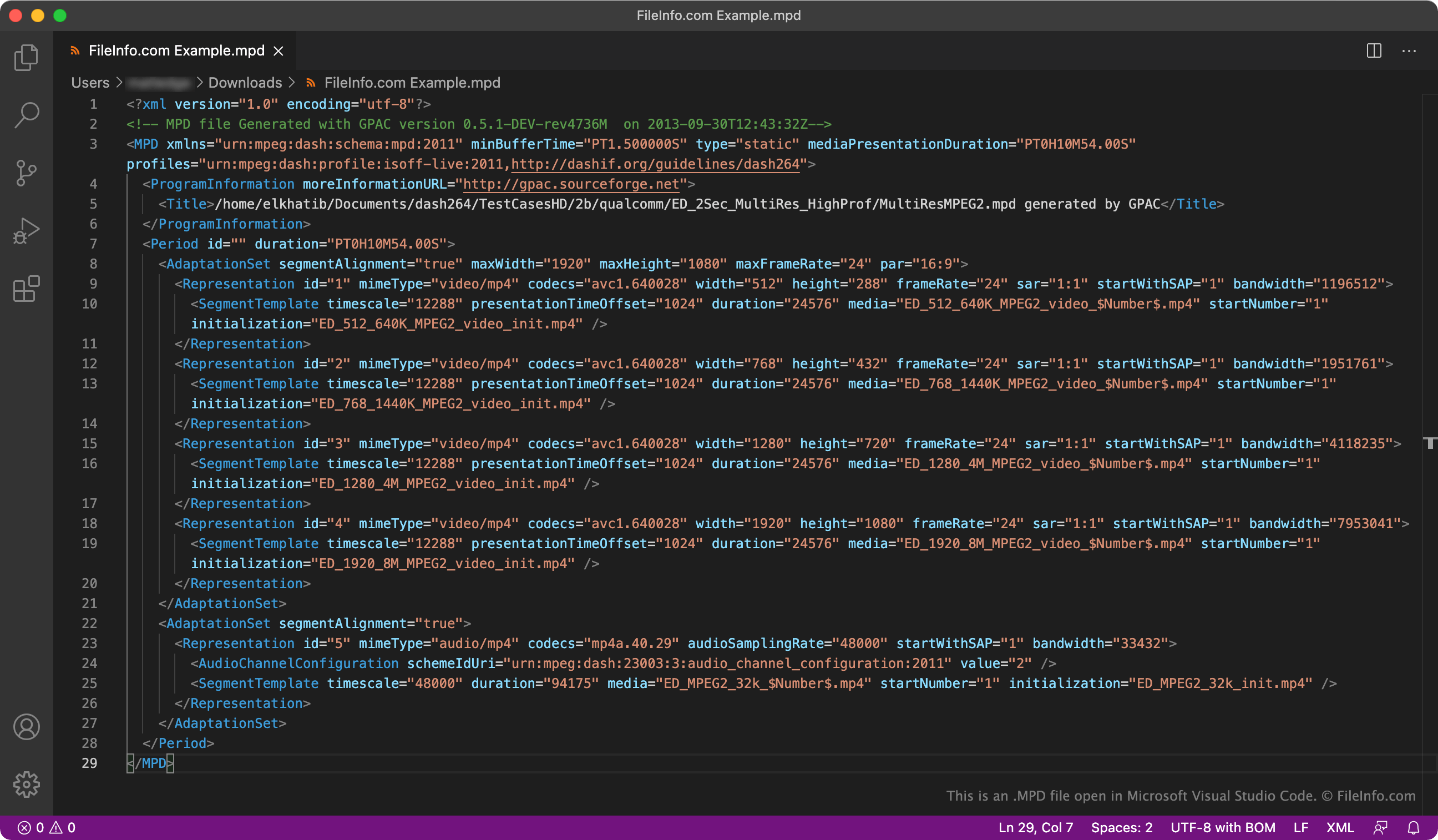
MPEG-DASH est une technique de diffusion en continu à débit adaptatif qui permet aux utilisateurs de regarder des vidéos de haute qualité sur Internet avec HTTP. Les vidéos diffusées avec MPEG-DASH sont divisées en segments, ce qui permet aux clients web de diffuser de longues vidéos sans interruption ni nouvelle mise en mémoire tampon.
Les fichiers MPD définissent comment une vidéo diffusée avec MPEG-DASH est divisée en segments et présentée aux utilisateurs. Bien que les différents fichiers MPD contiennent des formats et des paramètres différents, tous les fichiers MPD sont des fichiers XML. Ils incluent également tous les éléments <MPD>, <Period>, <AdaptationSet>, <Representation> et <SegmentTemplate>, qui sont utilisés comme suit :
- <MPD> : définit le profil de la vidéo diffusée en continu, la durée minimale de mise en mémoire tampon, la durée totale (si elle est connue) et la durée des segments
- <Period> : définit les chapitres de la vidéo diffusée en continu et la durée de chaque chapitre
- <AdaptationSet> : définit l'alignement, les dimensions maximales, la fréquence d'images maximale, la langue et le type de contenu de la vidéo diffusée en continu
- <Representation> : définit les résolutions et les débits auxquels la vidéo diffusée en continu est disponible
- <SegmentTemplate> : définit le décalage temporel et la durée des segments de la vidéo diffusée en continu
Comment ouvrir un fichier MPD
Vous pouvez utiliser VideoLAN VLC media player pour ouvrir un fichier MPD et lire la vidéo vers laquelle il pointe. Si votre fichier MPD est disponible à une URL, suivez les instructions ci-dessous. Sinon, ouvrez le fichier comme vous le feriez normalement.
- Dans VLC, sélectionnez (Windows, Linux) ou (Mac).
- Collez l'URL de votre fichier MPD dans le champ URL.
- Sélectionnez ou .
Notez que si le fichier MPD que vous essayez d'ouvrir est mal formaté ou si la vidéo vers laquelle il pointe n'est plus disponible, VLC ne lira aucune vidéo après l'ouverture de votre fichier.
Vous pouvez également utiliser yt-dlp, un programme en ligne de commande, pour télécharger la vidéo vers laquelle pointe un fichier MPD. Pour ce faire, utilisez la commande suivante (après avoir installé yt-dlp) :
yt-dlp -f https://URL/for/YourFile.mpd
De plus, comme les fichiers MPD sont des fichiers XML, vous pouvez les ouvrir dans n'importe quel éditeur de texte ou de code source, notamment :
- Microsoft Visual Studio Code (multiplateforme)
- GitHub Atom (multiplateforme)
- GNU Emacs (multiplateforme)
- Microsoft Notepad (Windows)
- Apple TextEdit (Mac)
Cela vous permet d'afficher et/ou de modifier le contenu textuel du fichier. L'ouverture d'un fichier MPD dans un éditeur de code source met en évidence la syntaxe XML du fichier, ce qui rend son texte plus facile à comprendre et à modifier.