.MLPROJ 文件扩展名

MATLAB Archived Project

开发者 MathWorks
受欢迎程度
3.3  |  3 
 

什么是 MLPROJ 文件?

An MLPROJ file is a MathWorks MATLAB project that has been packaged as a single compressed archive. It contains all the data needed to import and open a project in MATLAB. MLPROJ files are used to share projects among MATLAB users.

更多信息

MathWorks MATLAB is a cross-platform mathematical analysis and computation program. Researchers, developers, and engineers use MATLAB to perform calculations, develop algorithms, and model, analyze, and explore mathematical data.

When a MATLAB user wants to share a project (.PRJ file) they've been working on with another user, they can package that project and all its component files (including referenced projects) as an MLPROJ file. MLPROJ files are compressed archives, which make them easy to email, upload to a cloud storage system, or store on a USB flash drive. Other MATLAB users can then access and decompress the MLPROJ file, to open the project it contains.

Sometimes, MLPROJ files may contain only some of the files used by a MATLAB project. Users can use MATLAB export profiles to choose what files they include in their MLPROJ archives.

如何打开 MLPROJ 文件

You can open an MLPROJ (MATLAB Project) file in MathWorks MATLAB (cross-platform). If you have MATLAB installed, you can import the project an MLPROJ file contains by double-clicking the file. MATLAB will then open the Extract Project to dialog box. Specify the location at which you want to save the project, and then click Select Folder. The project your MLPROJ file contains will then open in MATLAB.

使用File Viewer Plus打开 400 多种文件格式。免费下载

可打开 MLPROJ 文件的程序

Windows
Mac
Linux
分类: 压缩
更新时间: 2021-04-28

Create ML Project

开发者 Apple
受欢迎程度
3.0  |  1 
 

An MLPROJ file is a machine learning model project file created in Apple Create ML. It contains the component files, including data sources and model containers, used to create, train, and test a model. In macOS, users can right-click an MLPROJ file and select Show Package Contents to view its components.

更多信息

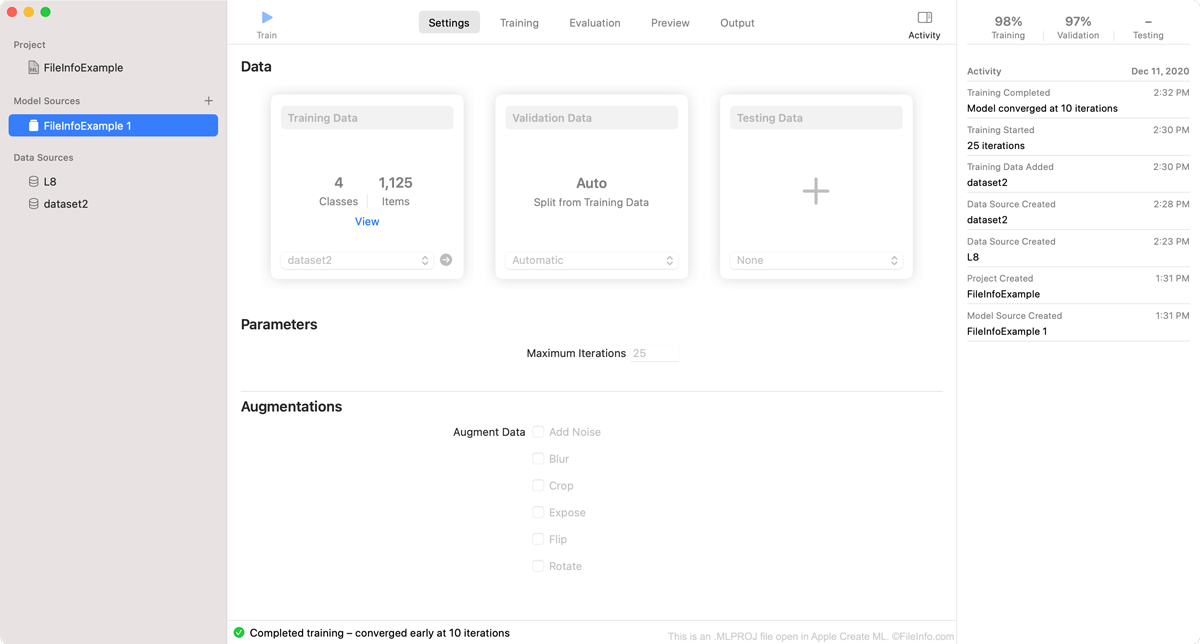
在 Apple Create ML 中打开的 .mlproj 文件截图
在 Apple Create ML 中打开的 MLPROJ 文件

Create ML is an Apple Xcode component that macOS developers can use to create and train machine learning models. Specifically, developers use Create ML to create Core ML machine learning models, which are optimized for integration into Xcode applications.

As a developer creates a model in Create ML, the program saves the developer's work within an MLPROJ file. The MLPROJ file contains all the data associated with the developer's machine learning model, including training data, snapshots, and model containers, but is not itself a model. When a developer has finished training, testing, and tweaking their machine learning model in Create ML, they save the model as an .MLMODEL file, before integrating the model into Xcode applications.

如何打开 MLPROJ 文件

You can open an MLPROJ file in Apple Create ML. To do so:

  1. Open Apple Xcode.
  2. From the Xcode menu bar, select Xcode → Open Developer Tool → Create ML.
  3. A Finder window will appear. In the window, locate your MLPROJ file. Then, select Open Project.
  4. Your Create ML project will appear in Create ML.

If you have already opened Create ML, you can select File → Open... from its menu bar to open your MLPROJ file.

可打开 MLPROJ 文件的程序

Mac
分类: 开发者
更新时间: 2020-12-16

验证者 FileInfo.com

FileInfo.com 团队 独立研究了本页面列出的所有文件格式和软件程序。 我们的目标是达到 100% 的准确率,并且仅发布我们已验证过的文件类型信息。

如果您想为此页面提出新增或更新建议,请告诉我们