.MLPROJ ファイル拡張子

2個のファイルタイプ.mlproj拡張子を使用しています。

MATLAB Archived Project

開発元 MathWorks
人気度
3.3  |  3 
 

MLPROJファイルとは?

An MLPROJ file is a MathWorks MATLAB project that has been packaged as a single compressed archive. It contains all the data needed to import and open a project in MATLAB. MLPROJ files are used to share projects among MATLAB users.

詳細情報

MathWorks MATLAB is a cross-platform mathematical analysis and computation program. Researchers, developers, and engineers use MATLAB to perform calculations, develop algorithms, and model, analyze, and explore mathematical data.

When a MATLAB user wants to share a project (.PRJ file) they've been working on with another user, they can package that project and all its component files (including referenced projects) as an MLPROJ file. MLPROJ files are compressed archives, which make them easy to email, upload to a cloud storage system, or store on a USB flash drive. Other MATLAB users can then access and decompress the MLPROJ file, to open the project it contains.

Sometimes, MLPROJ files may contain only some of the files used by a MATLAB project. Users can use MATLAB export profiles to choose what files they include in their MLPROJ archives.

MLPROJファイルの開き方

You can open an MLPROJ (MATLAB Project) file in MathWorks MATLAB (cross-platform). If you have MATLAB installed, you can import the project an MLPROJ file contains by double-clicking the file. MATLAB will then open the Extract Project to dialog box. Specify the location at which you want to save the project, and then click Select Folder. The project your MLPROJ file contains will then open in MATLAB.

File Viewer Plusで400種類以上のファイル形式を開けます。無料ダウンロード

MLPROJファイルを開くプログラム

Windows
無料体験版
Mac
無料体験版
Linux
無料体験版
カテゴリ: 圧縮
更新日: 2021-04-28

Create ML Project

開発元 Apple
人気度
3.0  |  1 
 

An MLPROJ file is a machine learning model project file created in Apple Create ML. It contains the component files, including data sources and model containers, used to create, train, and test a model. In macOS, users can right-click an MLPROJ file and select Show Package Contents to view its components.

詳細情報

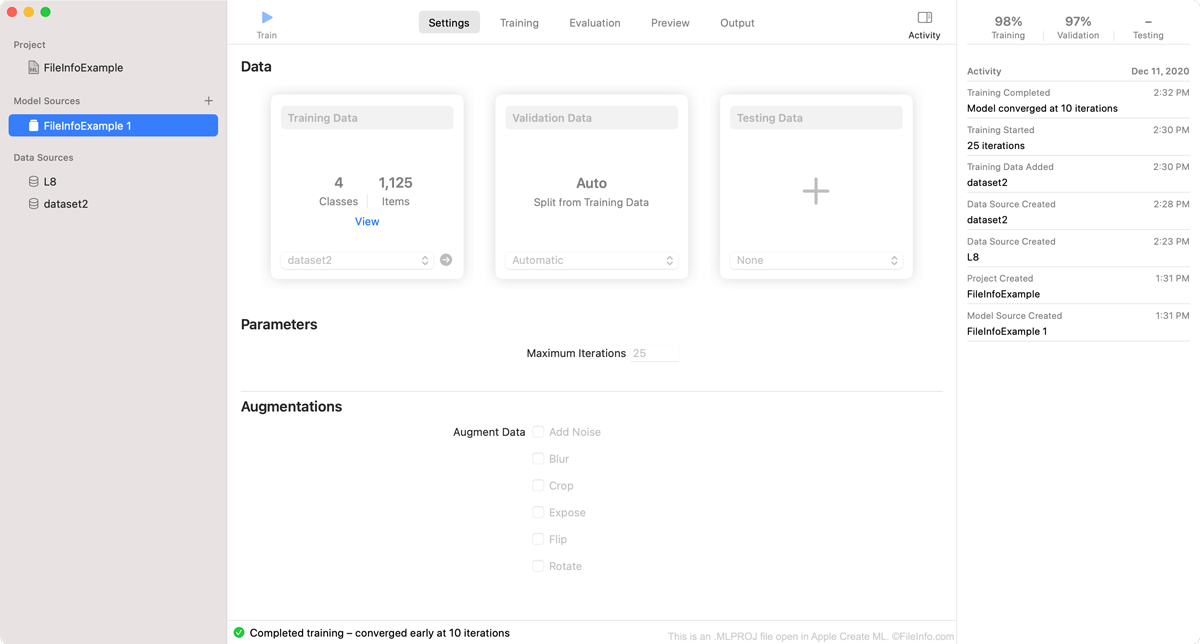
Apple Create MLで開いた.mlprojファイルのスクリーンショット
Apple Create MLで開いたMLPROJファイル

Create ML is an Apple Xcode component that macOS developers can use to create and train machine learning models. Specifically, developers use Create ML to create Core ML machine learning models, which are optimized for integration into Xcode applications.

As a developer creates a model in Create ML, the program saves the developer's work within an MLPROJ file. The MLPROJ file contains all the data associated with the developer's machine learning model, including training data, snapshots, and model containers, but is not itself a model. When a developer has finished training, testing, and tweaking their machine learning model in Create ML, they save the model as an .MLMODEL file, before integrating the model into Xcode applications.

MLPROJファイルの開き方

You can open an MLPROJ file in Apple Create ML. To do so:

  1. Open Apple Xcode.
  2. From the Xcode menu bar, select Xcode → Open Developer Tool → Create ML.
  3. A Finder window will appear. In the window, locate your MLPROJ file. Then, select Open Project.
  4. Your Create ML project will appear in Create ML.

If you have already opened Create ML, you can select File → Open... from its menu bar to open your MLPROJ file.

MLPROJファイルを開くプログラム

Mac
カテゴリ: 開発者
更新日: 2020-12-16

検証者 FileInfo.com

FileInfo.comチーム は、このページに掲載されているすべてのファイル形式とソフトウェアについて独自に調査しました。 私たちの目標は100%の正確性であり、検証済みのファイルタイプに関する情報のみを公開しています。

このページへの追加や更新をご提案いただける場合は、お知らせください。