.MLPROJ 파일 확장자

2개의 파일 유형.mlproj 확장자를 사용합니다.

MATLAB Archived Project

개발사 MathWorks
인기도
3.3  |  3 투표
 

MLPROJ 파일이란 무엇인가요?

An MLPROJ file is a MathWorks MATLAB project that has been packaged as a single compressed archive. It contains all the data needed to import and open a project in MATLAB. MLPROJ files are used to share projects among MATLAB users.

추가 정보

MathWorks MATLAB is a cross-platform mathematical analysis and computation program. Researchers, developers, and engineers use MATLAB to perform calculations, develop algorithms, and model, analyze, and explore mathematical data.

When a MATLAB user wants to share a project (.PRJ file) they've been working on with another user, they can package that project and all its component files (including referenced projects) as an MLPROJ file. MLPROJ files are compressed archives, which make them easy to email, upload to a cloud storage system, or store on a USB flash drive. Other MATLAB users can then access and decompress the MLPROJ file, to open the project it contains.

Sometimes, MLPROJ files may contain only some of the files used by a MATLAB project. Users can use MATLAB export profiles to choose what files they include in their MLPROJ archives.

MLPROJ 파일을 여는 방법

You can open an MLPROJ (MATLAB Project) file in MathWorks MATLAB (cross-platform). If you have MATLAB installed, you can import the project an MLPROJ file contains by double-clicking the file. MATLAB will then open the Extract Project to dialog box. Specify the location at which you want to save the project, and then click Select Folder. The project your MLPROJ file contains will then open in MATLAB.

File Viewer Plus(으)로 400개 이상의 파일 형식을 여세요.무료 다운로드

MLPROJ 파일을 여는 프로그램

Windows
무료 체험판
Mac
무료 체험판
Linux
무료 체험판
카테고리: 압축
업데이트: 2021-04-28

Create ML Project

개발사 Apple
인기도
3.0  |  1 투표
 

An MLPROJ file is a machine learning model project file created in Apple Create ML. It contains the component files, including data sources and model containers, used to create, train, and test a model. In macOS, users can right-click an MLPROJ file and select Show Package Contents to view its components.

추가 정보

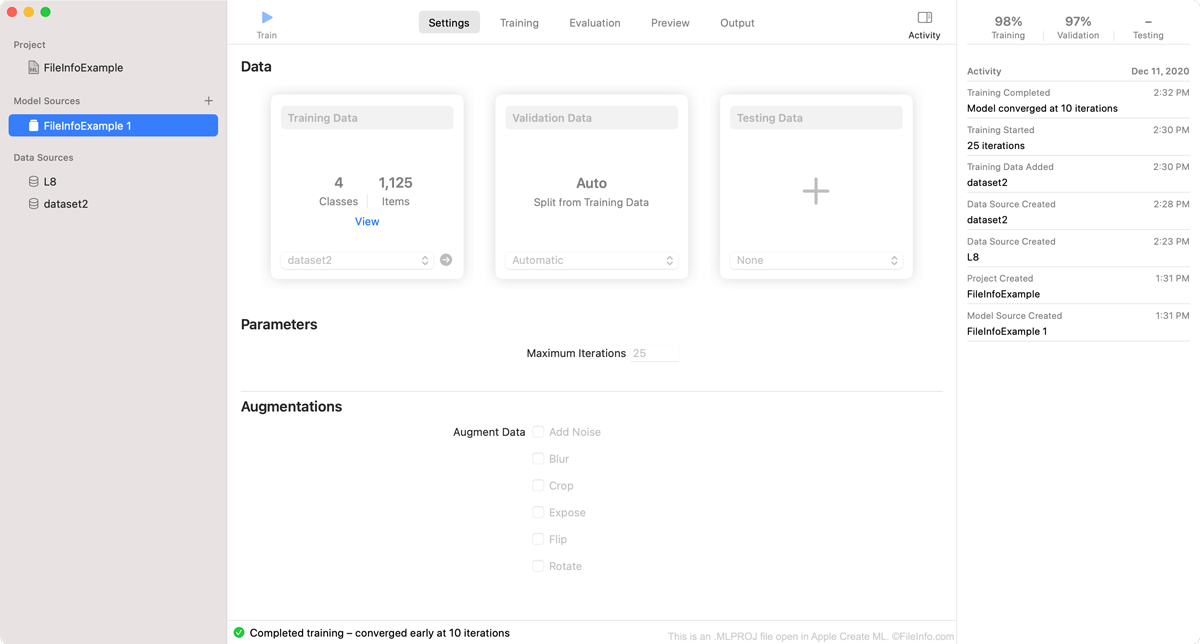
Apple Create ML에서 열린 .mlproj 파일의 스크린샷
Apple Create ML에서 열린 MLPROJ 파일

Create ML is an Apple Xcode component that macOS developers can use to create and train machine learning models. Specifically, developers use Create ML to create Core ML machine learning models, which are optimized for integration into Xcode applications.

As a developer creates a model in Create ML, the program saves the developer's work within an MLPROJ file. The MLPROJ file contains all the data associated with the developer's machine learning model, including training data, snapshots, and model containers, but is not itself a model. When a developer has finished training, testing, and tweaking their machine learning model in Create ML, they save the model as an .MLMODEL file, before integrating the model into Xcode applications.

MLPROJ 파일을 여는 방법

You can open an MLPROJ file in Apple Create ML. To do so:

  1. Open Apple Xcode.
  2. From the Xcode menu bar, select Xcode → Open Developer Tool → Create ML.
  3. A Finder window will appear. In the window, locate your MLPROJ file. Then, select Open Project.
  4. Your Create ML project will appear in Create ML.

If you have already opened Create ML, you can select File → Open... from its menu bar to open your MLPROJ file.

MLPROJ 파일을 여는 프로그램

Mac
카테고리: 개발자
업데이트: 2020-12-16

검증자 FileInfo.com

FileInfo.com 팀 이 페이지에 나열된 모든 파일 형식과 소프트웨어 프로그램을 독자적으로 조사했습니다. 저희의 목표는 100% 정확성이며, 검증한 파일 유형에 대한 정보만 게시합니다.

이 페이지에 추가하거나 업데이트할 내용을 제안하고 싶으시면 알려 주세요.