.MLPROJ Extension de fichier

MATLAB Archived Project

Développeur MathWorks
Popularité
3.3  |  3 Votes
 

Qu'est-ce qu'un fichier MLPROJ ?

An MLPROJ file is a MathWorks MATLAB project that has been packaged as a single compressed archive. It contains all the data needed to import and open a project in MATLAB. MLPROJ files are used to share projects among MATLAB users.

Plus d'informations

MathWorks MATLAB is a cross-platform mathematical analysis and computation program. Researchers, developers, and engineers use MATLAB to perform calculations, develop algorithms, and model, analyze, and explore mathematical data.

When a MATLAB user wants to share a project (.PRJ file) they've been working on with another user, they can package that project and all its component files (including referenced projects) as an MLPROJ file. MLPROJ files are compressed archives, which make them easy to email, upload to a cloud storage system, or store on a USB flash drive. Other MATLAB users can then access and decompress the MLPROJ file, to open the project it contains.

Sometimes, MLPROJ files may contain only some of the files used by a MATLAB project. Users can use MATLAB export profiles to choose what files they include in their MLPROJ archives.

Comment ouvrir un fichier MLPROJ

You can open an MLPROJ (MATLAB Project) file in MathWorks MATLAB (cross-platform). If you have MATLAB installed, you can import the project an MLPROJ file contains by double-clicking the file. MATLAB will then open the Extract Project to dialog box. Specify the location at which you want to save the project, and then click Select Folder. The project your MLPROJ file contains will then open in MATLAB.

Ouvrez plus de 400 formats de fichiers avec File Viewer Plus.Téléchargement gratuit

Programmes qui ouvrent les fichiers MLPROJ

Windows
Version d'essai gratuite
Mac
Version d'essai gratuite
Linux
Version d'essai gratuite

Create ML Project

Développeur Apple
Popularité
3.0  |  1 Vote
 

An MLPROJ file is a machine learning model project file created in Apple Create ML. It contains the component files, including data sources and model containers, used to create, train, and test a model. In macOS, users can right-click an MLPROJ file and select Show Package Contents to view its components.

Plus d'informations

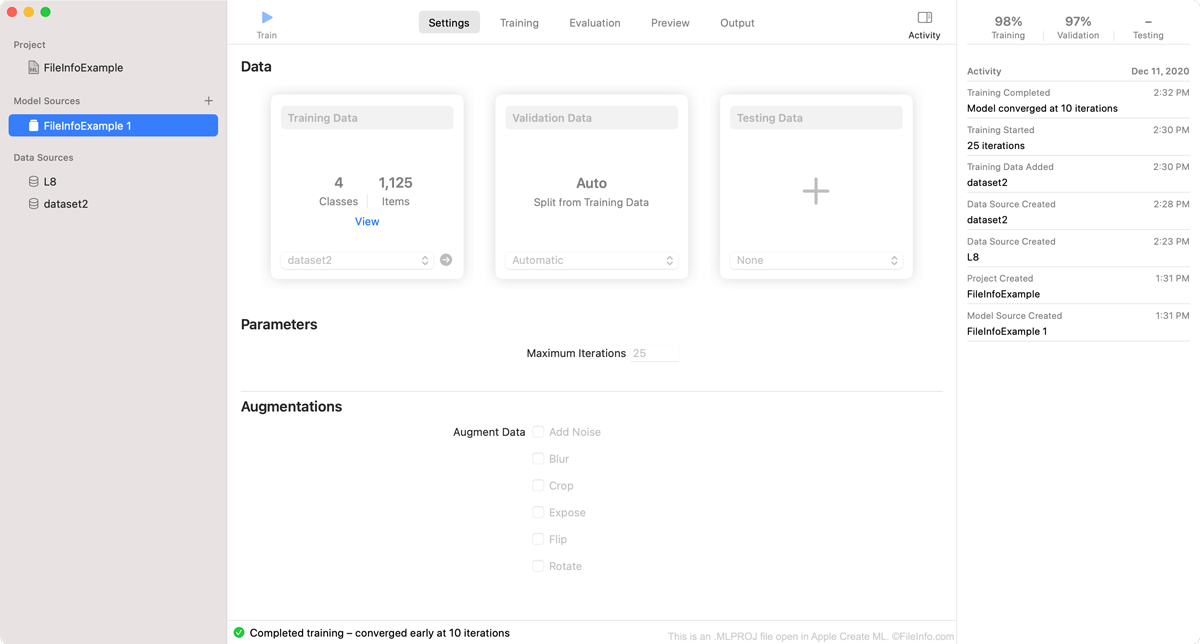
Capture d'écran d'un fichier .mlproj dans Apple Create ML
Fichier MLPROJ ouvert dans Apple Create ML

Create ML is an Apple Xcode component that macOS developers can use to create and train machine learning models. Specifically, developers use Create ML to create Core ML machine learning models, which are optimized for integration into Xcode applications.

As a developer creates a model in Create ML, the program saves the developer's work within an MLPROJ file. The MLPROJ file contains all the data associated with the developer's machine learning model, including training data, snapshots, and model containers, but is not itself a model. When a developer has finished training, testing, and tweaking their machine learning model in Create ML, they save the model as an .MLMODEL file, before integrating the model into Xcode applications.

Comment ouvrir un fichier MLPROJ

You can open an MLPROJ file in Apple Create ML. To do so:

  1. Open Apple Xcode.
  2. From the Xcode menu bar, select Xcode → Open Developer Tool → Create ML.
  3. A Finder window will appear. In the window, locate your MLPROJ file. Then, select Open Project.
  4. Your Create ML project will appear in Create ML.

If you have already opened Create ML, you can select File → Open... from its menu bar to open your MLPROJ file.

Programmes qui ouvrent les fichiers MLPROJ

Mac

Vérifié par FileInfo.com

L'équipe FileInfo.com a mené des recherches indépendantes sur tous les formats de fichiers et logiciels répertoriés sur cette page. Notre objectif est une précision de 100%, et nous ne publions que des informations sur les types de fichiers que nous avons vérifiés.

Si vous souhaitez suggérer des ajouts ou des mises à jour de cette page, faites-le-nous savoir.