.MLPROJ Bestandsextensie

2 bestandstypen gebruiken de extensie .mlproj.

MATLAB Archived Project

Ontwikkelaar MathWorks
Populariteit
3.3  |  3 Stemmen
 

Wat is een MLPROJ-bestand?

An MLPROJ file is a MathWorks MATLAB project that has been packaged as a single compressed archive. It contains all the data needed to import and open a project in MATLAB. MLPROJ files are used to share projects among MATLAB users.

Meer informatie

MathWorks MATLAB is a cross-platform mathematical analysis and computation program. Researchers, developers, and engineers use MATLAB to perform calculations, develop algorithms, and model, analyze, and explore mathematical data.

When a MATLAB user wants to share a project (.PRJ file) they've been working on with another user, they can package that project and all its component files (including referenced projects) as an MLPROJ file. MLPROJ files are compressed archives, which make them easy to email, upload to a cloud storage system, or store on a USB flash drive. Other MATLAB users can then access and decompress the MLPROJ file, to open the project it contains.

Sometimes, MLPROJ files may contain only some of the files used by a MATLAB project. Users can use MATLAB export profiles to choose what files they include in their MLPROJ archives.

Een MLPROJ-bestand openen

You can open an MLPROJ (MATLAB Project) file in MathWorks MATLAB (cross-platform). If you have MATLAB installed, you can import the project an MLPROJ file contains by double-clicking the file. MATLAB will then open the Extract Project to dialog box. Specify the location at which you want to save the project, and then click Select Folder. The project your MLPROJ file contains will then open in MATLAB.

Open meer dan 400 bestandsformaten met File Viewer Plus.Gratis downloaden

Programma's die MLPROJ-bestanden openen

Windows
Gratis proefversie
Mac
Gratis proefversie
Linux
Gratis proefversie

Create ML Project

Ontwikkelaar Apple
Populariteit
3.0  |  1 Stem
 

An MLPROJ file is a machine learning model project file created in Apple Create ML. It contains the component files, including data sources and model containers, used to create, train, and test a model. In macOS, users can right-click an MLPROJ file and select Show Package Contents to view its components.

Meer informatie

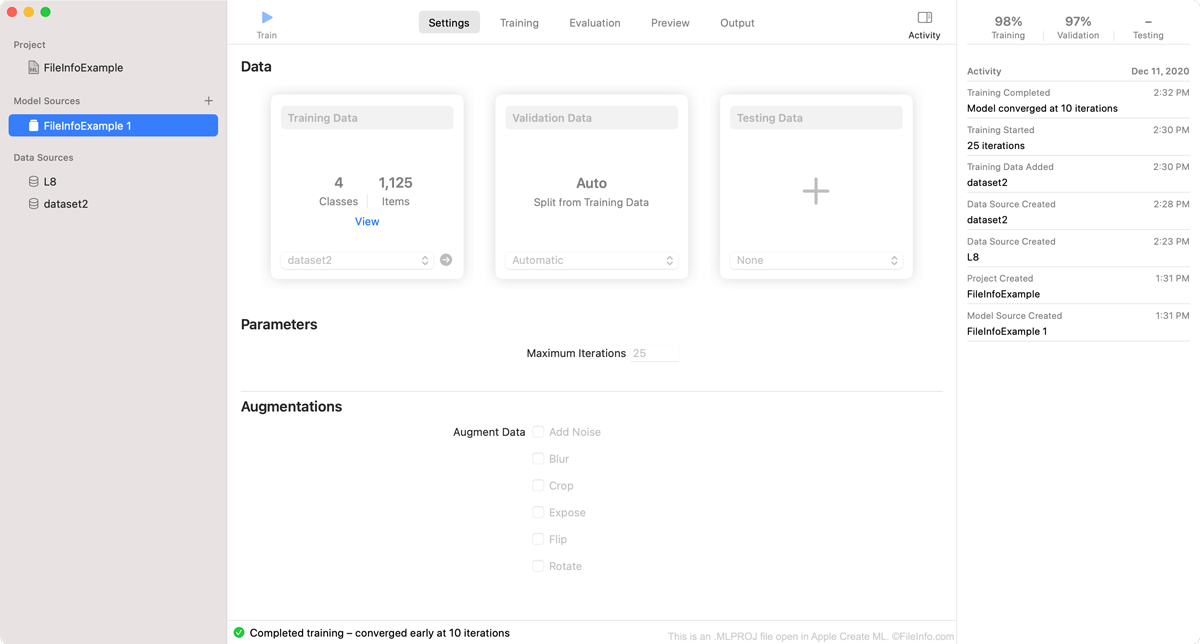
Schermafbeelding van een .mlproj-bestand in Apple Create ML
MLPROJ-bestand geopend in Apple Create ML

Create ML is an Apple Xcode component that macOS developers can use to create and train machine learning models. Specifically, developers use Create ML to create Core ML machine learning models, which are optimized for integration into Xcode applications.

As a developer creates a model in Create ML, the program saves the developer's work within an MLPROJ file. The MLPROJ file contains all the data associated with the developer's machine learning model, including training data, snapshots, and model containers, but is not itself a model. When a developer has finished training, testing, and tweaking their machine learning model in Create ML, they save the model as an .MLMODEL file, before integrating the model into Xcode applications.

Een MLPROJ-bestand openen

You can open an MLPROJ file in Apple Create ML. To do so:

  1. Open Apple Xcode.
  2. From the Xcode menu bar, select Xcode → Open Developer Tool → Create ML.
  3. A Finder window will appear. In the window, locate your MLPROJ file. Then, select Open Project.
  4. Your Create ML project will appear in Create ML.

If you have already opened Create ML, you can select File → Open... from its menu bar to open your MLPROJ file.

Programma's die MLPROJ-bestanden openen

Mac

Geverifieerd door FileInfo.com

Het FileInfo.com-team heeft onafhankelijk onderzoek gedaan naar alle bestandsformaten en softwareprogramma's die op deze pagina worden vermeld. Ons doel is 100% nauwkeurigheid en we publiceren alleen informatie over bestandstypen die we hebben geverifieerd.

Als u aanvullingen of updates voor deze pagina wilt voorstellen, kunt u het ons laten weten.