.FM 文件扩展名

FrameMaker Document

开发者 Adobe Systems
受欢迎程度
3.7  |  23 
 

什么是 FM 文件?

An FM file is a document created with Adobe FrameMaker, an application used to author, enrich, manage, and publish technical documentation. It stores information about the structure of a page that is set to be published for print or the web. FM files may store pages that are meant to be individually published or published as part of a FrameMaker book (.BOOK file).

更多信息

FrameMaker documents support text, raster graphics, and vector graphics, including .SVG images. Pages can be saved as .PDF files for better compatibility with other systems.

注: FrameMaker only supports .FM documents created in FrameMaker 3 or later.

使用File Viewer Plus打开 400 多种文件格式。免费下载

可打开 FM 文件的程序

Windows
免费试用
Mac
免费试用
Linux
免费试用

FileMaker Database

开发者 Claris
受欢迎程度
3.7  |  3 
 

An FM file is a database created by an early version of Claris FileMaker or FileMaker Pro. It contains one or more tables of data. For example, an FM file might contain a business's inventory list or contact list.

更多信息

FileMaker and FileMaker Pro are data management programs that allow businesses to track inventory, organize projects, and manage contacts. Nashoba released the original FileMaker for Mac in 1985. In 1990, Claris (which purchased Nashoba) released the first version of FileMaker Pro for Mac; Claris made the program available for Windows in 1992.

Early versions of FileMaker and FileMaker Pro, such as FileMaker Pro 2, saved users' databases as FM files. While current versions of FileMaker Pro cannot open FM files, you can still access the data your FM files contain, by converting them to newer FileMaker Pro database formats.

如何打开 FM 文件

You can open an FM file with FileMaker Pro (Windows, Mac). To open an FM file with a current version of FileMaker Pro, you must first convert the file to the current FileMaker Pro database format. For example, to open an FM file with FileMaker Pro 12, you must:

  1. Open the file with FileMaker Pro 6 to convert it to the FP6 format.
  2. Open the converted FP6 file with FileMaker Pro 7 - 11 to convert it to the .FP7 format.
  3. Open the converted FP7 file with FileMaker Pro 12 or a later version to convert it to the .FMP12 format.

可打开 FM 文件的程序

Windows
Mac
分类: 数据库
更新时间: 2022-08-31

FeatureCAM Part

开发者 Autodesk
受欢迎程度
2.0  |  2 
 

An FM file is a part file created by Autodesk FeatureCAM, a computer-assisted manufacturing program used to produce machining instructions for mechanical parts. It contains a set of features that define a part's shape. Using FeatureCAM and an FM file, machinists can export instructions that allow a computer numerical control device to produce a real-life version of the part the FM file describes.

更多信息

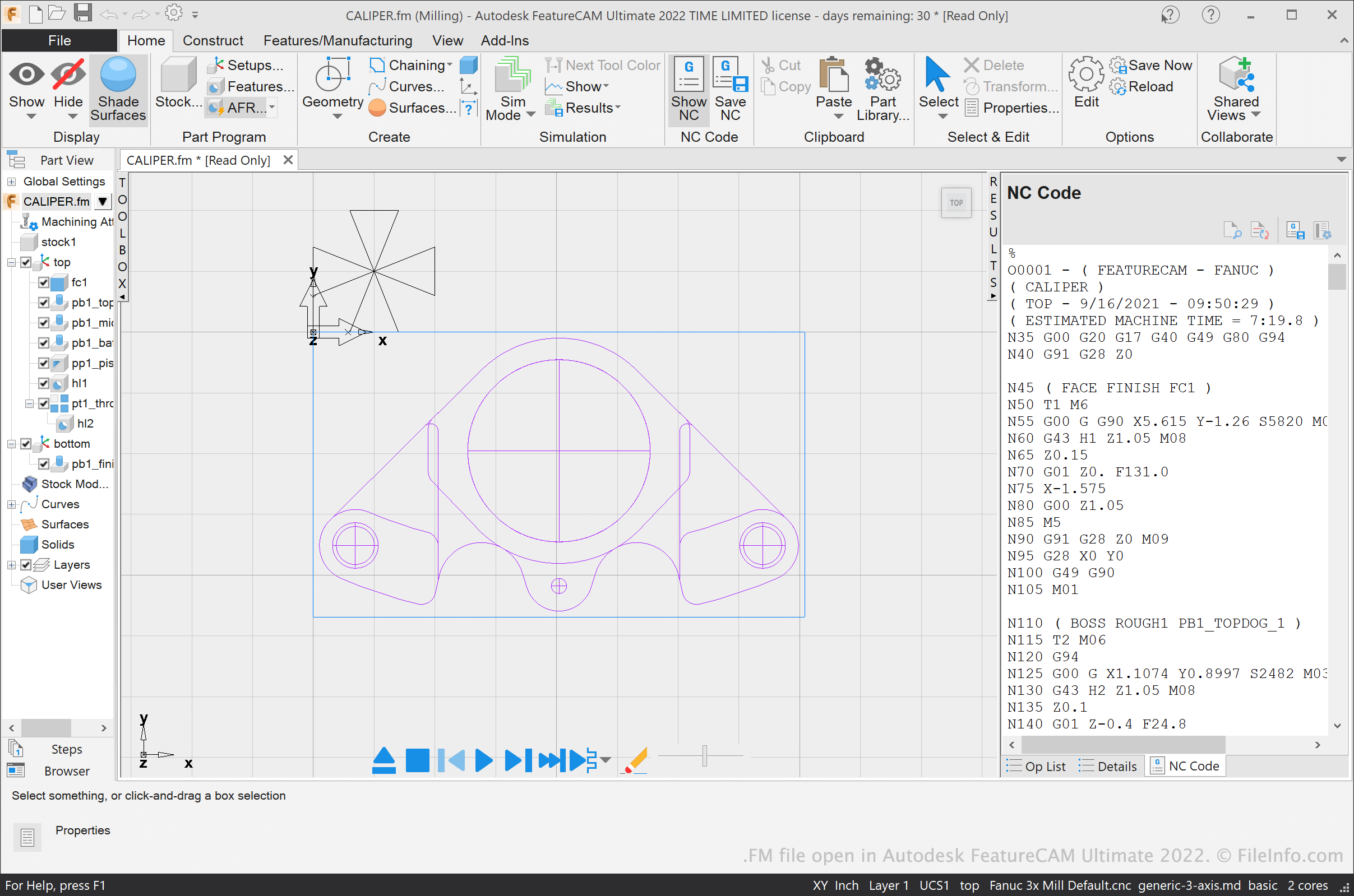
在 Autodesk FeatureCAM Ultimate 2022 中打开的 .fm 文件截图
在 Autodesk FeatureCAM Ultimate 2022 中打开的 FM 文件

Machining shops use computer-assisted manufacturing (CAM) and computer numerical control (CNC) applications to help them design and produce mechanical parts. FeatureCAM is a CAM application that allows machinists to design mechanical parts and output NC codes, which a CNC device can use to produce the part.

The parts machinists design in FeatureCAM are saved as FM files. Each FM file is comprised of a set of features, which contain instructions about how a CNC application should machine them.

FM files are often linked to several ancillary files, which use the same filename as the FM file but different extensions, such as .TXT, OP, TL, TDB, FDB, and CDB. FeatureCAM uses these ancillary files to load an FM file more quickly. However, you can open an FM file in FeatureCAM even if you do not possess its linked ancillary files. FeatureCAM will recreate the ancillary files when you open your FM file.

After a machinist finishes adding features to a FeatureCAM part, they can produce an NC code for that part (usually saved in a TXT file). The machinist can then transfer their NC code to a CNC device, which will use the code to produce a real-life version of the part.

注: FeatureCAM was previously developed by Engineering Geometry Systems and DelCam.

如何打开 FM 文件

You can open an FM file in Autodesk FeatureCAM (Windows). To do so, select [m]File → Open[/] from the program's menu bar. Then, navigate to and open your FM file.

可打开 FM 文件的程序

Windows
分类: CAD
更新时间: 2021-09-16

验证者 FileInfo.com

FileInfo.com 团队 独立研究了本页面列出的所有文件格式和软件程序。 我们的目标是达到 100% 的准确率,并且仅发布我们已验证过的文件类型信息。

如果您想为此页面提出新增或更新建议,请告诉我们