.FM 파일 확장자

FrameMaker Document

개발사 Adobe Systems
인기도
3.7  |  23 투표
 

FM 파일이란 무엇인가요?

An FM file is a document created with Adobe FrameMaker, an application used to author, enrich, manage, and publish technical documentation. It stores information about the structure of a page that is set to be published for print or the web. FM files may store pages that are meant to be individually published or published as part of a FrameMaker book (.BOOK file).

추가 정보

FrameMaker documents support text, raster graphics, and vector graphics, including .SVG images. Pages can be saved as .PDF files for better compatibility with other systems.

참고: FrameMaker only supports .FM documents created in FrameMaker 3 or later.

File Viewer Plus(으)로 400개 이상의 파일 형식을 여세요.무료 다운로드

FM 파일을 여는 프로그램

Windows
무료 체험판
Mac
무료 체험판
Linux
무료 체험판

FileMaker Database

개발사 Claris
인기도
3.7  |  3 투표
 

An FM file is a database created by an early version of Claris FileMaker or FileMaker Pro. It contains one or more tables of data. For example, an FM file might contain a business's inventory list or contact list.

추가 정보

FileMaker and FileMaker Pro are data management programs that allow businesses to track inventory, organize projects, and manage contacts. Nashoba released the original FileMaker for Mac in 1985. In 1990, Claris (which purchased Nashoba) released the first version of FileMaker Pro for Mac; Claris made the program available for Windows in 1992.

Early versions of FileMaker and FileMaker Pro, such as FileMaker Pro 2, saved users' databases as FM files. While current versions of FileMaker Pro cannot open FM files, you can still access the data your FM files contain, by converting them to newer FileMaker Pro database formats.

FM 파일을 여는 방법

You can open an FM file with FileMaker Pro (Windows, Mac). To open an FM file with a current version of FileMaker Pro, you must first convert the file to the current FileMaker Pro database format. For example, to open an FM file with FileMaker Pro 12, you must:

  1. Open the file with FileMaker Pro 6 to convert it to the FP6 format.
  2. Open the converted FP6 file with FileMaker Pro 7 - 11 to convert it to the .FP7 format.
  3. Open the converted FP7 file with FileMaker Pro 12 or a later version to convert it to the .FMP12 format.

FM 파일을 여는 프로그램

Windows
무료 체험판
Mac
무료 체험판

FeatureCAM Part

개발사 Autodesk
인기도
2.0  |  2 투표
 

An FM file is a part file created by Autodesk FeatureCAM, a computer-assisted manufacturing program used to produce machining instructions for mechanical parts. It contains a set of features that define a part's shape. Using FeatureCAM and an FM file, machinists can export instructions that allow a computer numerical control device to produce a real-life version of the part the FM file describes.

추가 정보

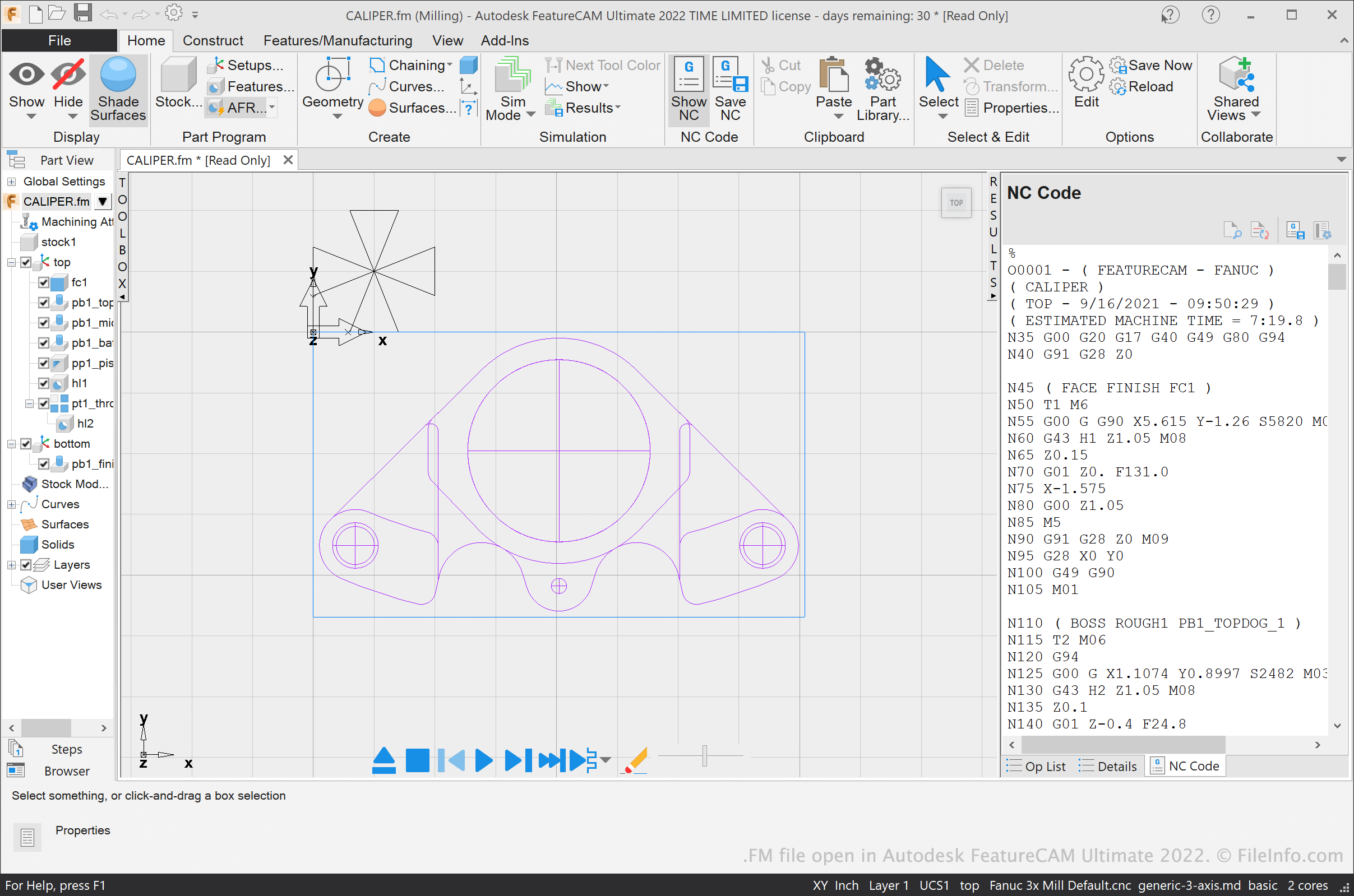
Autodesk FeatureCAM Ultimate 2022에서 열린 .fm 파일의 스크린샷
Autodesk FeatureCAM Ultimate 2022에서 열린 FM 파일

Machining shops use computer-assisted manufacturing (CAM) and computer numerical control (CNC) applications to help them design and produce mechanical parts. FeatureCAM is a CAM application that allows machinists to design mechanical parts and output NC codes, which a CNC device can use to produce the part.

The parts machinists design in FeatureCAM are saved as FM files. Each FM file is comprised of a set of features, which contain instructions about how a CNC application should machine them.

FM files are often linked to several ancillary files, which use the same filename as the FM file but different extensions, such as .TXT, OP, TL, TDB, FDB, and CDB. FeatureCAM uses these ancillary files to load an FM file more quickly. However, you can open an FM file in FeatureCAM even if you do not possess its linked ancillary files. FeatureCAM will recreate the ancillary files when you open your FM file.

After a machinist finishes adding features to a FeatureCAM part, they can produce an NC code for that part (usually saved in a TXT file). The machinist can then transfer their NC code to a CNC device, which will use the code to produce a real-life version of the part.

참고: FeatureCAM was previously developed by Engineering Geometry Systems and DelCam.

FM 파일을 여는 방법

You can open an FM file in Autodesk FeatureCAM (Windows). To do so, select [m]File → Open[/] from the program's menu bar. Then, navigate to and open your FM file.

FM 파일을 여는 프로그램

Windows
무료 체험판
카테고리: CAD
업데이트: 2021-09-16

검증자 FileInfo.com

FileInfo.com 팀 이 페이지에 나열된 모든 파일 형식과 소프트웨어 프로그램을 독자적으로 조사했습니다. 저희의 목표는 100% 정확성이며, 검증한 파일 유형에 대한 정보만 게시합니다.

이 페이지에 추가하거나 업데이트할 내용을 제안하고 싶으시면 알려 주세요.