

.KML Bestandsextensie
Keyhole Markup Language-bestand
| Ontwikkelaar | |
| Populariteit |
3,7 | 263 stemmen |
Wat is een KML-bestand?
Een KML-bestand bevat geografische modelgegevens in de Keyhole Markup Language (KML), een gegevensindeling voor geografische informatiesystemen (GIS) die is gebaseerd op XML. Het bevat plaatsmarkeringen, punten, lijnen, polygonen en afbeeldingen. KML-bestanden worden gebruikt om locaties te identificeren en te labelen, verschillende camerastandpunten te maken, texturen over kaarten heen te leggen en HTML-inhoud (links, letterstijlen, enzovoort) toe te voegen.
Meer informatie
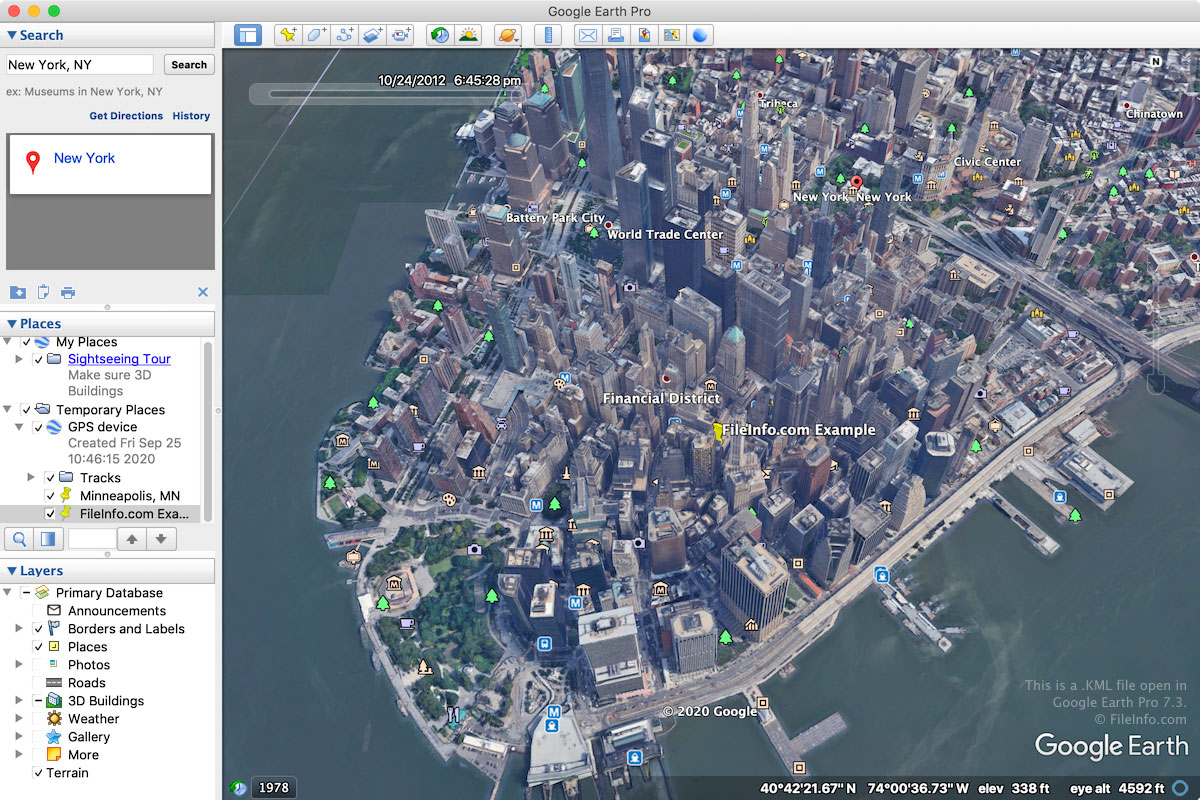
De KML-indeling werd oorspronkelijk ontwikkeld door Keyhole, Inc. voor Keyhole Earth Viewer, een kaartprogramma dat in 2004 door Google werd overgenomen. De indeling werd uiteindelijk een wereldwijde standaard voor geografische annotatie en visualisatie in 2D- en 3D-programma's voor geografische kaarten.
KML-bestanden worden voornamelijk gebruikt door de Google Earth-webapplicatie en het desktopprogramma Google Earth Pro. Ze worden ook ondersteund door andere kaartapplicaties, zoals Blue Marble Geographics Global Mapper en ESRI ArcGIS Pro.
De meeste KML-bestanden worden gemaakt met Google Earth of Google Earth Pro. Als je een KML-bestand wilt maken in Google Earth, klik je op het pictogram "Projects" in het linkerdeelvenster, selecteer je "Create" en kies je "Create KML file". Als je een KML-bestand wilt maken in Google Earth Pro, selecteer je en kies je vervolgens "Kml" in het vervolgkeuzemenu.
Omdat KML-bestanden als platte tekst worden opgeslagen, kun je KML-bestanden helemaal opnieuw maken of functies uit Google Earth Pro kopiëren. Klik hiervoor met de rechtermuisknop op een functie in de 3D Viewer van Google Earth Pro en selecteer . Plak de functie vervolgens in een TXT-bestand dat in een teksteditor is geopend. Je kunt de .TXT-bestanden daarna opslaan en de bestandsextensie .txt wijzigen in .kml.
OPMERKING: Je kunt KML-bestanden opslaan als .KMZ-bestanden. Deze worden gecomprimeerd met Zip om ruimte te besparen wanneer je de bestanden met andere gebruikers deelt.
Een KML-bestand openen
Je kunt KML-bestanden openen met verschillende kaartapplicaties voor Windows, macOS, Linux, Android en iOS. De webbrowserapplicatie Google Earth en de desktopapplicatie Google Earth Pro zijn veelgebruikte opties.
Als je een KML-bestand wilt openen met Google Earth, klik je op het pictogram "Projects" in het linkerdeelvenster, selecteer je "Open" en kies je "Import KML file from Google Drive" of "Import KML file from computer". Als je een KML-bestand wilt openen met Google Earth Pro, selecteer je .
Omdat KML-bestanden worden opgeslagen in een indeling die platte tekst gebruikt en op XML lijkt, kun je ze openen met een teksteditor, zoals Microsoft Notepad (Windows) of Apple TextEdit (macOS).
OPMERKING: Je kunt een KML-bestand ook openen in Google Maps door het op een online locatie te hosten en vervolgens de URL in het zoekvak van Google Maps te typen. Als je je KML-bestand bijvoorbeeld host op http://mywebsite.com/myfile.kml, typ je deze URL in het zoekvak van Google Maps om het bestand weer te geven.
Je kunt de URL ook zelf samenstellen in Google Maps door de URL van je KML-bestand vooraf te laten gaan door http://maps.google.com/maps?q=. Als je hetzelfde KML-bestand als hierboven wilt openen, kun je de volgende URL gebruiken:
http://maps.google.com/maps?q=http://mywebsite.com/myfile.kml
Deze procedure werkt ook voor Google Earth View, de plug-in voor het bekijken van de aarde in 3D die je aan je webbrowser kunt toevoegen.