.XD 파일 확장자

2개의 파일 유형.xd 확장자를 사용합니다.

Adobe XD Document

개발사 Adobe Systems
인기도
4.1  |  29 투표
 

XD 파일이란 무엇인가요?

An XD file is a website or mobile application mockup created using Adobe XD, a user interface (UI) and user experience (UX) design tool. It contains one or more artboards, which themselves contain layer-based graphic design elements, such as images, shapes, and text. XD files are used to prototype the look, feel, and workflows of websites and mobile applications, before developers begin developing those sites or applications.

추가 정보

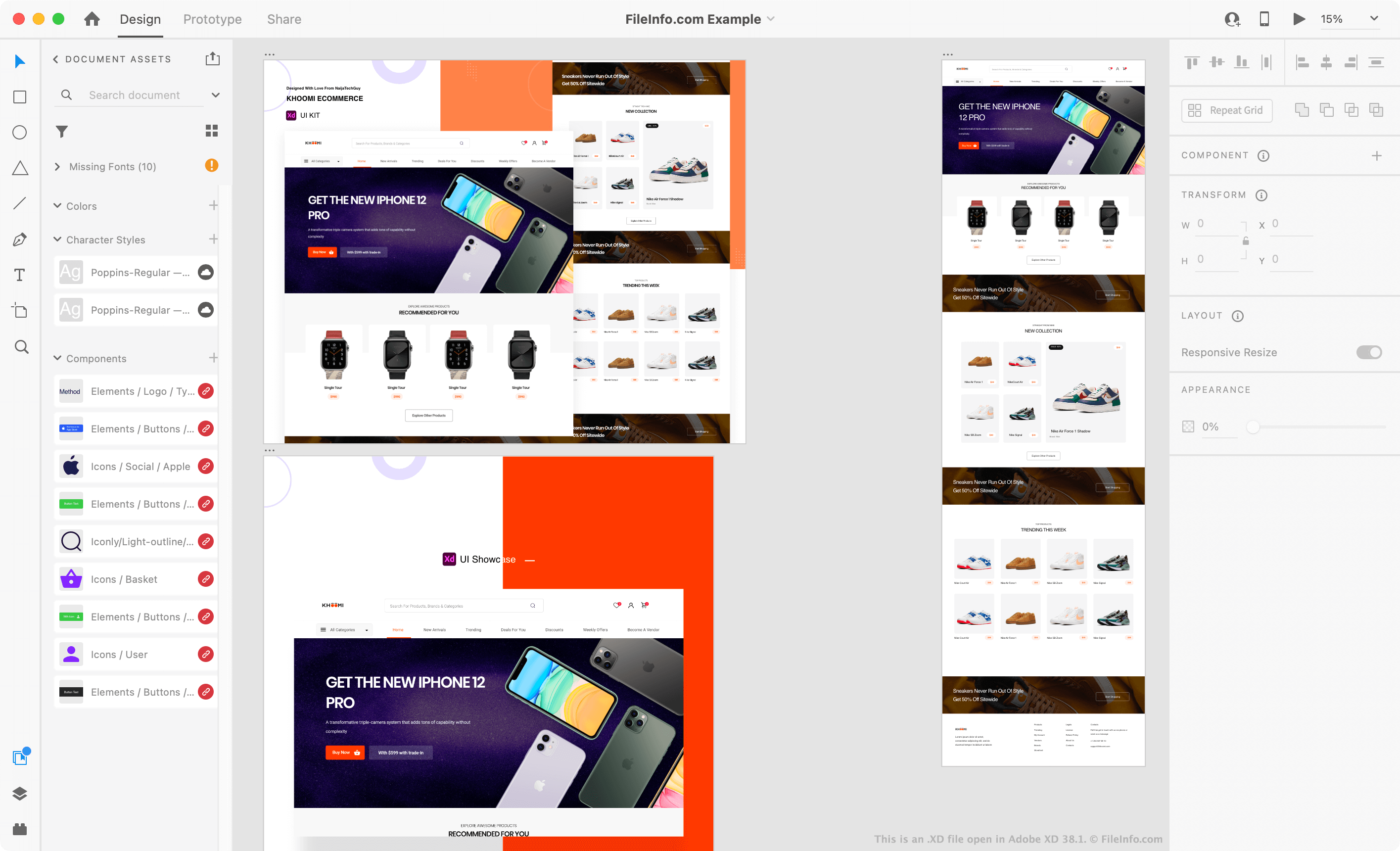
Adobe XD 38.1에서 열린 .xd 파일의 스크린샷
Adobe XD 38.1에서 열린 XD 파일

Adobe XD is a design application that UI and UX designers use to prototype website and mobile application frontends. XD allows designers to create basic wireframes and more finalized mockups, which simulate the pages of a website or screens of a mobile application. Each page or screen is typically placed on its own XD artboard.

Designers can use a variety of tools to animate their artboards and link them together. This allows designers to simulate the interactions users will have with a website or application. For example, a designer can place a Log In button on one artboard and link that button to an artboard prototyping their app's Login screen. Then, when the designer opens their prototype in XD's Preview mode, they can click the Log In button to be taken to the Login screen.

XD files are most often used to refine a website or mobile application's UI before developers start developing the site or app. For example, a UI designer might use an XD file to present a proposed website design and workflow to their web development team. Developers often use the assets (images, fonts, and other elements) included in XD files during the development process, to ensure the website or application they create matches their UI designer's prototype.

XD 파일을 여는 방법

You can open an XD file in Adobe XD (cross-platform). To do so, select File → Open from Your Computer... from the program's menu bar. Then, navigate to and open your XD file.

Those who do not have access to Adobe XD can open XD files in PSDETCH (web), Photopea (web), or Bohemian Coding Sketch (Mac) to view the artboards and elements their XD file contains.

How do I convert an XD file to a PNG, SVG, PDF, or JPG file?

To convert an XD file to a .PNG, .SVG, .PDF, or .JPG file, you can:

  1. Open your XD file in Adobe XD.
  2. Select File → Export → All Artboards.... from the program's menu bar.
  3. Select the format in which you want to export your artboards. Then, select Export All Artboards.
File Viewer Plus(으)로 400개 이상의 파일 형식을 여세요.무료 다운로드

XD 파일을 여는 프로그램

Windows
무료 체험판
Mac
무료 체험판
무료 체험판
Web
무료
무료+
iOS
무료 체험판
Android
무료 체험판
카테고리:
업데이트: 2022-09-21

xdBot Macro

개발사 ZiLko
인기도
4.3  |  4 투표
 

An XD file is a macro created by xdBot, a botting tool available in the Geode SDK for the Geometry Dash video game. It stores a recording of a player's actions when playing a Geometry Dash level. Players typically create XD files to save Geometry Dash botrun videos and share them with other Geometry Dash players.

추가 정보

Geometry Dash is a cross-platform game where players click in time with audio beats to jump a cube over obstacles. Players that want to modify gameplay may install Geode SDK (or Geode), a modding framework and mod loader for Geometry Dash.

xdBot is a modding tool developed by ZiLko that is available with Geode for the Windows version of Geometry Dash. It allows players to control the game's speed and record their game actions as a macro, similar to the Mega Hack v7 Pro tool, which saves macros as .MHR files.

Players can then replay their macro at regular (or faster) speed to create level speedrun videos (often referred to as "botrun" or "bot" videos since the player is not manually controlling their cube during these videos). Optionally, players can save the xdBot macros they create as XD files (using the Save option in xdBot's Macros section) to share the macros with other xdBot players.

XD 파일을 여는 방법

You can open an XD file with xdBot, a tool included with the Geode for the Geometry Dash (Windows). For example, to open an XD file with xdBot, select Load in the app's Macros section.

XD 파일을 여는 프로그램

Windows
카테고리: 게임
업데이트: 2024-02-14

검증자 FileInfo.com

FileInfo.com 팀 이 페이지에 나열된 모든 파일 형식과 소프트웨어 프로그램을 독자적으로 조사했습니다. 저희의 목표는 100% 정확성이며, 검증한 파일 유형에 대한 정보만 게시합니다.

이 페이지에 추가하거나 업데이트할 내용을 제안하고 싶으시면 알려 주세요.