

.PXZ 파일 확장자
Pixlr 레이어 이미지
| 개발사 | Inmagine |
| 인기도 |
3.1 | 13 표 |
PXZ 파일이란 무엇인가요?
PXZ 파일은 Pixlr X, Pixlr E 또는 Pixlr M 이미지 편집기로 만든 프로젝트 파일입니다. Pixlr에서 레이어 기반 이미지를 불러오는 데 사용하는 Zip으로 압축된 아카이브입니다. PXZ 파일은 2021년에 .PXD 파일을 대체했습니다.
추가 정보
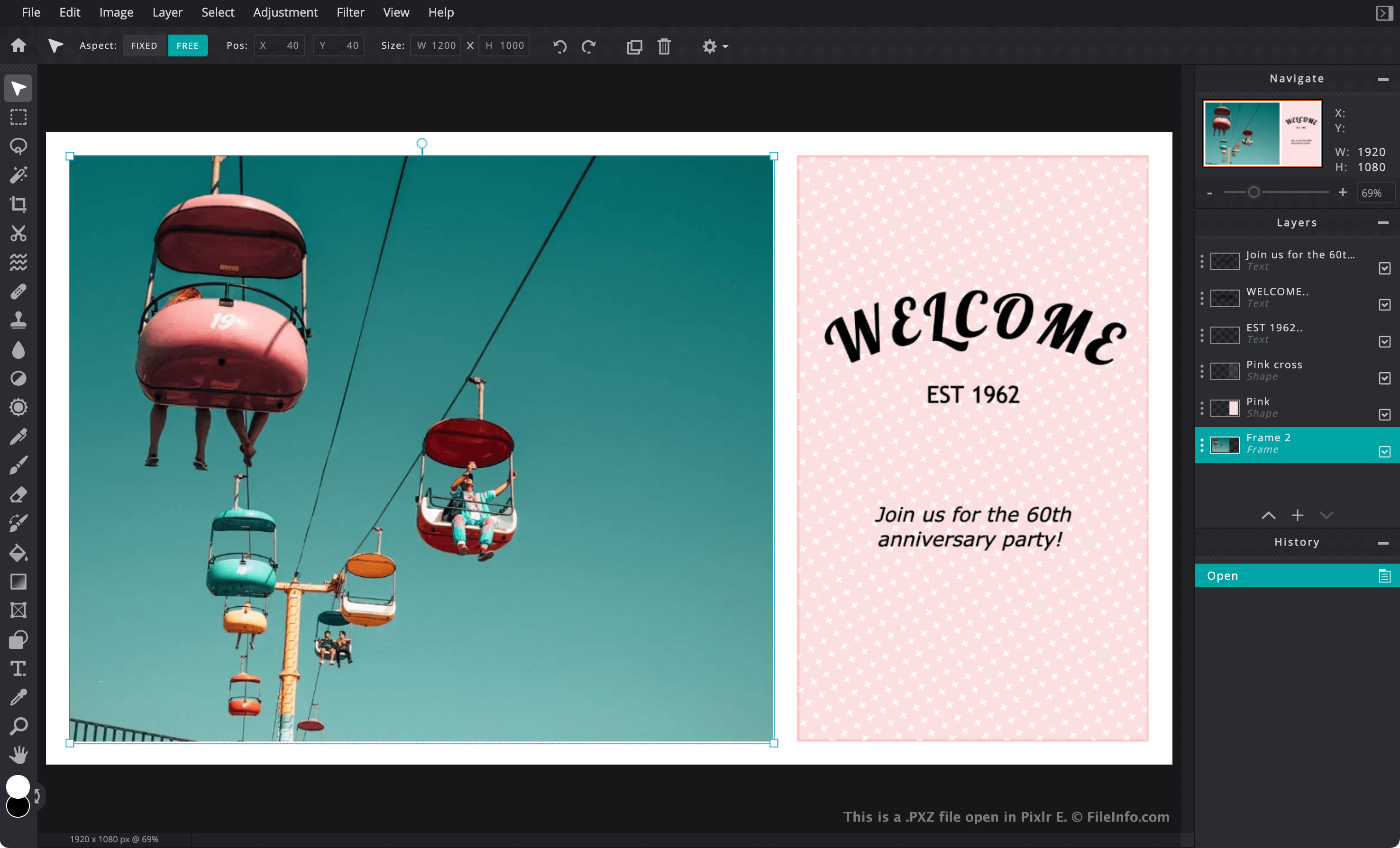
Pixlr은 그래픽 디자이너와 사진작가가 이미지를 만들고 편집하는 데 사용하는 웹 기반 이미지 편집 애플리케이션 모음입니다. Pixlr은 Adobe Photoshop과 비슷하지만, Pixlr의 웹 버전은 사용자의 웹 브라우저에서 전적으로 작동합니다.
사용자가 진행 중인 Pixlr 프로젝트를 PC 또는 모바일 기기에 저장하려는 경우 프로젝트를 PXZ 파일로 저장할 수 있습니다. 프로젝트를 PXZ 파일로 저장하면 텍스트, 조정, 필터, 마스크 및 추가 이미지 삽입 등 사용자가 이미지에 적용한 레이어 기반 편집 내용이 보존됩니다. 따라서 사용자는 나중에 해당 레이어를 계속 편집할 수 있습니다. 반면 Pixlr 프로젝트를 .JPG, .PNG. 또는 .WEBP 파일로 저장하면 이미지가 단일 레이어로 병합됩니다.
각 PXZ 파일은 Pixlr이 레이어 기반 이미지를 사용자에게 불러오고 표시하는 데 사용하는 모든 파일을 포함한 Zip 아카이브입니다. PXZ 파일에는 일반적으로 다음이 포함됩니다.
- 프로젝트에 포함된 모든 이미지의 .WEBP 사본과 프로젝트 전체의 WEBP 미리 보기 및 썸네일
- 프로젝트의 이름, 유형, 크기 및 레이어를 설명하는 .JSON 파일
- 프로젝트에서 사용하는 글꼴을 지정하는 .WOFF 파일
- 프로젝트에 추가된 도형을 설명하는 .SVG 파일
2021년 초까지 Pixlr은 레이어 기반 이미지를 PXD 파일로 저장했습니다. Pixlr 사용자는 여전히 Pixlr에서 PXD 파일을 불러올 수 있지만, 현재 Pixlr은 모든 레이어 기반 이미지를 PXZ 형식으로 저장합니다.
참고: Autodesk는 2011년에 Pixlr을 인수했으며, 이후 Inmagine이 2017년에 Autodesk로부터 Pixlr을 인수했습니다.
PXZ 파일을 여는 방법
Pixlr X 또는 Pixlr E(Web, Windows, Mac)로 PXZ 파일을 열 수 있습니다. Pixlr X 또는 Pixlr E의 웹 버전에서 PXZ 파일을 열려면 다음 단계를 따르세요.
- 웹 브라우저에서 https://pixlr.com으로 이동한 다음 웹 사이트의 메뉴 모음에서 또는 를 선택합니다. 초보 이미지 편집자는 를 선택하고, 숙련된 편집자는 를 선택해야 합니다.
- 를 선택합니다.
- PXZ 파일이 있는 위치로 이동하여 파일을 엽니다.
Windows에서는 Chasys Draw IES로도 PXZ 파일을 열 수 있습니다.
PXZ 파일은 Zip으로 압축되어 있으므로 Zip 압축 해제 도구를 사용하여 파일의 내용을 추출할 수 있습니다. Corel WinZip(Windows), Apple Archive Utility(Mac) 및 B1 Free Archiver는 PXZ 파일의 압축을 해제하고 파일에 포함된 WEBP 이미지 및 기타 파일을 추출하는 몇 가지 도구입니다.