

.PXZ Extension de fichier
Image en couches compressée Pixlr
| Développeur | Inmagine |
| Popularité |
3,1 | 13 Votes |
Qu'est-ce qu'un fichier PXZ ?
Un fichier PXZ est un fichier de projet créé par les éditeurs d’images Pixlr X, Pixlr E ou Pixlr M. Il s’agit d’une archive compressée au format Zip utilisée pour charger une image en couches dans Pixlr. Les fichiers PXZ ont remplacé les fichiers .PXD en 2021.
Plus d'informations
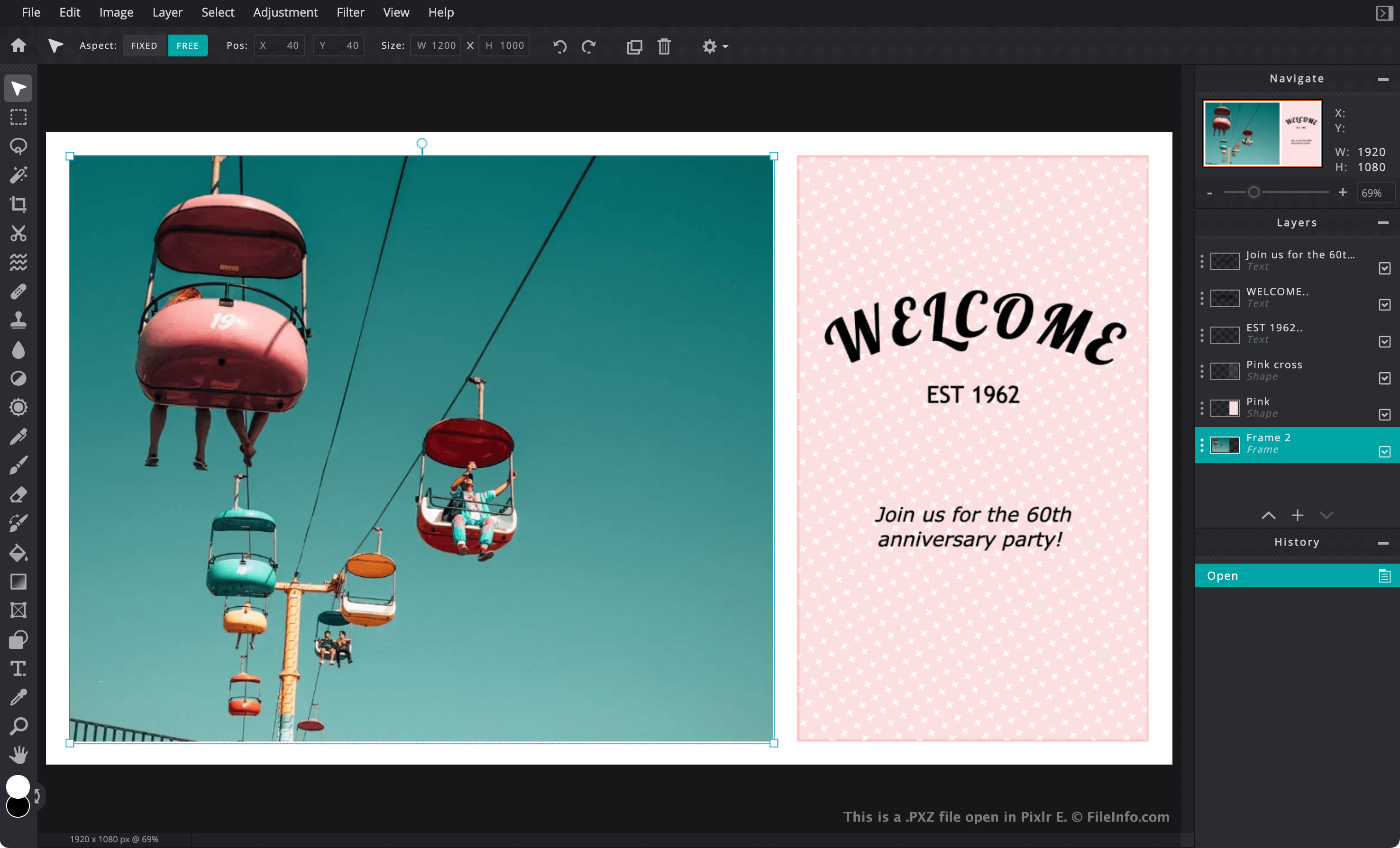
Pixlr est une suite principalement en ligne d’applications de retouche d’images que les graphistes et les photographes utilisent pour créer et modifier des images. Pixlr est similaire à Adobe Photoshop, mais la version en ligne de Pixlr fonctionne entièrement dans le navigateur web de l’utilisateur.
Si un utilisateur souhaite enregistrer un projet Pixlr en cours sur son PC ou son appareil mobile, il peut l’enregistrer en tant que fichier PXZ. L’enregistrement du projet en tant que fichier PXZ conserve les modifications effectuées sur les différents calques de l’image, comme l’ajout de texte, les réglages, les filtres, les masques et les images supplémentaires. Cela permet à l’utilisateur de continuer à modifier ces calques ultérieurement. En revanche, l’enregistrement d’un projet Pixlr en tant que fichier .JPG, .PNG ou .WEBP aplatit l’image sur un seul calque.
Chaque fichier PXZ est une archive Zip qui contient tous les fichiers utilisés par Pixlr pour charger et afficher les images en couches aux utilisateurs. Les fichiers PXZ contiennent généralement :
- des copies .WEBP de chaque image contenue dans le projet, ainsi qu’un aperçu et une miniature WEBP de l’ensemble du projet
- un fichier .JSON qui décrit le nom, le type, la taille et les calques du projet
- des fichiers .WOFF qui indiquent les police(s) utilisées par le projet
- des fichiers .SVG qui décrivent les formes ajoutées au projet
Jusqu’au début de 2021, Pixlr enregistrait les images en couches dans des fichiers PXD. Bien que les utilisateurs de Pixlr puissent toujours charger des fichiers PXD dans Pixlr, Pixlr enregistre désormais toutes les images en couches au format PXZ.
REMARQUE : Autodesk a racheté Pixlr en 2011, puis Inmagine a racheté Pixlr à Autodesk en 2017.
Comment ouvrir un fichier PXZ
Vous pouvez ouvrir les fichiers PXZ avec Pixlr X ou Pixlr E (Web, Windows, Mac). Pour ouvrir un fichier PXZ dans la version en ligne de Pixlr X ou Pixlr E :
- Dans votre navigateur web, accédez à https://pixlr.com et sélectionnez ou dans la barre de menus du site. Les utilisateurs débutants doivent sélectionner , tandis que les utilisateurs expérimentés doivent sélectionner .
- Sélectionnez .
- Accédez à votre fichier PXZ et ouvrez-le.
Vous pouvez également ouvrir les fichiers PXZ avec Chasys Draw IES sous Windows.
Comme les fichiers PXZ sont compressés au format Zip, vous pouvez extraire leur contenu avec un outil de décompression Zip. Corel WinZip (Windows), Apple Archive Utility (Mac) et B1 Free Archiver sont quelques options pour décompresser votre fichier PXZ et extraire les images WEBP ainsi que les autres fichiers qu’il contient.