

.MJML 파일 확장자
Mailjet Markup Language 파일
| 개발사 | Mailjet |
| 인기도 |
3.3 | 3 표 |
MJML 파일이란 무엇인가요?
MJML 파일은 Mailjet Markup Language(MJML)를 사용해 형식이 지정된 반응형 이메일 템플릿 또는 요소입니다. 이 파일에는 템플릿 또는 요소의 내용과 서식을 결정하는 일반 텍스트가 포함되어 있으며, MJML 태그와 구문을 사용해 정의됩니다. 개발자는 대부분 공식 MJML 앱으로 MJML 파일을 만들고 편집합니다.
추가 정보
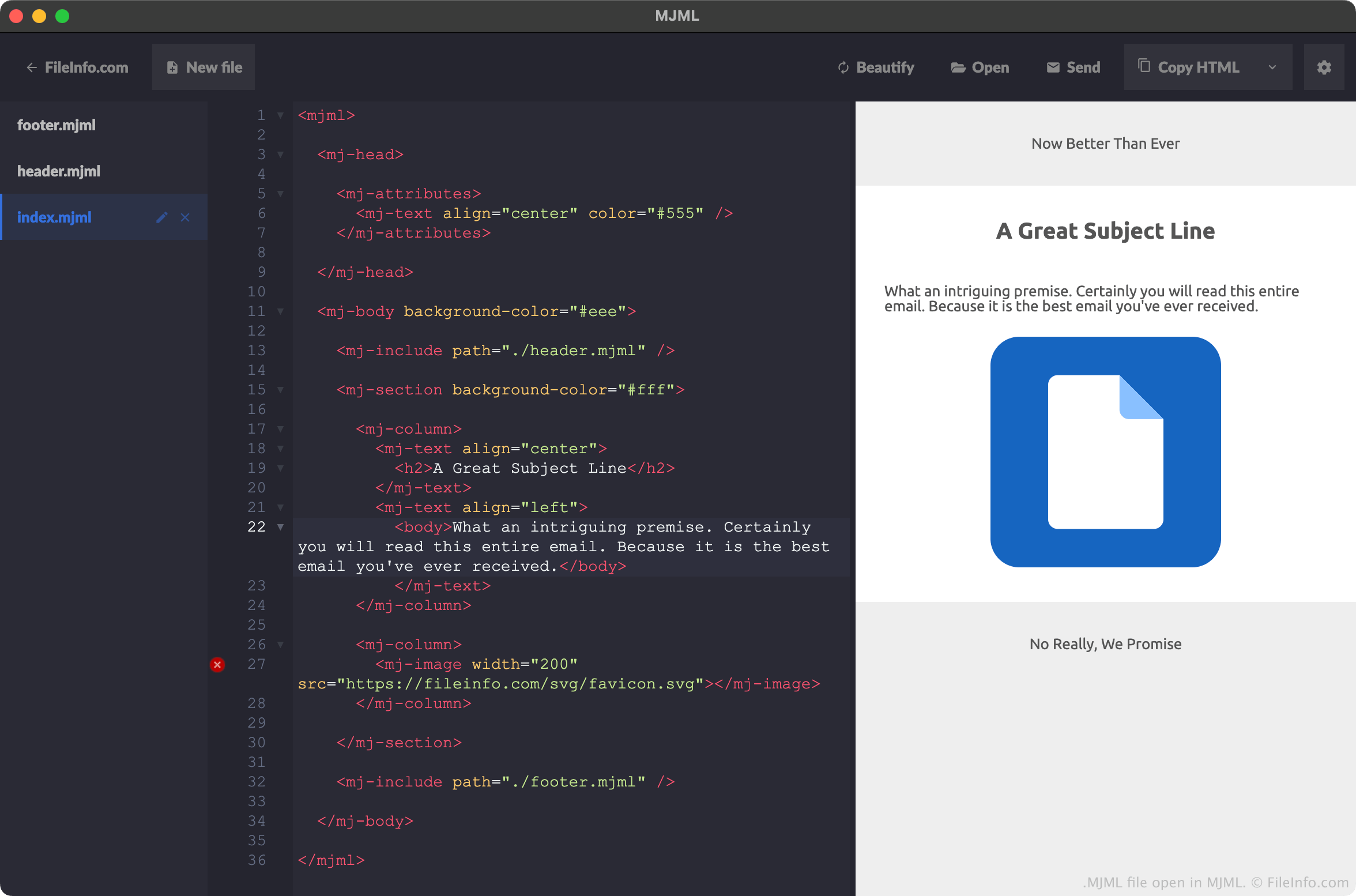
MJML은 웹 개발자가 반응형 이메일과 템플릿을 만드는 데 사용할 수 있는 마크업 언어입니다. HTML과 유사한 구문과 요소를 제공하며, 개발자가 반응형 이메일 요소를 코딩하는 데 걸리는 시간을 줄일 수 있도록 표준 구성 요소 라이브러리도 제공합니다.
개발자는 MJML을 사용해 만든 이메일, 템플릿, 요소를 MJML 파일로 저장하는 경우가 많습니다. 예를 들어 개발자가 MJML 앱에서 새 프로젝트를 만들면 MJML은 해당 프로젝트의 기본 콘텐츠를 index.mjml이라는 파일에 저장합니다. 개발자가 머리글과 바닥글이 포함된 새 프로젝트를 만들면 MJML은 프로젝트의 머리글과 바닥글 요소를 각각 header.mjml 및 footer.mjml이라는 파일에 저장합니다. (이 경우 개발자의 index.mjml 파일에는 header.mjml 및 footer.mjml 파일에 대한 참조가 포함됩니다.)
개발자는 대부분 MJML 앱에서 MJML 파일을 만들지만, 모든 텍스트 편집기를 사용해 MJML 파일을 만들 수도 있습니다. Mailjet은 개발자가 이러한 앱에서 MJML 파일을 더 쉽게 만들 수 있도록 Microsoft Visual Studio Code, Github Atom, Sublime Text용 플러그인을 제공합니다.
일반적인 .MJML 파일 이름
index.html - MJML 이메일의 주요 콘텐츠를 정의합니다.
header.html - MJML 이메일의 머리글을 정의합니다.
footer.html - MJML 이메일의 바닥글을 정의합니다.
MJML 파일을 여는 방법
MJML 파일은 Mailjet의 공식 MJML 애플리케이션으로 여는 것이 가장 좋습니다. MJML은 MJML 파일의 구문을 강조할 뿐만 아니라 다음 기능도 제공합니다:
- MJML 파일이 설명하는 이메일 또는 요소의 실시간 미리 보기를 표시합니다
- 개발자가 MJML 파일을 .HTML 파일로 내보낼 수 있습니다
하지만 모든 텍스트 편집기로 MJML 파일을 열 수 있습니다. Microsoft Visual Studio Code, Github Atom, Sublime Text용 플러그인을 사용하면 해당 프로그램에서 MJML 구문을 올바르게 강조할 수 있습니다.
MJML 파일을 변환하는 방법
MJML 앱을 사용하면 MJML 파일이 설명하는 이메일 템플릿 또는 요소를 .HTML(Hypertext Markup Language) 형식으로 변환할 수 있습니다. 변환하려면 다음 단계를 따르세요:
- MJML로 MJML 파일을 엽니다.
- 옆에 표시되는 드롭다운 화살표를 선택합니다.
- 을 선택합니다.
- HTML 파일의 이름을 지정하고 저장합니다.