

.MJML Dateiendung
Mailjet-Markup-Language-Datei
| Entwickler | Mailjet |
| Beliebtheit |
3,3 | 3 Stimmen |
Was ist eine MJML-Datei?
Eine MJML-Datei ist eine responsive E-Mail-Vorlage oder ein responsives E-Mail-Element, das mit der Mailjet Markup Language (MJML) formatiert wurde. Sie enthält einfachen Text, der den Inhalt und die Formatierung der Vorlage oder des Elements festlegt, definiert mithilfe von MJML-Tags und Syntax. In den meisten Fällen erstellen und bearbeiten Entwickler MJML-Dateien mit der offiziellen MJML-App.
Weitere Informationen
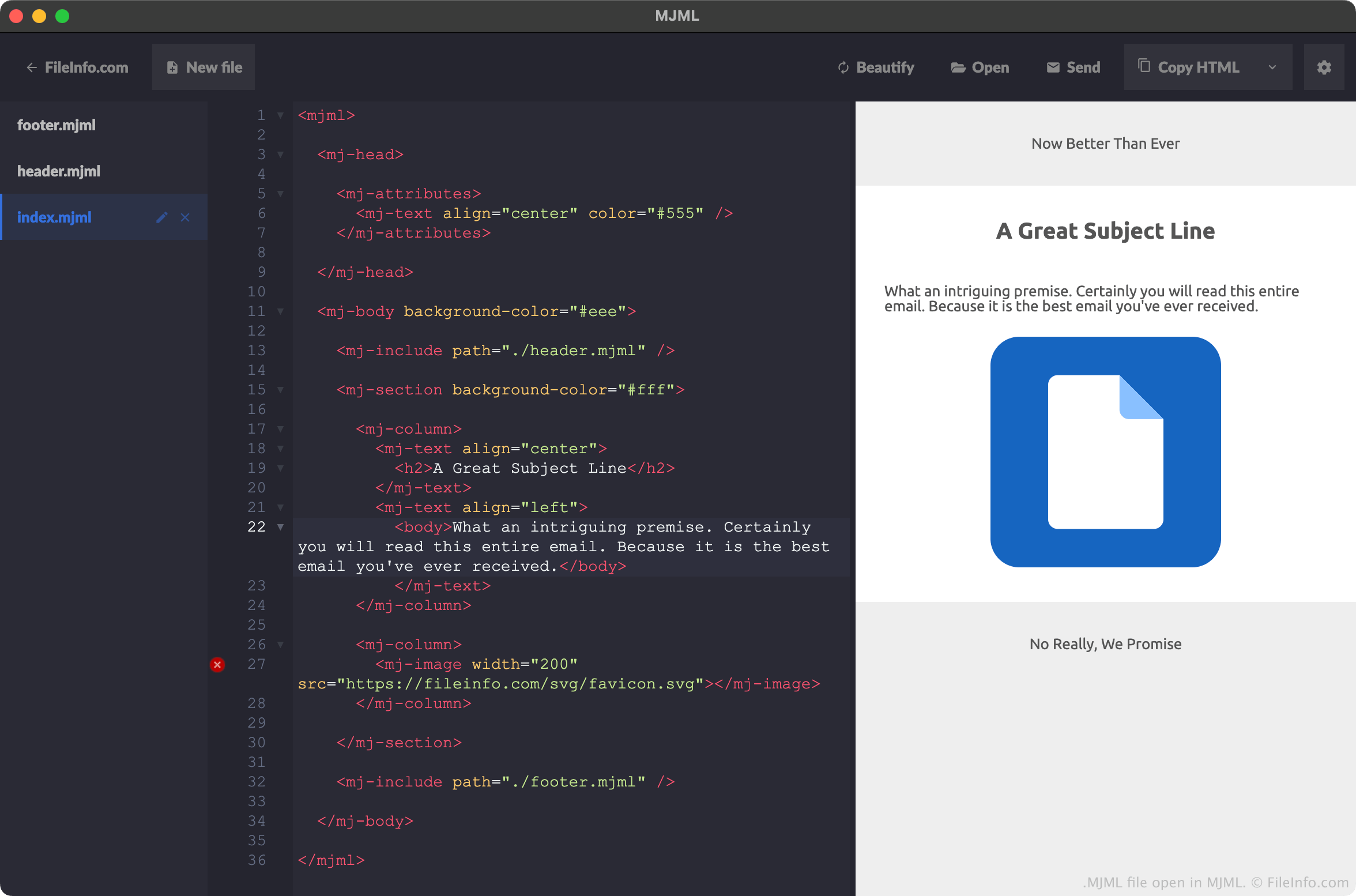
MJML ist eine Auszeichnungssprache, mit der Webentwickler responsive E-Mails und Vorlagen erstellen können. Sie bietet eine HTML-ähnliche Syntax und Elemente sowie eine Standardkomponentenbibliothek, aus der Entwickler auswählen können, um den Zeitaufwand für die Programmierung responsiver E-Mail-Elemente zu verringern.
Oft speichern Entwickler die E-Mails, Vorlagen und Elemente, die sie mit MJML erstellt haben, als MJML-Dateien. Wenn ein Entwickler beispielsweise ein neues Projekt in der MJML-App erstellt, speichert MJML den grundlegenden Inhalt des Projekts in einer Datei namens index.mjml. Wenn ein Entwickler ein neues Projekt erstellt, das eine Kopf- und eine Fußzeile enthält, speichert MJML die Kopf- und Fußzeilenelemente des Projekts in Dateien namens header.mjml und footer.mjml. (In diesem Fall enthält die Datei index.mjml des Entwicklers Verweise auf die Dateien header.mjml und footer.mjml.)
Obwohl Entwickler MJML-Dateien meist innerhalb der MJML-App erstellen, können sie dafür jeden Texteditor verwenden. Mailjet stellt Plug-ins für Microsoft Visual Studio Code, Github Atom und Sublime Text bereit, die es Entwicklern erleichtern, MJML-Dateien in diesen Apps zu erstellen.
Häufige .MJML-Dateinamen
index.html - Definiert den Hauptinhalt einer MJML-E-Mail.
header.html - Definiert die Kopfzeile einer MJML-E-Mail.
footer.html - Definiert die Fußzeile einer MJML-E-Mail.
So öffnen Sie eine MJML-Datei
MJML-Dateien sollten am besten mit der offiziellen MJML-Anwendung von Mailjet geöffnet werden. MJML hebt nicht nur die Syntax einer MJML-Datei hervor, sondern:
- zeigt eine Live-Vorschau der E-Mail oder des Elements an, die bzw. das in einer MJML-Datei beschrieben wird
- ermöglicht Entwicklern, MJML-Dateien als .HTML-Dateien zu exportieren
Sie können MJML-Dateien jedoch mit jedem Texteditor öffnen. Plug-ins für Microsoft Visual Studio Code, Github Atom und Sublime Text ermöglichen es diesen Programmen, die MJML-Syntax korrekt hervorzuheben.
So konvertieren Sie eine MJML-Datei
Mit der MJML-App können Sie die E-Mail-Vorlage oder das E-Mail-Element, die bzw. das in einer MJML-Datei beschrieben wird, in das .HTML-Format (Hypertext Markup Language) konvertieren. Gehen Sie dazu wie folgt vor:
- Öffnen Sie Ihre MJML-Datei mit MJML.
- Wählen Sie den Dropdown-Pfeil neben aus.
- Wählen Sie aus.
- Benennen und speichern Sie Ihre HTML-Datei.