.BAR 파일 확장자

Age of Empires 3 Data File

개발사 Microsoft
인기도
4.0  |  30 투표
 

BAR 파일이란 무엇인가요?

Data file used by Age of Empires III, a strategy game where players control units and build empires; may include game data, such as textures, music, fonts, text, and other game settings; serves as a file container that holds game data.

추가 정보

BAR files are loaded by Age of Empires III on-demand during gameplay.

File Viewer Plus(으)로 400개 이상의 파일 형식을 여세요.무료 다운로드

BAR 파일을 여는 프로그램

Windows
카테고리: 게임
업데이트: 2010-03-04

Age of Mythology Data File

개발사 Microsoft
인기도
3.3  |  3 투표
 

File used by Age of Mythology, a Microsoft real-time strategy (RTS) game where player control units in a mythological era; serves as a file container which includes game data, such as textures, music, maps, models, and other game settings.

추가 정보

BAR files are commonly used to create custom modifications for game content.

BAR 파일을 열거나 참조하는 프로그램

카테고리: 게임
업데이트: 2010-03-04

Brew MP Binary Application Resource

개발사 Qualcomm
인기도
3.0  |  3 투표
 

A BAR file is a Binary Application Resource used by Brew Mobile Platform (MP) applications. It specifies the assets available to an executing module. BAR files are compiled from .CAR files and loaded when the application is run.

BAR 파일을 열거나 참조하는 프로그램

Windows
Qualcomm Brew MP SDK
Mac
Qualcomm Brew MP SDK
Linux
Qualcomm Brew MP SDK
카테고리: 데이터
업데이트: 2022-03-22

XnViewMP Custom Toolbars

개발사 XnSoft
인기도
3.5  |  2 투표
 

A BAR file contains data used to load customized XnViewMP toolbars. It defines the buttons and separators that each of XnViewMP's toolbars (Browser and View) contains. XnViewMP users can create and save custom toolbars using the program's Customize toolbar... feature.

추가 정보

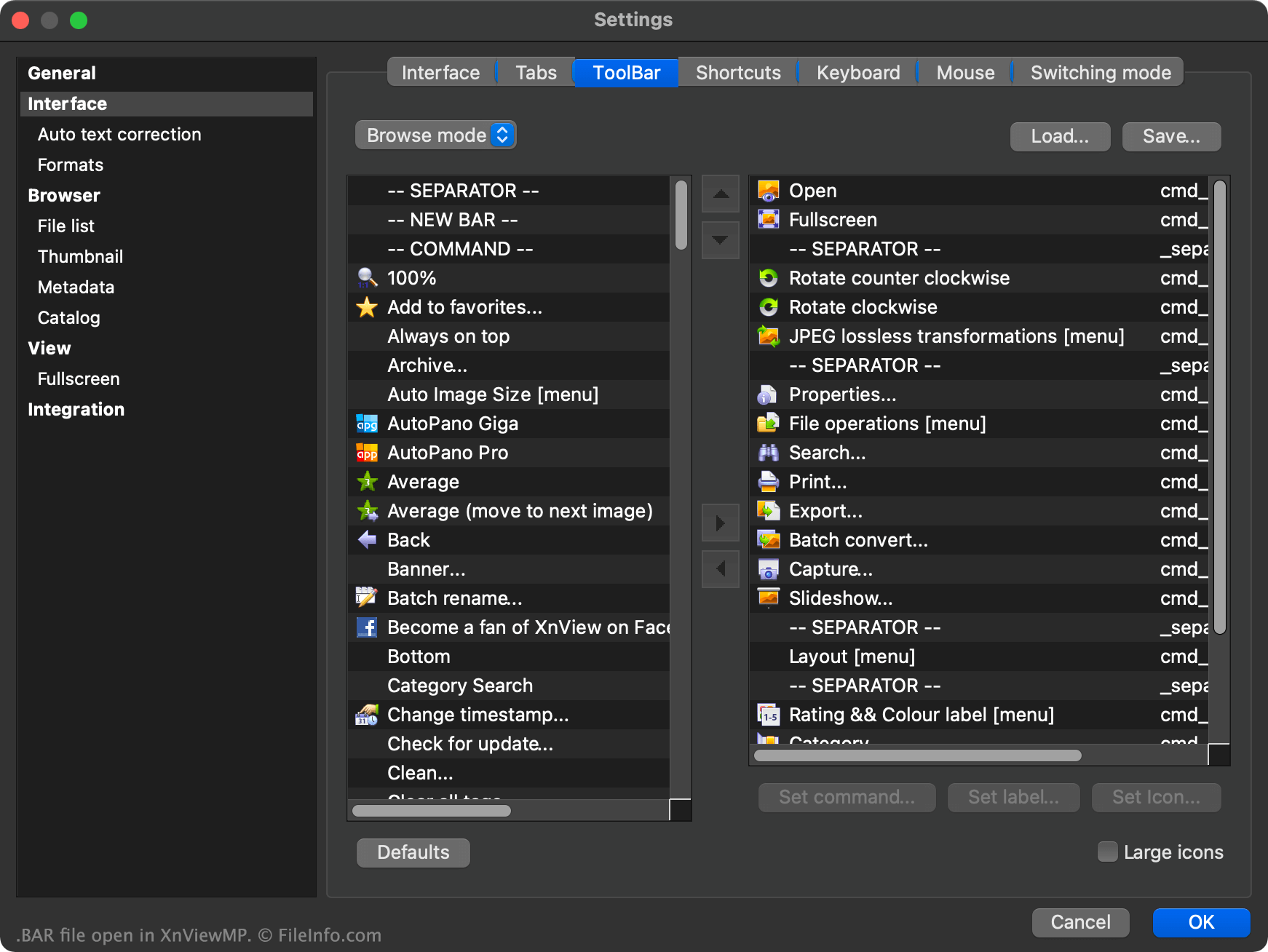
XnViewMP에서 열린 .bar 파일의 스크린샷
XnViewMP에서 열린 BAR 파일

XnViewMP is an image viewer that allows users to open, edit, and convert images saved in over 500 different formats. The program contains both a file browser and an image viewer, each of which uses its own toolbar.

Users can customize either of XnViewMP's toolbars by right-clicking in the toolbar and selecting Customize toolbar.... This allows the user to add additional toolbar buttons, remove buttons, move buttons within a toolbar, add separators, add custom toolbar commands, and more.

If a user wants to save their custom toolbar settings, so they can load their custom toolbars in another instance of XnViewMP, they can do so by selecting the Save... button that appears in the toolbar Settings window. This saves the user's toolbar settings as a BAR file.

The BAR file is a plain text file broken into two sections, one for XnViewMP's Browser toolbar and another for its View toolbar. Each section contains a list of the buttons and separators used in its associated toolbar.

BAR 파일을 여는 방법

To use a BAR file as an XnViewMP custom toolbar:

  1. Open XnViewMP.
  2. Right-click in the program's toolbar.
  3. Select Customize toolbar....
  4. Select Load....
  5. Navigate to and open your BAR file.
  6. Select OK.

If necessary, you can also open a BAR file in Microsoft Notepad (Windows), Apple TextEdit (Mac), or any other text editor, to view the plain text data the file contains.

BAR 파일을 여는 프로그램

Windows
무료
Mac
무료
Linux
무료
카테고리: 설정
업데이트: 2022-01-10

검증자 FileInfo.com

FileInfo.com 팀 이 페이지에 나열된 모든 파일 형식과 소프트웨어 프로그램을 독자적으로 조사했습니다. 저희의 목표는 100% 정확성이며, 검증한 파일 유형에 대한 정보만 게시합니다.

이 페이지에 추가하거나 업데이트할 내용을 제안하고 싶으시면 알려 주세요.