.APK 파일 확장자

2개의 파일 유형.apk 확장자를 사용합니다.

Android Package File

개발사 Google
인기도
4.3  |  109710 투표
 

APK 파일이란 무엇인가요?

An APK file is an app created for Android, Google's mobile operating system. Some apps come pre-installed on Android devices, while other apps can be downloaded from Google Play. Apps downloaded from Google Play are automatically installed on your device, while those downloaded from other sources must be installed manually.

추가 정보

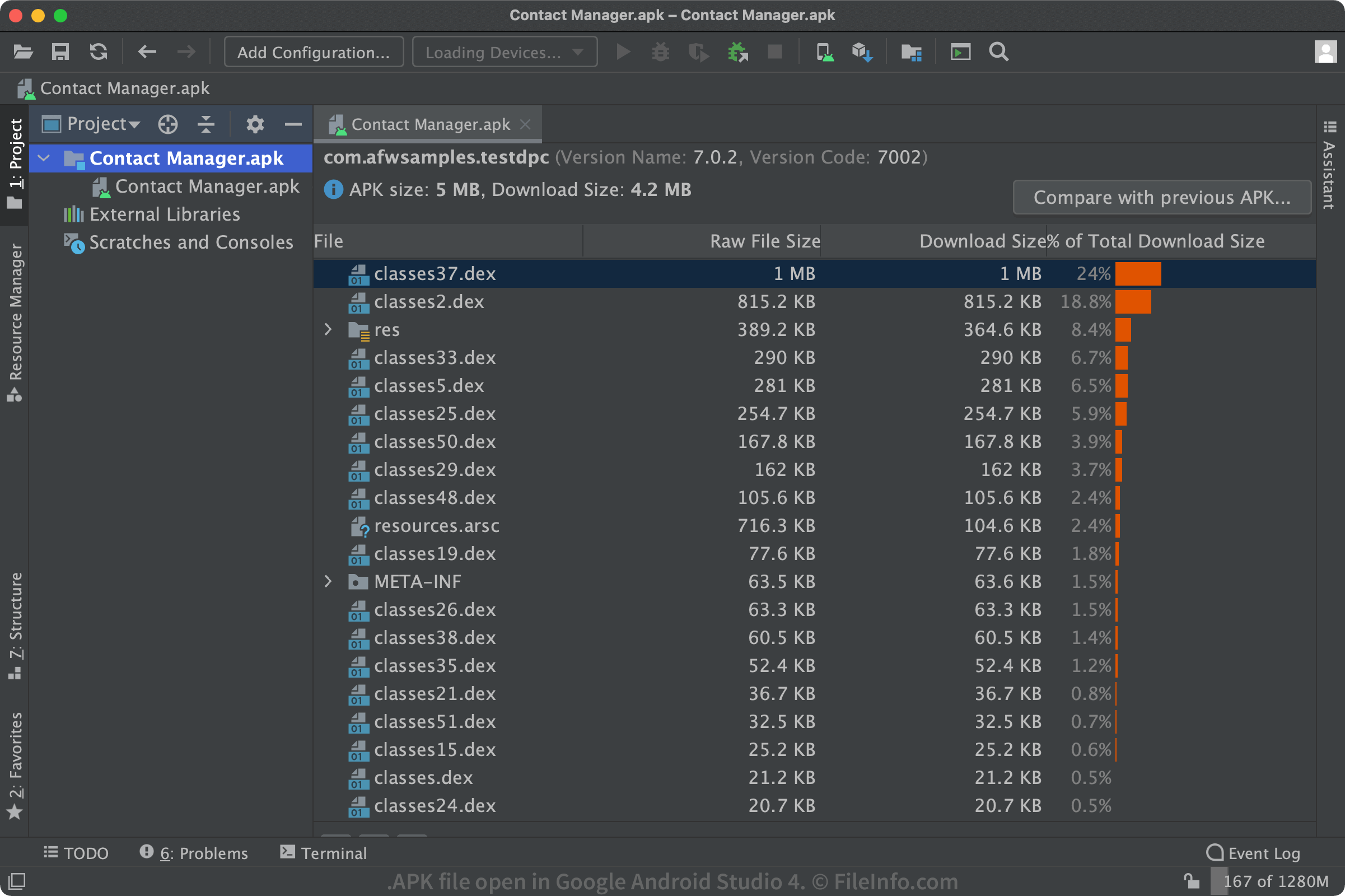
Android Studio 4.2.2에서 열린 .apk 파일의 스크린샷
Android Studio 4.2.2에서 열린 APK 파일

Typically, users never see APK files because Android handles app installation in the background via Google Play or another app distribution platform. However, many websites offer direct APK file downloads for Android users who want to install apps manually. In this case, you should be careful that you trust the source of the APK file, because malware can be distributed in APK files, just as it can in the case of Windows and .EXE files.

How do I install an APK file on my Android device?

You can install APK files manually by following these instructions. Make sure that you trust the source of the APK file.

How do I install an APK file in Windows 11?

Windows 11 is the first version of Windows to officially support the ability to install APK files. Windows 11 users can manually install APK files using Windows Subsystem for Android in combination with Android Debug Bridge. As of early 2022, this feature is available to only members of the Windows Insider Program. It also requires that users enable the Hyper-V and Virtual Machine Platform features in Windows settings.

What does an APK file contain?

Android packages contain all the necessary files for a single Android program. Below is a list of the most prominent files and folders:

  • META-INF/​: Contains the manifest file, signature, and a list of resources in the archive
  • lib/​: Native libraries that run on specific device architectures (armeabi-v7a, x86, etc.)
  • res/​: Resources, such as images, that were not compiled into resources.arsc
  • assets/​: Raw resource files that developers bundle with the app
  • AndroidManifest.xml: Describes the name, version, and contents of the APK file
  • classes.dex: The compiled Java classes to be run on the device (.DEX file)
  • resources.arsc: The compiled resources, such as strings, used by the app (.ARSC file)

How do I view the contents of an APK file?

APK files are saved in a compressed .ZIP format and can be opened by any Zip decompression tool. Therefore, if you would like to explore the contents of an APK file, you can rename the file extension to ".zip" and open the file, or you can open the file directly through a Zip application's open dialog box.

How do I create APK files?

Android apps are developed using Android Studio, the official IDE for Android software developers. It is available for Windows, Mac, and Linux, and it allows users to develop apps and prepare them for upload to a distribution service, such as Google Play. When apps are ready, developers can build them into APK files and sign them for release.

참고: See the .AAB description for details on Google's new publishing format for developers.

File Viewer Plus(으)로 400개 이상의 파일 형식을 여세요.무료 다운로드

APK 파일을 여는 프로그램

Windows
무료+
무료 체험판
무료
무료 체험판
무료 체험판
Linux
무료 체험판
무료
Web
Android

Alpine Linux Package

개발사 Alpine Linux Team
인기도
3.8  |  254 투표
 

An APK file may also be a software package that can be installed in Alpine Linux, a Linux distribution that focuses on security and simplicity. It contains one or more programs, related configuration files, and a list of dependencies. APK files are commonly installed with the Alpine Package Keeper (apk).

추가 정보

To install software in Alpine Linux, users typically use apk to search for applicable software packages, saved as APK files.

Each APK file is a .TAR.GZ archive that contains one or more programs and the configuration files and dependency information needed to install those programs. APK files are available from Alpine Linux repositories, which are directories that contain several related APK files. Each repository also includes an index file named APKINDEX.tar.gz, which contains a document that lists and briefly describes the repository's APK files.

참고: Alpine Linux APK files are also commonly called a-packs.

APK 파일을 여는 방법

In Alpine Linux, you can use Alpine Package Keeper (apk) to install the software package an APK file contains. For example, you can use the following command to install an APK file:

apk add --allow-untrusted /Path/To/YourFile.apk

Note that Alpine Linux APK files are not the same as Android APK files. You cannot install Alpine Linux APK files on Android devices (and vice versa).

APK 파일을 열거나 참조하는 프로그램

Linux
OS에 포함됨
카테고리: 압축
업데이트: 2022-12-15

검증자 FileInfo.com

FileInfo.com 팀 이 페이지에 나열된 모든 파일 형식과 소프트웨어 프로그램을 독자적으로 조사했습니다. 저희의 목표는 100% 정확성이며, 검증한 파일 유형에 대한 정보만 게시합니다.

이 페이지에 추가하거나 업데이트할 내용을 제안하고 싶으시면 알려 주세요.