

.PIMX Estensione file
File di gestione dell'installazione dei pacchetti Adobe
| Sviluppatore | Adobe Systems |
| Popolarità |
3,1 | 12 Voti |
Che cos'è un file PIMX?
Un file PIMX è un file di gestione dell'installazione dei pacchetti utilizzato per controllare l'installazione di un pacchetto Adobe Creative Cloud o Adobe Application Manager. Contiene XML che specifica dove deve essere installato un pacchetto Adobe, oltre al nome, al tipo, ai contenuti e alle dimensioni del pacchetto. I file PIMX contengono anche informazioni di convalida utilizzate per verificare che tu possa installare il pacchetto a cui fanno riferimento.
Maggiori informazioni
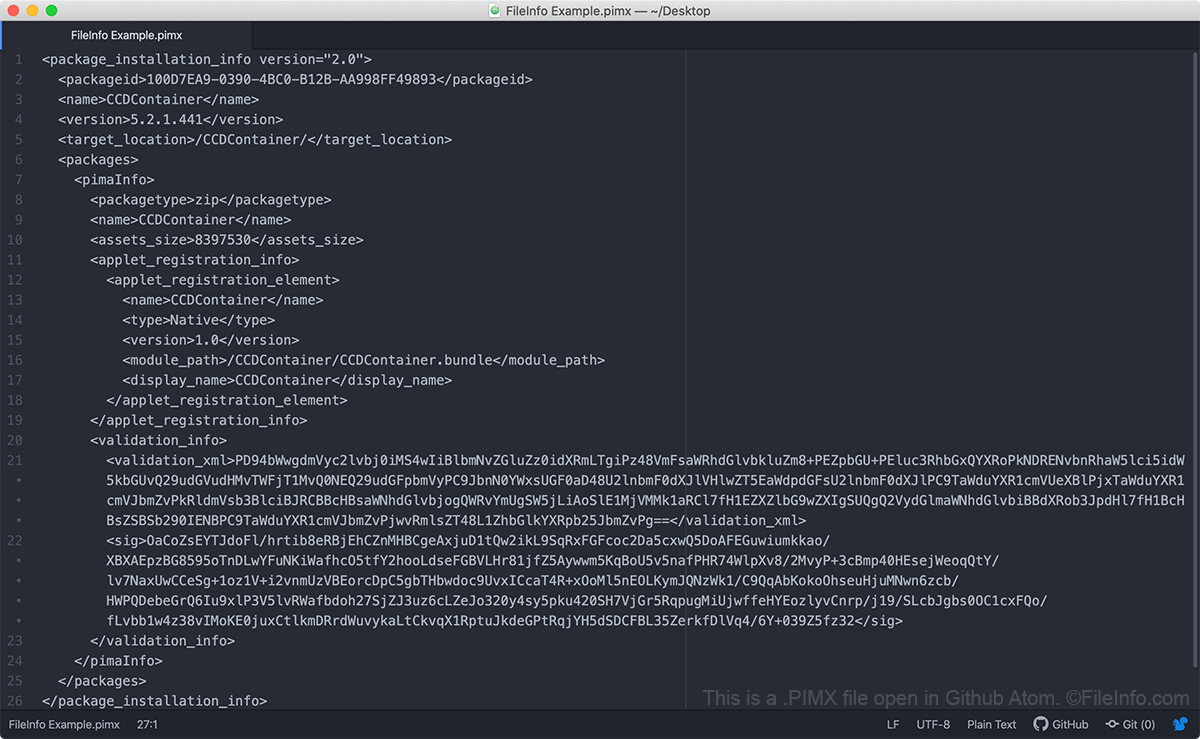
Adobe Creative Cloud e Adobe Application Manager usano i file PIMX per installare e aggiornare i pacchetti Adobe. Questi pacchetti possono includere applicazioni Adobe, estensioni, informazioni di configurazione, archivi e altri file. Il file PIMX in sé non contiene un pacchetto Adobe. Al contrario, contiene metadati utilizzati per recuperare un pacchetto dai server di Adobe e installarlo correttamente sul tuo computer.
Se ti manca un file PIMX o ne possiedi uno non valido, potresti avere problemi nell'installare o aggiornare le applicazioni Adobe sul tuo computer. In tal caso, potresti dover disinstallare Adobe Creative Cloud, eliminare dal computer i file di Creative Cloud e poi reinstallare Creative Cloud prima di provare a installare o aggiornare la tua applicazione Adobe.
Come aprire un file PIMX
Poiché sono file di testo semplice, puoi aprire un file PIMX usando qualsiasi editor di testo, ad esempio Notepad ++ (Windows), Apple TextEdit (Mac) o Github Atom (multipiattaforma). Tuttavia, non dovresti modificare un file PIMX, perché così potresti compromettere il tuo accesso alle applicazioni Adobe.