

.V5BLOCKS Extension de fichier
Projet VEXcode V5
| Développeur | VEX Robotics |
| Popularité |
3,0 | 1 Vote |
Qu'est-ce qu'un fichier V5BLOCKS ?
Un fichier V5BLOCKS est un projet créé avec VEXcode V5 de VEX Robotics, un environnement de développement multiplateforme conçu pour programmer les robots VEX V5. Il contient un ensemble de blocs de programmation dans une syntaxe semblable à JSON, qui regroupe les instructions, les paramètres et les configurations contrôlant les actions d’un robot. Les équipes de robotique, les enseignants et les amateurs participant à des compétitions de VEX Robotics ou à des activités d’apprentissage sont les principaux utilisateurs qui manipulent les fichiers V5BLOCKS.
Plus d'informations
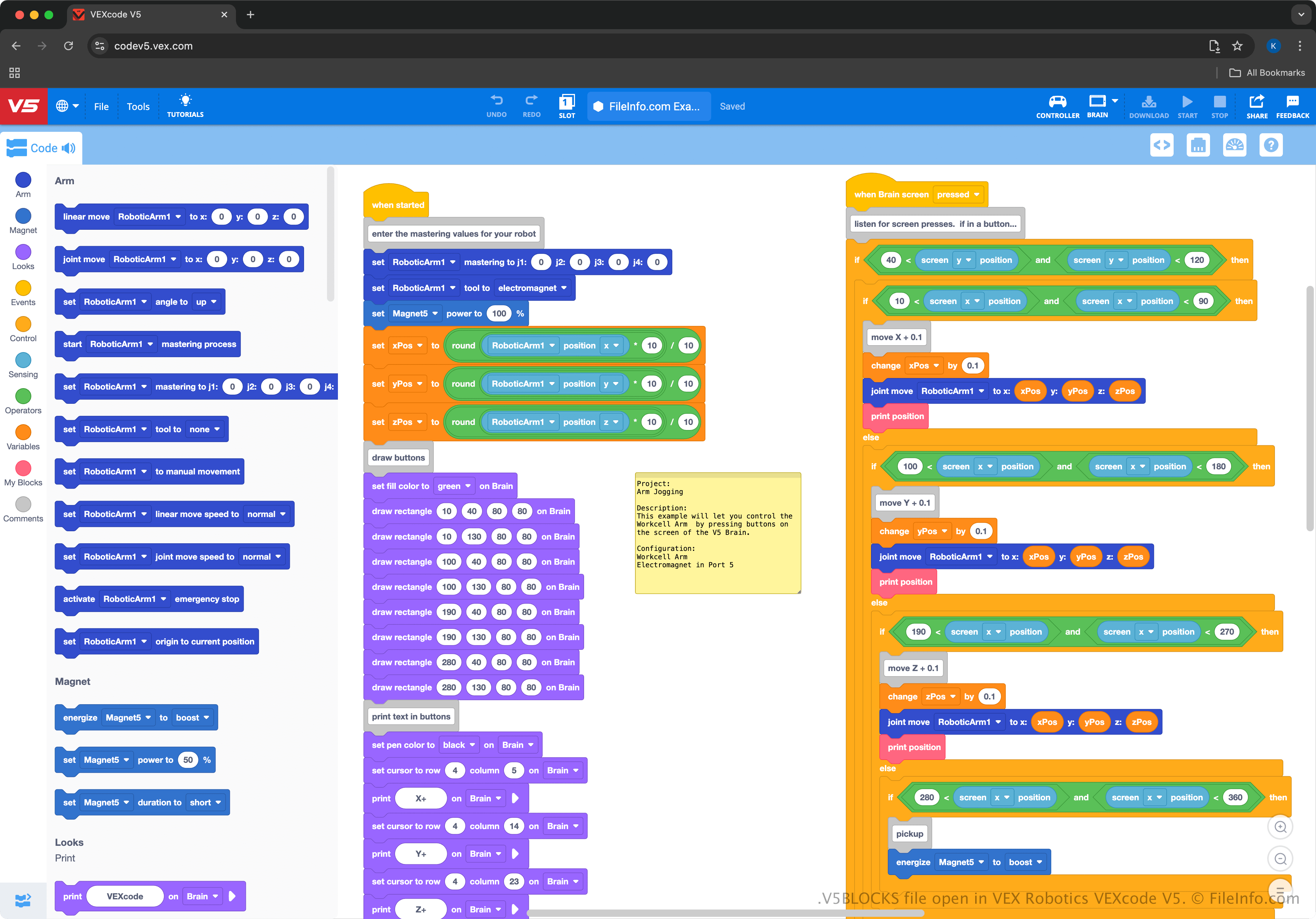
VEXcode V5 fournit une interface par glisser-déposer, qui permet aux utilisateurs de sélectionner des blocs représentant du code et de les relier pour faire fonctionner des robots. L’environnement est similaire à MIT Scratch, ce qui le rend facile à utiliser pour les débutants et accessible aux élèves ou aux enseignants qui apprennent à programmer des robots. Par exemple, il enseigne des concepts de programmation sans nécessiter d’expérience préalable dans les langages de programmation textuels.
L’environnement VEXcode V5 permet d’exporter des projets V5BLOCKS vers le matériel VEX V5 Brain, afin que les utilisateurs puissent tester et perfectionner leurs programmes robotiques dans des applications réelles. Les utilisateurs peuvent également passer de l’interface basée sur des blocs à la programmation textuelle dans VEXcode pour travailler avec des langages de programmation plus complexes comme Python ou C++ (ils peuvent enregistrer ces projets sous forme de fichiers .V5PYTHON et .V5CPP).
Comment ouvrir un fichier V5BLOCKS
Vous pouvez ouvrir les fichiers V5BLOCKS avec VEXcode V5, disponible pour Windows, macOS, Android, iOS et dans un navigateur web. Pour ouvrir un fichier V5BLOCKS, sélectionnez dans VEXcode V5.
Comme les fichiers V5BLOCKS contiennent du texte brut, vous pouvez également les ouvrir avec des éditeurs de texte simples, comme Microsoft Notepad (Windows), Apple TextEdit (macOS) et gedit (Linux). Cependant, les fichiers ne s’afficheront pas comme lorsqu’ils sont ouverts avec VEXcode V5, et les éditeurs de texte n’offrent pas les mêmes fonctions d’édition pratiques.