

.V5BLOCKS Dateiendung
VEXcode V5-Projekt
| Entwickler | VEX Robotics |
| Beliebtheit |
3,0 | 1 Stimme |
Was ist eine V5BLOCKS-Datei?
Eine V5BLOCKS-Datei ist ein von VEX Robotics VEXcode V5 erstelltes Projekt, einer plattformübergreifenden Entwicklungsumgebung zum Programmieren von VEX V5-Robotern. Sie enthält eine Sammlung von Programmierblöcken in einer JSON-ähnlichen Syntax, die Anweisungen, Einstellungen und Konfigurationen umfasst, mit denen die Aktionen eines Roboters gesteuert werden. Robotikteams, Lehrkräfte und Hobbyisten, die an VEX Robotics-Wettbewerben oder Lernumgebungen teilnehmen, sind die hauptsächlichen Nutzer, die mit V5BLOCKS-Dateien arbeiten.
Weitere Informationen
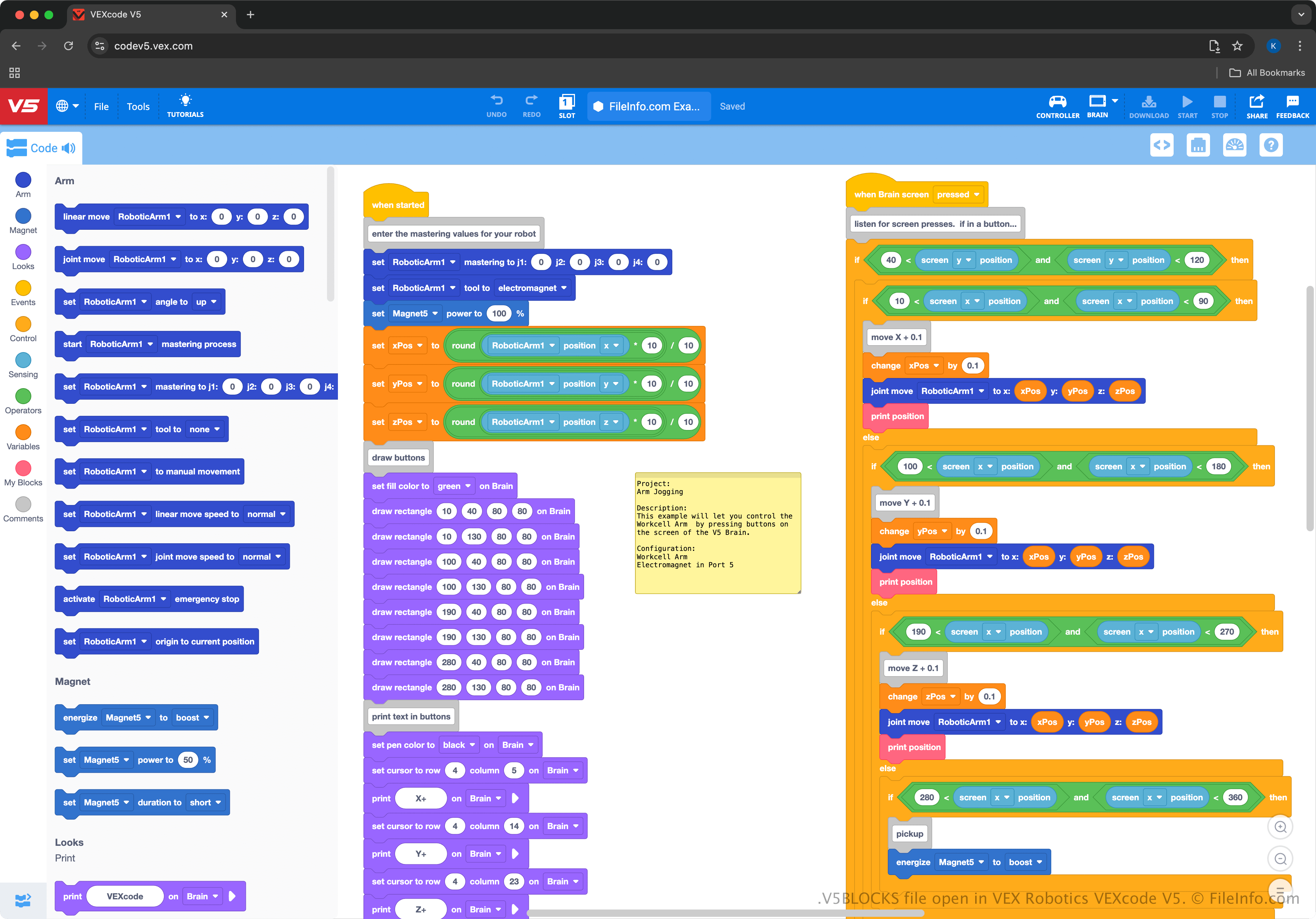
VEXcode V5 bietet eine Drag-and-drop-Oberfläche, über die Nutzer Blöcke auswählen, die Code darstellen, und sie miteinander verbinden können, um Roboter zu steuern. Die Umgebung ähnelt MIT Scratch und ist daher anfängerfreundlich und für Schüler oder Lehrkräfte zugänglich, die das Programmieren von Robotern lernen. So vermittelt sie beispielsweise Programmierkonzepte, ohne vorherige Erfahrung mit textbasierten Programmiersprachen vorauszusetzen.
Die VEXcode-V5-Umgebung unterstützt den Export von V5BLOCKS-Projekten für die VEX-V5-Brain-Hardware, sodass Nutzer ihre Roboterprogramme in realen Anwendungen testen und verbessern können. Nutzer können in VEXcode auch von der blockbasierten Oberfläche zur textbasierten Programmierung wechseln, um mit komplexeren Programmiersprachen wie Python oder C++ zu arbeiten (Nutzer können diese Projekte als .V5PYTHON- und .V5CPP-Dateien speichern).
So öffnen Sie eine V5BLOCKS-Datei
Sie können V5BLOCKS-Dateien mit VEXcode V5 öffnen, das für Windows, macOS, Android, iOS und in einem Webbrowser verfügbar ist. Um eine V5BLOCKS-Datei zu öffnen, wählen Sie in VEXcode V5 aus.
Da V5BLOCKS-Dateien reinen Text enthalten, können Sie sie auch mit einfachen Texteditoren wie Microsoft Notepad (Windows), Apple TextEdit (macOS) und gedit (Linux) öffnen. Die Dateien werden jedoch nicht genauso dargestellt wie beim Öffnen mit VEXcode V5, und die Texteditoren bieten nicht dieselben hilfreichen Bearbeitungsmöglichkeiten.