

.PO Dateiendung
Portable-Object-Datei
| Entwickler | k. A. |
| Beliebtheit |
4,0 | 56 Stimmen |
Was ist eine PO-Datei?
Eine PO-Datei ist eine textbasierte Objektdatei, die bei der Softwareentwicklung verwendet wird. Sie kann von Java-Programmen, GNU gettext oder anderen Softwareprogrammen als Eigenschaftendatei verwendet werden. Meistens enthalten PO-Dateien Übersetzungen von Texten der Benutzeroberfläche, auf die GNU gettext verweist.
Weitere Informationen

GNU gettext ist ein Werkzeugpaket, das Programmierern und Übersetzern dabei hilft, Übersetzungsdateien für Benutzeroberflächen zu erstellen. Die meisten dieser Dateien werden als PO-Dateien gespeichert (andere werden als .POT-Dateien gespeichert). Jede PO-Datei enthält einen oder mehrere Einträge, die eine ursprüngliche, nicht übersetzte Zeichenkette(n) mit der entsprechenden Übersetzung(en) verknüpfen. Der ursprüngliche Text folgt dem Bezeichner msgid; die Übersetzung folgt dem Bezeichner msgstr.
Alle Übersetzungen in einer einzelnen PO-Datei sind in derselben Übersetzungssprache verfasst. Wenn ein Programm Übersetzungen für mehrere Sprachen benötigt, verwendet es mehrere PO-Dateien.
So öffnen Sie eine PO-Datei
Sie können eine PO-Datei in jedem Text- oder Quellcodeeditor öffnen und bearbeiten, etwa in Microsoft Visual Studio Code (plattformübergreifend) oder GitHub Atom (plattformübergreifend).
Programme, die .PO-Dateien öffnen oder referenzieren
Apple-II-Disk-Image in ProDOS-Sektorordnung
| Entwickler | k. A. |
| Beliebtheit |
2,0 | 2 Stimmen |
Eine PO-Datei ist ein Disk-Image, das für die Verwendung mit einem Apple-II-Computer erstellt wurde. Sie enthält Anwendungen, Spiele und/oder andere Dateien, die auf einen Apple-II-Computer oder in einen Emulator geladen werden können. PO-Dateien werden in der ProDOS-Sektorreihenfolge und nicht in der DOS-3.3-Sektorreihenfolge gespeichert.
Weitere Informationen
Apple veröffentlichte im Juni 1977 den ersten Apple-II-Computer. Ihm folgten der Apple II+, der Apple II3, der Apple IIc und der Apple IIGS.
Mehrere Tools ermöglichen es Benutzern, Abbilder der Festplatten dieser Computer zu erstellen, um die darauf gespeicherten Anwendungen, Dateien und anderen Daten zu bewahren. Diese Disk-Images werden in vielen Formaten gespeichert, darunter auch im PO-Format. Bemerkenswert ist, dass Disk-Images im PO-Format Daten in der ProDOS-Sektorreihenfolge speichern, während .DO-Disk-Images Daten in der DOS-3.3-Sektorreihenfolge speichern. (Einige Apple-II-Computer verwendeten das Betriebssystem ProDOS, während andere DOS 3.3 verwendeten.) Beide Formate können stattdessen die Erweiterung .DSK verwenden.
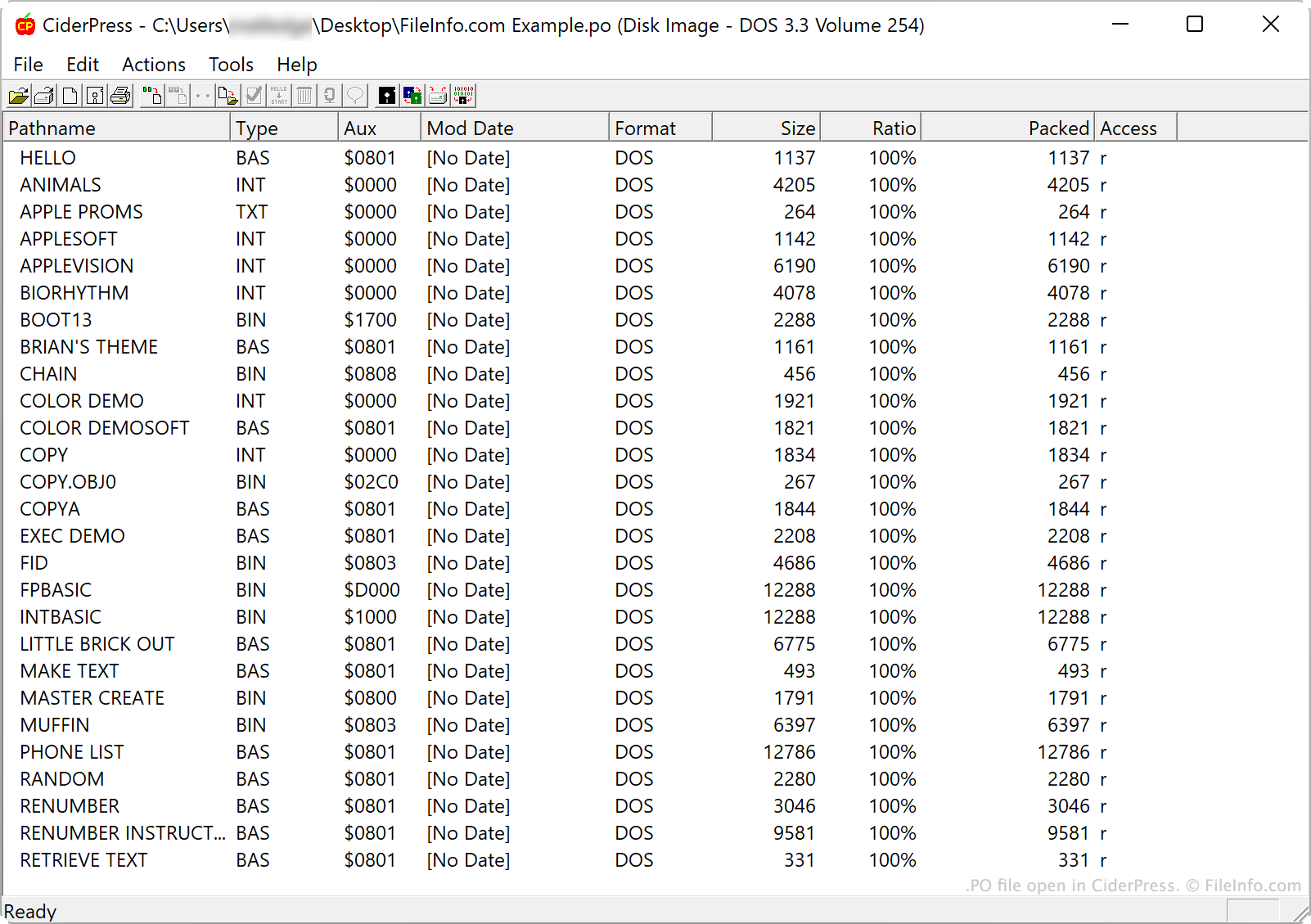
Wenn ein Benutzer ein PO-Disk-Image in einem Apple-II-Computer oder -Emulator einbindet, kann er auf die darin enthaltenen Ordner und Dateien zugreifen. Benutzer können den Inhalt einer PO-Datei außerdem in Dienstprogrammen für Apple-II-Disk-Images untersuchen.
So öffnen Sie eine PO-Datei
Sie können eine PO-Datei in verschiedenen Dienstprogrammen für Apple-II-Disk-Images und Apple-II-Emulatoren öffnen. Zum Beispiel:
- CiderPress (Windows) ermöglicht es Ihnen, eine PO-Datei zu öffnen, ihren Inhalt zu untersuchen, zu extrahieren oder zu ergänzen.
- Apple Disk Transfer ProDOS (plattformübergreifend) ermöglicht es Ihnen, PO-Dateien auf einen Apple-II-Computer zu übertragen.
- KEGS (Kent's Emulated GS) (plattformübergreifend) ermöglicht es Ihnen, PO-Dateien zu öffnen und einzubinden.