.BIP Dateiendung

Character Studio Biped File

Entwickler k. A.
Beliebtheit
4.0  |  20 Stimmen
 

Was ist eine BIP-Datei?

Motion capture file created with Character Studio; records the motion of a biped (typically a human) and saves individual frames to a file; allows human motion to be accurately reproduced in video games, movies, and other media where special effects are used.

Über 400 Dateiformate öffnen mit File Viewer Plus.Kostenloser Download

Programme, die .BIP-Dateien öffnen

Windows
Discreet Character Studio
Kostenlose Testversion
Kategorie: 3D-Bild
Aktualisiert: 2007-12-05

Dharma Ransomware Encrypted File

Entwickler N/A
Beliebtheit
3.0  |  2 Stimmen
 

A BIP file is a file encrypted by a virus variant of Dharma ransomware utilized by cybercriminals. It contains a file, such as a .JPG or .MP3 file, encrypted with Advanced Encryption Standard (AES) encryption by the virus. BIP files are similar to .WALLET files but became prevalent in May 2018.

Weitere Informationen

The purpose of Dharma ransomware is to take your files hostage and force you to pay the perpetrator, typically through bitcoin, to unlock your files. Once the virus infiltrates your computer, often via email attachment from an unknown sender, it begins scrambling your files, renaming them, and encrypting them. The virus then generates a .TXT ransom note (FILES ENCRYPTED.txt) informing you of the takeover and what you need to do to recover your files.

The virus renames your files using the following naming convention:

[filename].id-[ID].[[email protected]].bip

For example, if you have a sample.xlsx file it becomes [email protected] file.

So öffnen Sie eine BIP-Datei

No known program can restore BIP files to their original state. The best way to recover your files is to retrieve them from a recent backup or perform a System Restore to a point before your computer was infected.

Warnung

FileInfo.com recommends you never pay a ransom to decrypt files encrypted by ransomware. Paying a ransom encourages ransomware distributors to continue their efforts, and there is no guarantee that paying a ransom will give you access to your files. Instead, you should restore your data from a recent backup created before the ransomware infected your computer.

Programme, die .BIP-Dateien öffnen

Windows
System Restore
Kategorie: Kodiert
Aktualisiert: 2019-01-29

KeyShot 3D File

Entwickler KeyShot
Beliebtheit
3.0  |  1 Stimme
 

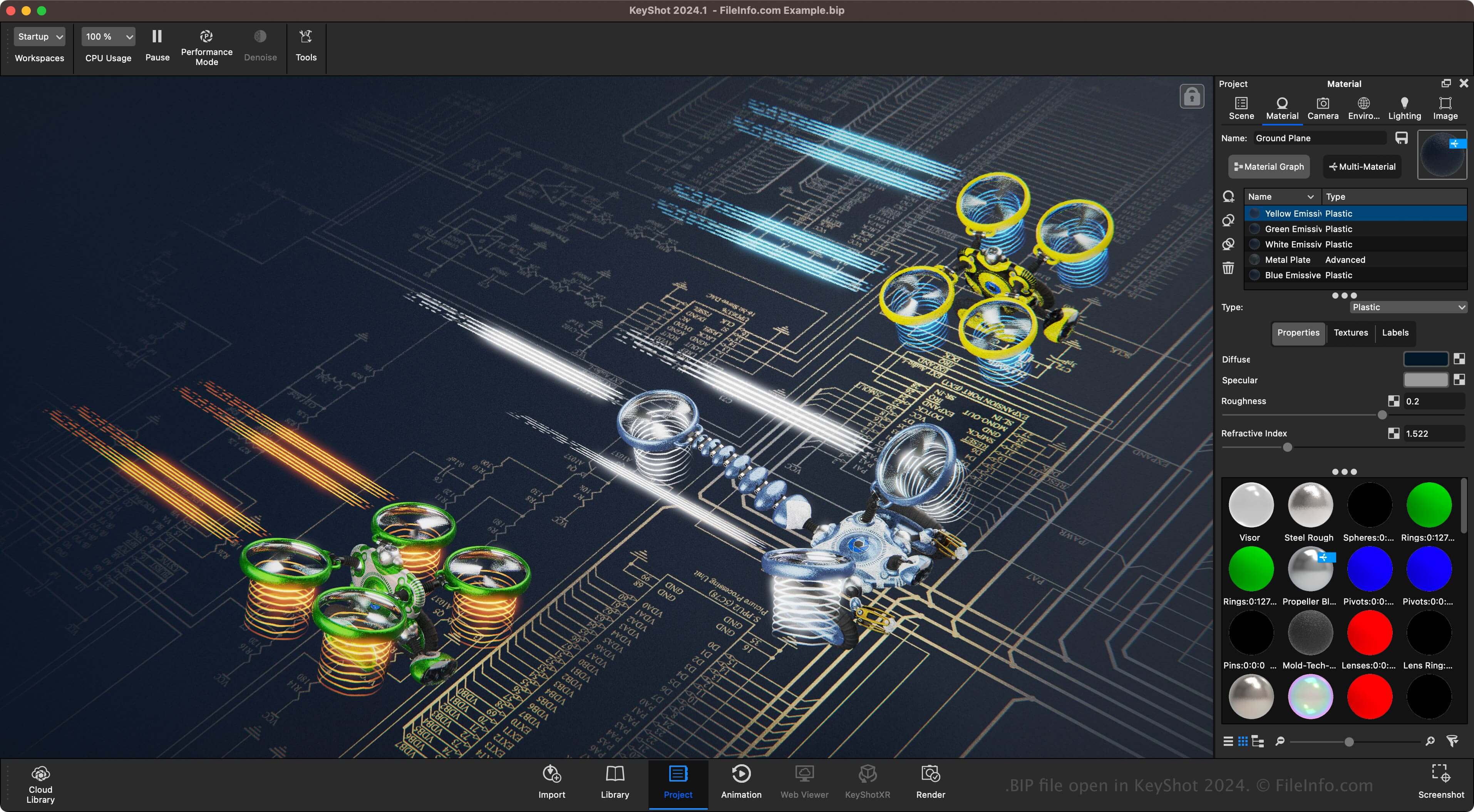
A BIP file is a 3D model or scene created by KeyShot, a 3D rendering and animation software. It contains information about the scene or model, including scene items, materials, camera angles, and lighting presets. BIP files are the primary format associated with KeyShot, allowing users to save and re-open the files to continue modifying the model or scene before exporting it.

Weitere Informationen

Screenshot einer .bip-Datei in KeyShot 2024
BIP-Datei geöffnet in KeyShot 2024

KeyShot is software that specializes in rendering 3D models and scenes. 3D artists for various companies, including Under Armour, Sonos, Caterpillar, GE Healthcare, and Motorola, use the software.

For example, a 3D designer for Under Armour may use KeyShot to create a scene showcasing athletic wear on the field of a stadium. Another example is a 3D designer using KeyShot to create a farm scene showcasing equipment manufactured by Caterpillar.

So öffnen Sie eine BIP-Datei

You can open BIP files with KeyShot in Windows and macOS. To open a BIP file, select File → Open.

So konvertieren Sie eine BIP-Datei

Keyshot can convert BIP files to various file types, including the following formats:

  • .OBJ - Wavefront 3D Object File
  • .STL - Stereolithography File
  • .FBX - Autodesk FBX Interchange File
  • .GLB - Binary GL Transmission Format File
  • .GLTF - GL Transmission Format File
  • .USD - Universal Scene Description Format
  • .USDZ - Universal Scene Description Zipped Format
  • .3MF - 3D Manufacturing File

Programme, die .BIP-Dateien öffnen

Windows
Kostenlose Testversion
Mac
Kostenlose Testversion
Kategorie: 3D-Bild
Aktualisiert: 2024-05-29

Geprüft von FileInfo.com

Das FileInfo.com-Team hat alle auf dieser Seite aufgeführten Dateiformate und Softwareprogramme unabhängig recherchiert. Unser Ziel ist 100% Genauigkeit, und wir veröffentlichen nur Informationen zu Dateitypen, die wir überprüft haben.

Wenn Sie Ergänzungen oder Aktualisierungen zu dieser Seite vorschlagen möchten, teilen Sie es uns bitte.