

.MSG Extensão de arquivo
Arquivo de item do Outlook
| Desenvolvedor | Microsoft |
| Popularidade |
3,4 | 224 Votos |
O que é um arquivo MSG?
Um arquivo MSG é um item do Outlook, como uma mensagem de email, contato, compromisso, reunião ou tarefa, criado ou salvo pelo Microsoft Outlook. Ele armazena todas as informações associadas ao item, incluindo anexos no caso de mensagens de email. Os usuários geralmente encontram arquivos MSG quando itens do Outlook são exportados para compartilhamento ou arquivamento, embora outros programas compatíveis com a Messaging Application Programming Interface (MAPI) da Microsoft também possam abri-los ou criá-los.
Mais informações
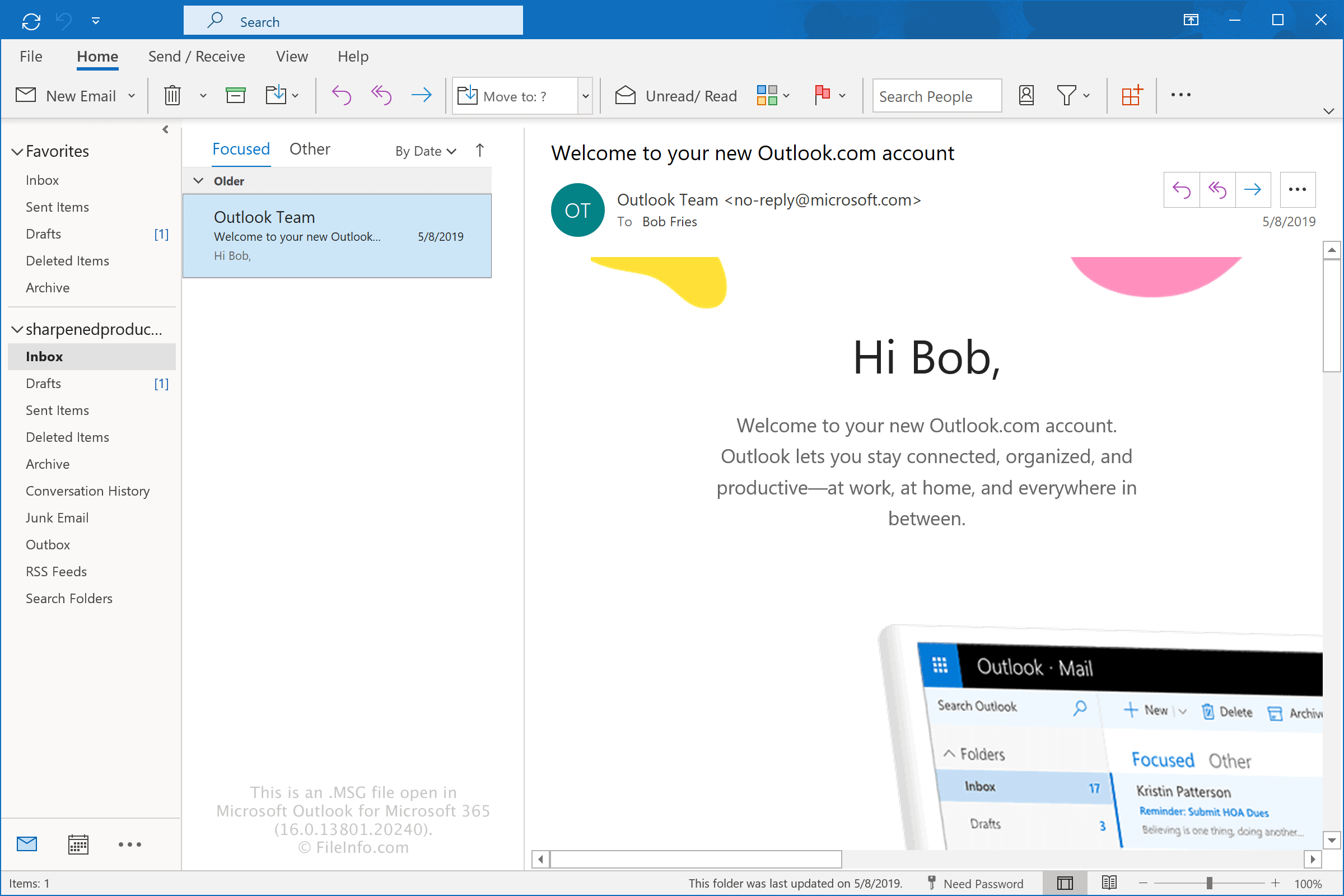
A Microsoft desenvolveu o formato MSG para o Microsoft Outlook e o Microsoft Exchange Server e ainda oferece suporte a ele atualmente. O formato permite que os usuários do Outlook salvem itens individuais separadamente da caixa de correio, facilitando o compartilhamento, o backup ou o arquivamento de mensagens, compromissos, contatos e outros dados específicos do Outlook.
As informações armazenadas em um arquivo MSG dependem do tipo de item do Outlook que ele contém. Alguns exemplos comuns incluem:
- Email – Um arquivo MSG contém o remetente, os destinatários, o assunto, o corpo da mensagem, a data, os anexos e outras propriedades da mensagem de email. Por padrão, o Outlook dá ao arquivo o nome do assunto do email.
- Compromisso – Um arquivo MSG contém detalhes do compromisso, como horário de início e término, local, descrição, lembretes e outras informações de agendamento. Por padrão, o Outlook dá ao arquivo o nome do título do compromisso.
- Reunião – Um arquivo MSG contém detalhes da reunião, incluindo o organizador, os participantes obrigatórios e opcionais, os horários de início e término, o local e a mensagem da reunião. Por padrão, o Outlook dá ao arquivo o nome do título da reunião.
- Contato – Um arquivo MSG contém informações de contato, como o nome da pessoa, a empresa, endereços de email, números de telefone, endereços postais e outros detalhes de contato. Por padrão, o Outlook dá ao arquivo o nome completo do contato.
- Tarefa – Um arquivo MSG contém informações da tarefa, incluindo o assunto, a data de início, a data de vencimento, a prioridade, o status de conclusão, observações e lembretes. Por padrão, o Outlook dá ao arquivo o nome do assunto da tarefa.
Como criar um arquivo MSG com o Outlook
Você pode criar um arquivo MSG com o Outlook arrastando uma mensagem de email, um compromisso, uma reunião, um contato ou uma tarefa do Outlook para a área de trabalho ou para uma pasta no Explorador de Arquivos do Windows. Por padrão, o Outlook dá ao arquivo o nome do assunto ou título do item. Por exemplo, um email com o assunto "Thanks for contacting us" torna-se Thanks for contacting us.msg.
Você também pode criar um arquivo MSG selecionando o item do Outlook e escolhendo . Em seguida, selecione o local onde deseja salvar o arquivo e especifique o nome, se desejar.
Como abrir um arquivo MSG
Você pode abrir um arquivo MSG com o Microsoft Outlook no Windows simplesmente clicando duas vezes no arquivo. Se o Outlook não estiver definido como o aplicativo padrão para abrir arquivos MSG, clique com o botão direito do mouse no arquivo e escolha o Outlook para abrir o arquivo MSG. Quando você o abre no Outlook, o programa formata a mensagem para que ela apareça da mesma forma que aparecia antes de ser exportada.
Você também pode abrir arquivos MSG com programas de terceiros, como o Encryptomatic MsgViewer Pro (Windows), o Mailward (Web) e o 45RPM MailRaider Pro (macOS).
Como converter um arquivo MSG
O Microsoft Outlook pode converter arquivos MSG em vários tipos de arquivo. Por exemplo, você pode converter arquivos MSG em arquivos .HTML selecionando . Você também pode converter arquivos MSG em arquivos .PDF por meio da opção Microsoft Print to PDF.
Programas que abrem ou fazem referência a arquivos MSG
Arquivo de mensagens do jogo Fallout
| Desenvolvedor | Bethesda Softworks |
| Popularidade |
3,4 | 25 Votos |
Um arquivo MSG é um arquivo de dados do jogo usado por Fallout e Fallout 2, da Bethesda Softworks. Ele contém diálogos do jogo e/ou outras mensagens exibidas no jogo. Os arquivos MSG são arquivos de texto simples, que armazenam cada linha de diálogo ou mensagem em uma linha separada.
Mais informações
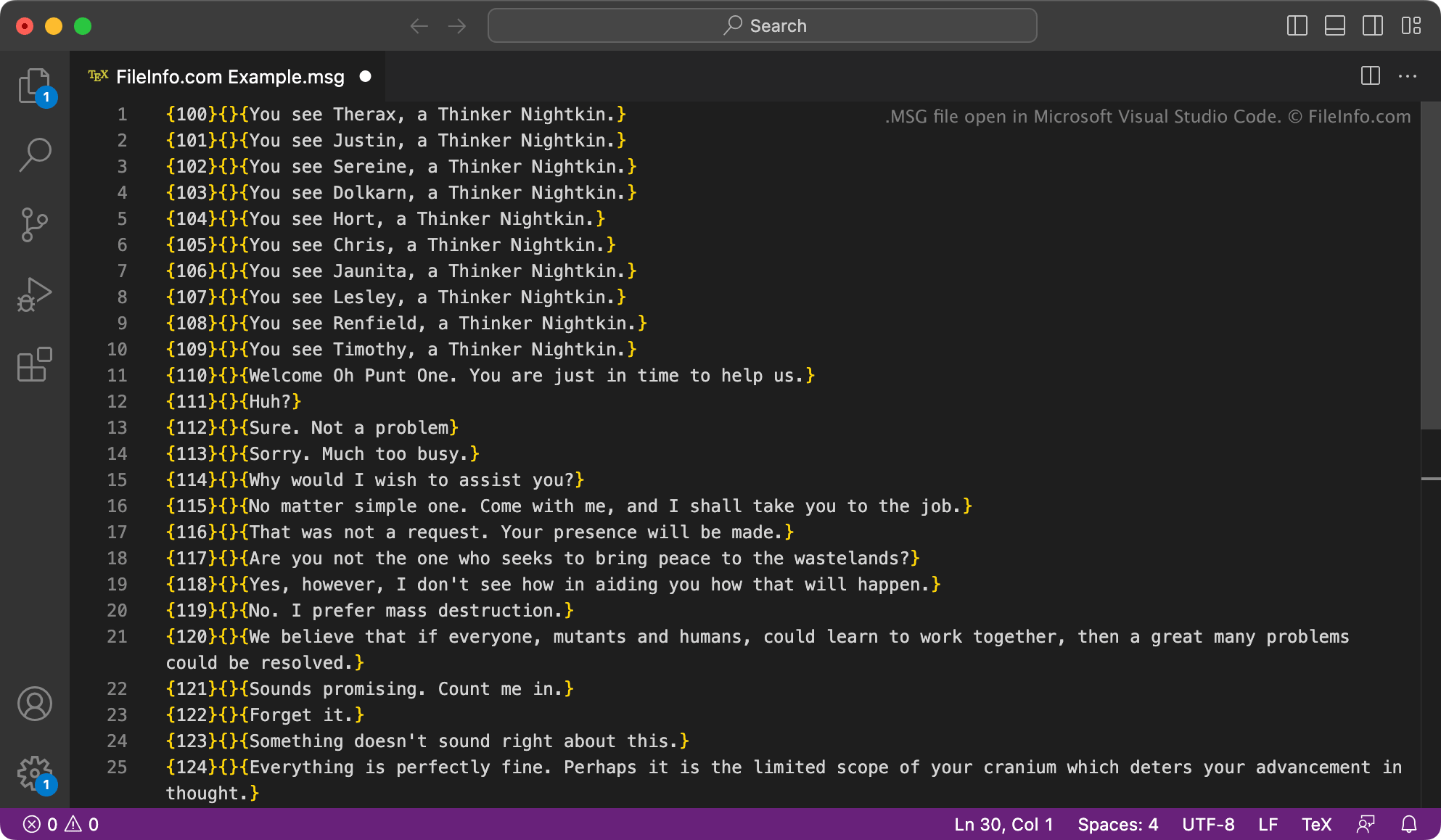
Fallout é uma série de jogos de RPG ambientados em um mundo pós-apocalíptico assolado por precipitação nuclear. Os dois primeiros jogos da série Fallout, Fallout e Fallout 2, armazenam em arquivos MSG os dados usados para exibir mensagens relacionadas a personagens, diálogos de personagens e mensagens de itens. Esses arquivos estão localizados nos seguintes diretórios:
- text/english/game
- text/english/dialog
Cada arquivo MSG recebe o nome do personagem(ns) ou item(ns) ao qual está associado. As mensagens e os metadados contidos nos arquivos são formatados da seguinte maneira:
{###}{soundfilename}{Message text}
O jogo usa o número especificado no campo {###} para carregar as mensagens no momento correto. As linhas que incluem um nome de arquivo no campo {soundfilename} estão associadas a um arquivo de áudio (.ACM). Cada arquivo MSG termina com uma linha em branco e também pode incluir comentários precedidos por um símbolo #.
NOTA: A maioria dos outros arquivos de mensagens exibidas no jogo dos jogos Fallout usa a extensão .TXT. No entanto, o texto que eles contêm é salvo no mesmo formato dos arquivos MSG.
Como abrir um arquivo MSG
Você pode abrir um arquivo MSG com o Microsoft Notepad (Windows), o Apple TextEdit (Mac) ou qualquer outro editor de texto para visualizar e editar o texto que ele contém. Lembre-se de que editar um arquivo MSG pode fazer com que Fallout ou Fallout 2 funcione incorretamente.
Modificadores de Fallout podem usar a ferramenta ScanMsg (Windows) para verificar se há erros de formatação nos arquivos MSG que modificaram.