

.IRCP Extensão de arquivo
Arquivo composto IRIDAS do SpeedGrade
| Desenvolvedor | Adobe Systems |
| Popularidade |
3,5 | 6 Votos |
O que é um arquivo IRCP?
Um arquivo IRCP contém um projeto criado pelo Adobe SpeedGrade, um aplicativo de correção de cores usado na produção de vídeos. Ele armazena uma linha do tempo de clipes de vídeo, além de configurações de cores e máscaras a serem aplicadas a cada clipe.
Mais informações
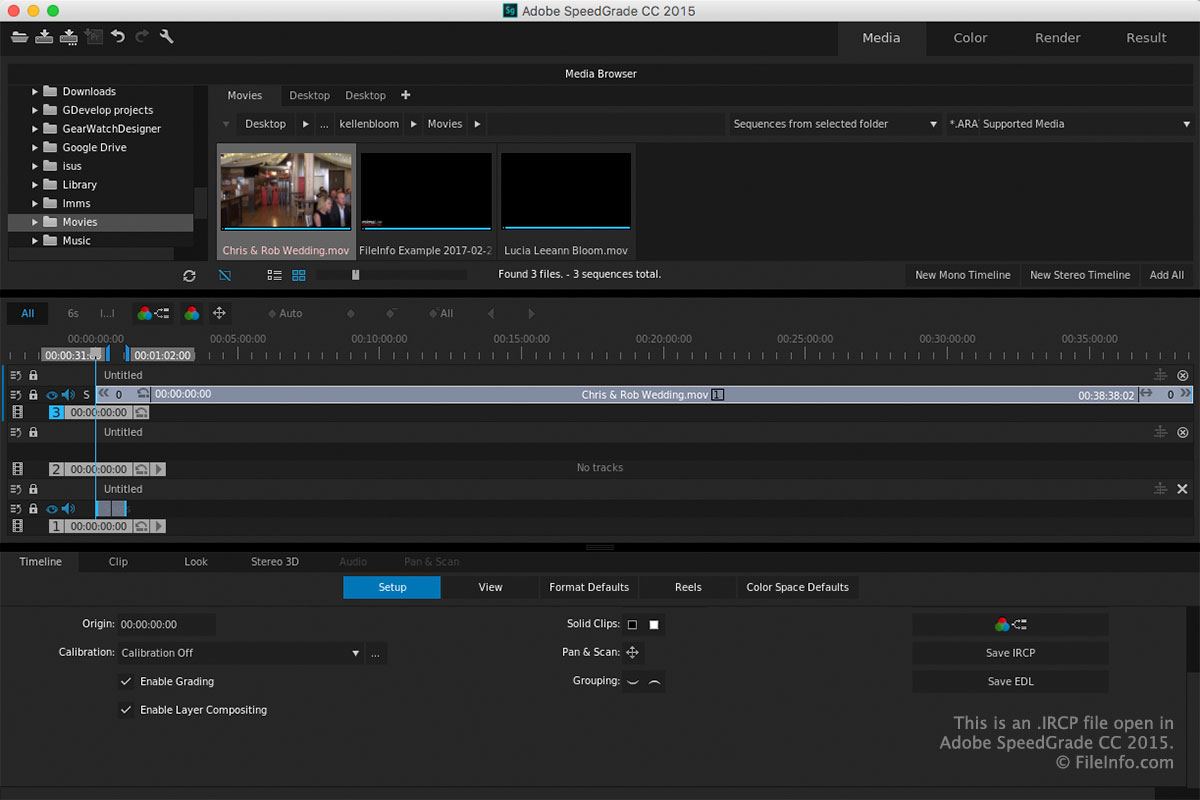
Os usuários do SpeedGrade utilizam o software durante a pós-produção para ajustar as cores dos vídeos. Ao modificar ou corrigir as cores, os usuários podem dar às produções uma aparência e um clima específicos (por exemplo, tons de azul para transmitir uma sensação de frio ou tons de vermelho e laranja para criar uma aparência quente).
Quando você salva um projeto no SpeedGrade, o aplicativo cria um arquivo IRCP para armazenar seu conteúdo. Depois de salvar o arquivo, você pode fechá-lo, reabri-lo e continuar editando o projeto.
Para salvar um projeto como um arquivo IRCP com o SpeedGrade, clique no ícone "Save SpeedGrade Project" na barra de ferramentas, no canto superior esquerdo da área de trabalho.
NOTA: A tecnologia IRIDAS foi adquirida pela Adobe Systems, e o formato baseado em XML IRIDAS Composite (IRCP) agora é usado com o Adobe SpeedGrade, que foi descontinuado.
Como abrir um arquivo IRCP
Você pode abrir arquivos IRCP com o Adobe SpeedGrade (Windows e macOS) clicando no ícone "Open SpeedGrade Project" na barra de ferramentas, no canto superior esquerdo da área de trabalho.
NOTA: Como os arquivos IRCP são salvos no padrão XML, você também pode abri-los e editá-los com um editor de XML ou de texto. Tenha em mente que um arquivo IRCP não aparecerá da mesma forma em um editor de texto ou XML que no SpeedGrade.