.MAT Rozszerzenie pliku

MATLAB MAT-file

Deweloper The MathWorks
Popularność
2.9  |  54 Głosów
 

Czym jest plik MAT?

A MAT file is a data file saved in the MATLAB MAT-file binary data container format. The MathWorks MATLAB, a numerical computing and programming application, creates MAT files to store workspace variables which may include arrays, variables, functions, and other types of data. By saving workspace variables in a MAT file, MATLAB users can preserve their workspace and load it later.

Więcej informacji

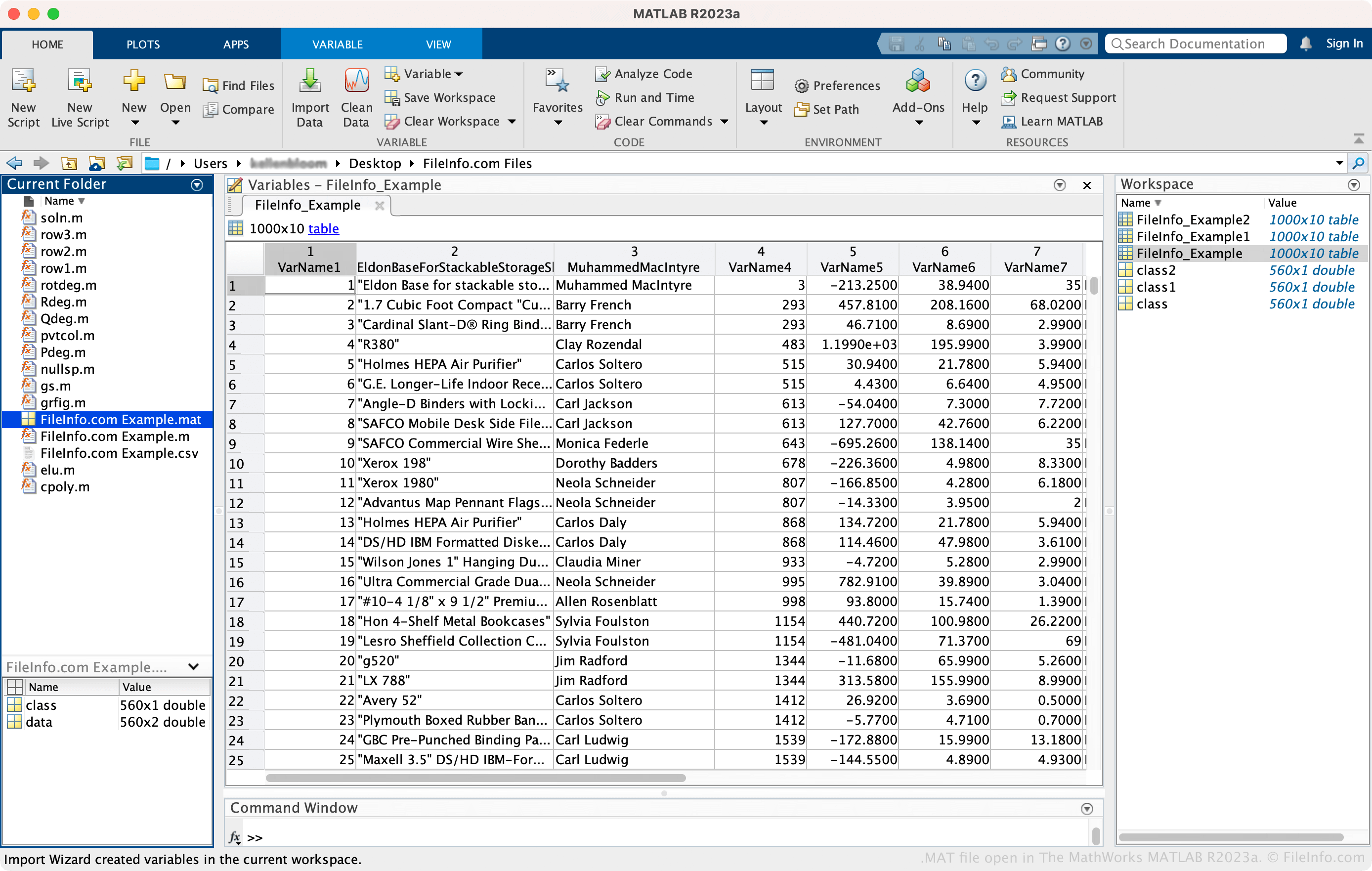
Zrzut ekranu pliku .mat w The MathWorks MATLAB R2023a
Plik MAT otwarty w The MathWorks MATLAB R2023a

Scientists and engineers primarily use MATLAB to analyze data, develop algorithms, create models, build apps, and more. With the many tools included in the software, MATLAB provides a workspace that stores data you have imported into MATLAB from data files or other supported programs. Since MATLAB automatically clears the workspace when you close the program, saving your workspace as a MAT file helps you save time and preserves your environment.

How to create a MAT file with MATLAB

To create a MAT file with MATLAB, select Save Workspace in the "HOME" tab. You can also click the arrow in the "Workspace" pane, then select Save. Then, name the file, choose the save location, and select Save.

Additionally, MAT files support various format versions, which means you may encounter files with the same .mat extension saved in different formats providing different capabilities. Some examples of differences include compression to reduce file size (starting with version 7 of the MAT-file format) and saving and loading parts of variables (starting with version 7.3). You can choose the format in which MATLAB saves MAT files by selecting MATLAB → Settings... → General → MAT-Files.

Jak otworzyć plik MAT

You can open a MAT file with The MathWorks MATLAB (multiplatform). To open a MAT file, select Import Data from the "HOME" tab, choose the MAT file, then select Open.

Otwórz ponad 400 formatów plików za pomocą File Viewer Plus.Bezpłatne pobieranie

Programy otwierające pliki MAT

Windows
Bezpłatna wersja próbna
Mac
Bezpłatna wersja próbna
Kategoria: Dane
Zaktualizowano: 2023-05-04

Microsoft Access Table Shortcut

Deweloper Microsoft
Popularność
3.5  |  11 Głosów
 

A MAT file is a table shortcut used by Microsoft Access, which is a relational database management system. It contains a shortcut link to a specific table within an Access database, allowing users to access the table quickly without opening the full Access application. MAT files primarily serve to streamline the user's workflow by providing direct access to frequently used database tables.

Więcej informacji

Typically, users create MAT files by dragging a table from Microsoft Access onto their desktop or into another folder, generating a shortcut link represented by the MAT file. You will likely find MAT files on desktops or within directories of users who frequently interact with certain Access tables, particularly in business environments where managing and accessing large amounts of data via databases is routine.

Jak otworzyć plik MAT

You can open MAT files with Microsoft Access. To open a MAT file, simply double-click it if you have Microsoft Access installed on your computer. Alternatively, you can select File → Open in Microsoft Access.

Programy otwierające pliki MAT

Windows
Bezpłatna wersja próbna
Kategoria: Różne
Zaktualizowano: 2026-07-29

3ds Max Materials File

Deweloper Autodesk
Popularność
2.8  |  12 Głosów
 

A MAT file is a material library file used by Autodesk 3ds Max, a 3D modeling, animation, and rendering application. It contains one or more materials, including settings such as colors, textures, shaders, and other surface properties that determine how 3D objects appear when rendered. Designers and artists use MAT files to save and share reusable material libraries across multiple 3ds Max projects.

Więcej informacji

Users typically create MAT files with the Material Editor, where they can build custom materials and save them for later use. Rather than recreating materials for each project, users can load a MAT file to quickly apply previously saved materials to 3D models. The files can reference a variety of texture maps, including diffuse, bump, and specular maps, to create detailed and realistic surface appearances.

UWAGA: MAT files are commonly used in industries such as architecture, product visualization, game development, and film production. They complement .MAX scene files by making it easier to organize, reuse, and share material libraries between projects.

Jak otworzyć plik MAT

You can open MAT files with Autodesk 3ds Max. To load a MAT file in 3ds Max, use the Material Editor feature within the program. Additionally, you can import MAT files using the "Material/Map Browser" in 3ds Max for texturing 3D models.

Programy otwierające lub odwołujące się do plików MAT

Windows
Bezpłatna wersja próbna
Kategoria: Obraz 3D
Zaktualizowano: 2026-07-29

Vue Material File

Deweloper E-on Software
Popularność
2.4  |  8 Głosów
 

A MAT file is a material file used by E-on Vue software for creating 2D and 3D visualizations, as well as computer graphics materials. It contains images and textures that can be applied to 3D objects, serving as components or building blocks to construct comprehensive Vue scenes. MAT files help achieve realistic textures and surfaces in digital graphics projects.

Więcej informacji

You will likely find MAT files within E-on Vue projects, with users typically being graphic designers and digital artists who need to create detailed 3D environments. To create a MAT file, you can access the material and texture libraries within Vue, import images, adjust texture properties, and then save them as MAT files.

UWAGA: Vue software is available in several versions, including Infinite, xStream, Ozone, Esprit, Studio, Complete, Pioneer, and Theme Packs. Each version offers unique capabilities catering to different levels of user expertise and application complexity.

Jak otworzyć plik MAT

You can open MAT files with E-on Vue. To open the file, launch Vue and import the MAT file via the material browser available within the application.

Programy otwierające lub odwołujące się do plików MAT

Windows
Bezpłatna wersja próbna
Mac
Bezpłatna wersja próbna

V-Ray Materials File

Deweloper Chaos Group
Popularność
1.5  |  6 Głosów
 

A MAT file is a materials file used by various 3D design programs to apply texture styles and surface materials using the V-Ray plugin developed by Chaos Group. It stores material settings, such as color, transparency, reflection, and texture maps, that define the appearance of 3D models. MAT files are widely used in architectural visualization, product design, and other fields requiring realistic rendering.

Więcej informacji

Artists and designers commonly use MAT files to add realistic details to virtual objects. They typically create these files by saving custom material settings within V-Ray.

Users can share MAT files across different projects or between team members to maintain consistent visual styles. In V-Ray-supported applications, users can load MAT files to quickly apply predefined materials, streamlining the texture application process.

UWAGA: V-Ray Materials Files may include references to external texture files, such as .JPG or .PNG images, which need to be included in the texture or materials directory for the MAT file to render correctly.

Jak otworzyć plik MAT

You can open MAT files with 3D modeling and rendering software that supports V-Ray materials. Some programs that can open MAT files include Autodesk 3ds Max and MAXON CINEMA 4D with the V-Ray plugin.

Programy otwierające lub odwołujące się do plików MAT

Windows
Caligari trueSpace7 with Chaos Group V-Ray plugin
Kategoria: Wtyczka
Zaktualizowano: 2026-07-29

Zweryfikowane przez FileInfo.com

Zespół FileInfo.com niezależnie zbadał wszystkie formaty plików i programy wymienione na tej stronie. Naszym celem jest 100% dokładność i publikujemy wyłącznie informacje o zweryfikowanych typach plików.

Jeśli chcesz zaproponować dodatki lub aktualizacje tej strony, daj nam znać.